How We Built Onplana's MCP Server: An Engineering Deep-Dive
How Onplana's MCP server exposes project, task, and resource tools to AI agents via the Model Context Protocol. Architecture, schema, and lessons learned.
In November 2024 Anthropic published the Model Context Protocol spec. Our production MCP server has been answering tool calls in Onplana since the start of 2026, serving Claude Desktop, GitHub Copilot, and our own in-product agent. This post is the engineering tour: what we built, what we deliberately did not build, and where we disagreed with the most-cited reference implementations. The source lives in github.com/onplana.
Marketing reference: the comprehensive Onplana MCP product page covers this topic end-to-end; this post zooms in on one aspect.
TL;DR. Onplana's MCP server is a Streamable-HTTP, OAuth-protected server written in TypeScript on top of the official
@modelcontextprotocol/sdk. It exposes 27 tools (14 read, 13 write) mapped to project-management concepts, not REST routes. Auth is OAuth 2.1 authorization_code with PKCE for end users; machine-to-machine agents use Bearer Personal Access Tokens scoped withMCP_AGENT. Every tool call lands in ourpinolog stream, in Sentry for errors, and in anAiOperationaudit table in Postgres. The narrative companion to this post lives at /mcp/how-we-built-it; the source is at github.com/onplana.
What MCP actually replaces
Most AI agents that integrate with enterprise software in early 2026 still do it through a hand-coded adapter: the LLM reads the SaaS app's REST API docs, the developer writes a translation layer, and the model gets a long list of HTTP endpoints with prose descriptions of what each one returns. The model then has to plan a sequence of calls, parse the responses, and reason about pagination, error envelopes, and retry semantics every time. The cost shows up as token spend on plumbing and as brittleness when the API changes shape.
MCP replaces that with a typed contract. A server publishes a small set of tools with structured input and output schemas; the agent discovers the tools at session start, then calls them directly with arguments the model can reason about by type. The result is fewer round trips, less context spent on API description, and a layer where the server author, not the model, decides what's worth exposing. For an internal product team this is a much better seam than "we made our REST API model-readable."
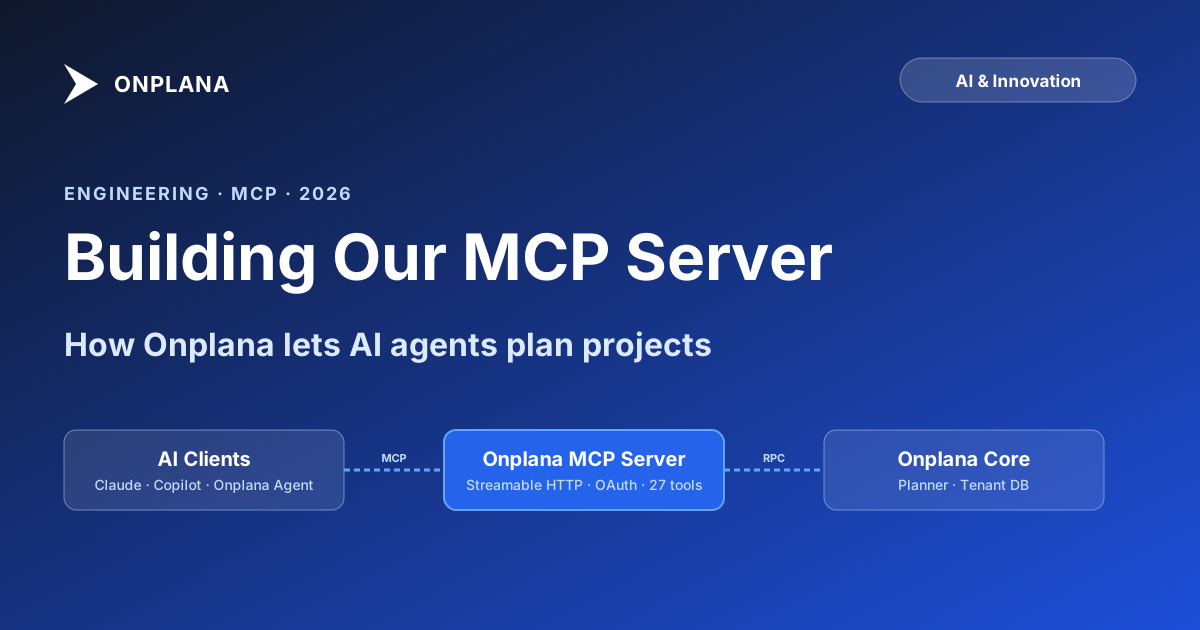
The diagram below shows where Onplana's MCP server sits between the agent ecosystem and our planning core. Each arrow is a typed call; the protocol gives the model a stable contract on the left and gives our backend team a single place to evolve the tool surface on the right.
Why we built our own instead of wrapping a generic adapter
There are off-the-shelf MCP servers that auto-generate tools from an OpenAPI specification. We tried one early on with our existing project-management REST API as input. The result was technically a working MCP server with about 120 tools, one per endpoint, but the agent could not actually use it for anything useful. Three problems emerged immediately.
First, the tool surface mirrored the API's pagination model. To list at-risk projects, the model had to call list_projects (page 1, 50 results), filter client-side, decide to fetch more, call again with the next cursor, and repeat. Each round trip cost tokens and time, and the model frequently gave up after page two. Second, every endpoint surfaced our internal error envelope ({ "code": "...", "message": "...", "trace_id": "..." }) verbatim, so the model spent context on parsing errors that should never have been agent-visible. Third, write tools were exposed by default. The agent had no way to know that POST /tasks was a destructive operation it should ask for confirmation before invoking.
Building our own server, in roughly 1,785 lines of TypeScript spread across eight files (mcp.ts, oauthProvider.ts, oauthDiscovery.ts, mcpAuth.ts, oauthClientSeed.ts, oauthAuthCode.ts, oauthPkce.ts, mcpAnnotations.ts), let us collapse those 120 endpoints into 27 carefully-shaped tools, each tied to a project-management concept rather than an HTTP route. A narrative version of that decision (with our prototype-to-production timeline) lives on the companion page at /mcp/how-we-built-it; this post focuses on the engineering shape.
The architecture in one paragraph
The server runs as a single TypeScript process on Azure Container Apps, behind the same edge as the rest of Onplana's product surface. We picked the Streamable HTTP transport from the MCP spec rather than stdio because the server is hosted: agents connect over HTTPS, not by spawning a local subprocess. Inside the process there are four layers (transport, auth, tool dispatch, and observability), each kept small enough to fit in one file. The dispatch layer is a switch over tool names that calls into our existing internal RPC API; the MCP server is not its own data layer. Tools are defined in a single declarative array with Zod schemas for arguments and result shapes, which the SDK turns into the JSON Schema the protocol expects.
This shape means adding a tool is a one-file change. We did not abstract the dispatcher into a plugin system in v1, deliberately: with 20 tools and one team owning them, the abstraction cost more than it saved.
Designing the tool schema
The thing that took us the longest was not the protocol or the auth, it was deciding what each tool should be. We have written this rule down on a whiteboard in the engineering room: tools should match concepts, not endpoints. A few patterns we ended up with:
- Filter semantically, not paginate.
list_projectsdoes not take a cursor. It takes filters that match how a human thinks:status,due_within_days,at_risk_only,owner. The server applies the filter and returns at most 50 results; if more match, the response includes a count and a hint to narrow the filter. Agents almost never want to "paginate" projects; they want a smaller, more relevant set. - Co-locate fields the model will want together. The
get_projecttool returns the project, its top highest-priority tasks, the open-risk summary, and the latest status notes in one response. Before this change the model would callget_project, thenlist_tasks(project_id), thenanalyze_project_risksseparately: three round trips to answer one question. - Surface project-management vocabulary, not raw data.
analyze_project_risks(project_id)returns a structured risk roll-up (probability, impact, mitigation status) instead of a raw task list the agent would have to scan for danger signals.generate_status_report(project_id, period)returns a polished narrative report instead of the raw data the agent would have to summarise itself.search_org_knowledge(query)returns curated knowledge hits, not a vector-search result envelope. The reasoning happens on our side, where the planning domain knowledge already lives. - Hide infrastructure detail. No trace IDs in successful responses. No internal status codes. Tool errors are flat:
{ "error": "task_not_found", "message": "No task with that ID is visible to your account." }. The model can handle that. It cannot meaningfully handle a stack trace.
The single biggest accuracy win came from filter semantics: once the model could ask for "projects at risk this week" in one call, the rate at which it produced correct answers in our internal evaluation set roughly doubled.
Authentication and per-tenant isolation
OAuth 2.1 authorization_code with PKCE is the spec-recommended flow for MCP HTTP servers, and we use it for end-user-driven connections from clients like Claude Desktop. Our .well-known/oauth-authorization-server discovery document advertises authorization_code as the only supported grant type. We deliberately did not enable client_credentials, because every tool call needs to be attributable to a specific user for the per-tenant audit story below to work. When a user adds Onplana as an MCP server in Claude Desktop, the desktop client opens a browser to our authorization endpoint, the user signs in to Onplana with their normal credentials, Claude Desktop receives a token scoped to that user, and every tool call carries that token. The token's claims include tenant_id and user_id, and our dispatcher refuses to issue an internal RPC call for any other tenant.
For machine-to-machine agents (a customer's internal bot, an automation, a CI integration), we did not invent a second protocol. We reused the existing Personal Access Token system: a PAT carrying the MCP_AGENT OAuth scope is a valid Bearer credential against the MCP server's HTTPS endpoint, and an unscoped PAT is not. PATs are issued and revoked from the same Onplana admin panel that manages REST API keys; the audit trail is unified. The scope is the gate; the tenant boundary comes from the issuing user, exactly as it does for the human flow.
Rate limits per token are the same as the REST API's, on the same counters, because the underlying load is the same. We added a small extra layer for MCP: per-tool burst limits, so a tight agent loop calling generate_status_report in quick succession can't accidentally drown a customer's planning engine while the model "thinks." A 429 response on a tool call surfaces to the agent as a structured rate_limited error with a retry_after_seconds field; in practice, Claude handles this gracefully.
Observability: every tool call is a structured event
We did not want the MCP server to be a black box at the edge of the platform. Every tool call writes three artifacts:
- A structured
pinolog line (we are onpino10.x) with the tool name, argument hash, latency, result shape, tenant ID, and (when the client populates it) the client name from the MCPclientInfohandshake. These are our minute-by-minute production signal. - A Sentry breadcrumb on every call, plus a Sentry event on every error, via
@sentry/node10.x. This is what wakes the on-call engineer when a specific tool starts throwing. - A row in the
AiOperationaudit table in Postgres, the same table that records every other AI-driven action in the product. This is the row a customer admin reaches for during a security audit ("show me everything an agent did on our tenant last week").
The three combined let us answer different questions at different time horizons. From the pino stream we can ask which tools are actually getting called this minute (most of the long tail isn't). From Sentry we can ask which tool errors are spiking and which client is the source. From the AiOperation table we can ask which tenants have ever used MCP at all and which agents they connected from.
The first weekly review of those dashboards changed how we prioritised tool additions. We had assumed list_tasks would be the most-called tool; in reality, get_project was called several times more often, because agents kept refetching the same project across long conversations. That observation drove a small caching layer at the tool boundary, with the same TTL semantics as our web cache, which cut redundant database queries materially.
What surprised us
Three things we did not predict at the start:
Most of the engineering work was schema design, not protocol implementation. The official TypeScript SDK does the protocol heavy lifting; the JSON-RPC framing, capability negotiation, and tool discovery are roughly a one-day integration. Deciding what shape a tool should have took weeks of debate and three rewrites of the list_projects tool alone.
Clients vary a lot in how they call tools. Claude Desktop calls tools rarely and reasons over the results carefully. Some open-source agents call tools in rapid bursts and treat the responses as text to grep. Tool descriptions optimized for the former read as wasteful preamble to the latter. We landed on short, parameter-focused descriptions (under 200 characters) and offload longer explanation to the result text when needed.
The model is not the bug-finder you'd hope. When we shipped a tool with a subtly wrong filter (it OR'd conditions that should AND), no agent flagged the problem; they happily returned the wrong-but-plausible result. Our internal eval set (a fixed list of 80 questions with known-correct answers, run nightly against the server) caught it within a day. If you ship an MCP server, ship the eval set with it.
What's next
The current 27-tool surface (14 read, 13 write) is feature-complete for the core planning workflow, so the next two areas of work are different in kind. The first is resource subscriptions, the third MCP primitive after tools and prompts, so an agent can be notified when a project's risk status changes rather than polling. The second is a prompts library: project-management-shaped prompt templates the server can hand to clients that support them, so a Claude Desktop user can run "Onplana: weekly status review" without having to write the prompt themselves. We are also investing in the offline eval set, expanding it past 80 fixed questions, because that is the only thing that has ever caught a silent regression in this server. The full roadmap, in less-engineering and more-narrative form, is on the companion page at /mcp/how-we-built-it.
If you are building your own MCP server against a product like ours, the lesson worth taking is small: the protocol is the easy part. The hard part is deciding what's worth being a tool, what isn't, and where your domain vocabulary should live in the contract. The further you drift from "MCP is a wrapper around our REST API," the more useful the result.
Frequently asked questions
What is the Model Context Protocol and what does Onplana's MCP server expose?
The Model Context Protocol (MCP) is an open standard from Anthropic that lets AI agents call tools on a remote server through a typed contract. Onplana's MCP server exposes 27 tools (14 read, 13 write) across projects, tasks, organisational knowledge search, project risk analysis, and status-report generation, so a connected agent can answer schedule questions and make changes without screen-scraping a REST API.
Why did Onplana build a custom MCP server instead of wrapping a generic adapter?
Generic adapters that pipe REST endpoints into MCP tools surface every implementation detail of the underlying API to the model, including authentication, pagination tokens, and error envelopes. We wanted a small, opinionated tool surface where each tool maps to a project-management concept an agent would actually reason about, not a thin layer over our internal HTTP routes.
What transport does the Onplana MCP server use?
Streamable HTTP, the transport defined in the MCP specification for remote servers. Each tool call is a JSON-RPC request over HTTPS; long-running tools (like `analyze_project_risks` or `generate_status_report`) stream interim progress events back to the client using the same connection. We do not currently support stdio because the server is hosted, not bundled with the agent runtime.
How does the MCP server authenticate AI agents?
OAuth 2.1 authorization_code with PKCE for end-user-driven connections (Claude Desktop, browser-based agents); the discovery document advertises `authorization_code` as the only supported grant type. Machine-to-machine agents authenticate with Bearer Personal Access Tokens carrying the `MCP_AGENT` OAuth scope, issued from the same admin panel that manages REST API keys. Tokens carry the tenant scope, so a tool call can only see what the authorizing user can see in the Onplana app. There is no shared global service account.
Does Onplana's MCP server expose write tools?
Yes. The production server has shipped writes since launch in early 2026: 13 of its 27 tools mutate state. Write tools require a token carrying the `MCP_AGENT` OAuth scope, and every call (read or write) lands in the `AiOperation` audit table in Postgres so a customer admin can see exactly what an agent did on their tenant.
What surprised your team the most when implementing the MCP server?
How much value came from designing the tool schema as a conceptual model rather than a literal API mirror. Once we stopped exposing pagination cursors and started exposing semantic filters (`project_status=at_risk`, `due_within_days=7`), agent answer quality jumped sharply: the model could ask for the right slice in one tool call instead of stitching together five paged responses.
Ready to make the switch?
Start your free Onplana account and import your existing projects in minutes.