Onplana Security and Compliance: How Your Data Is Held
Onplana's security and compliance: SSO, SCIM, HIPAA/GDPR/FINRA/SOC 2 retention presets, audit trails with before/after diffs, and per-tenant deactivation.
Most security pages are decoration. They list "encryption" without explaining what's actually encrypted. They claim "compliance" without naming a single standard. They lead with logos and end without commitments.
This is the inverse. It's a working inventory of every security and compliance control Onplana ships today, what it does, where it lives, what tier you get it on, and where it has known limits. If you're filling out a vendor security questionnaire, this page should answer most of your sections.
The 30-Second Summary
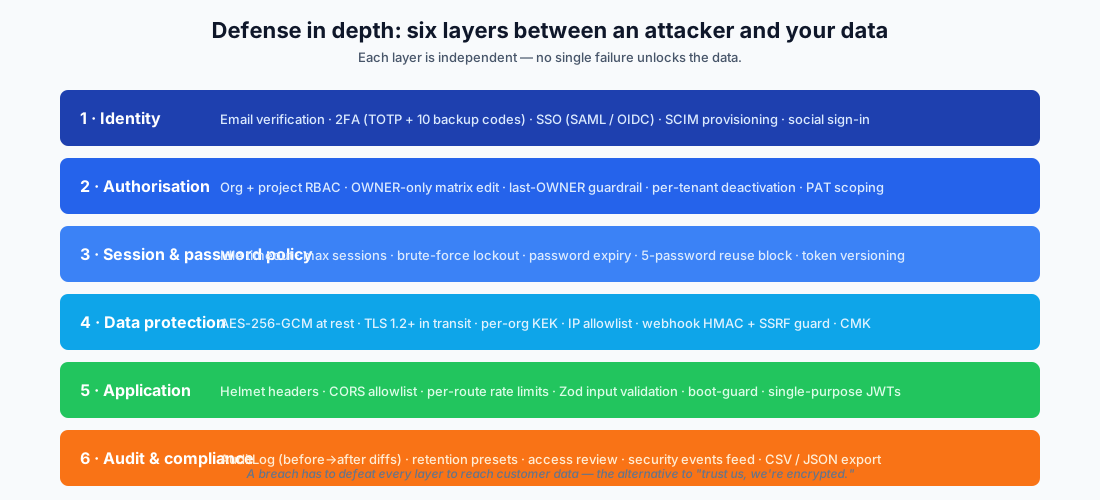
- Six layers of defense: identity, authorisation, session policy, data protection, application security, and audit. No single failure unlocks the data.
- SSO + SCIM on ENTERPRISE: SAML 2.0, OIDC, full SCIM 2.0 with per-tenant deactivation.
- Six retention presets: STANDARD / GDPR / HIPAA / FINRA / SOC 2 / CUSTOM, enforced by a daily worker, strictest-wins across multi-org users.
- Audit log with before-and-after diffs on every policy change: retention, password, session, 2FA enforcement, and SCIM mutations.
- AES-256 at rest, TLS 1.2+ in transit, with per-org KEKs for sensitive secondary stores and CMK on ENTERPRISE_PLUS.
- Boot-guarded production: fail-closed validation of every required secret on startup; missing keys mean the new revision refuses to boot rather than silently downgrading.
Layer 1, Identity
The first question every breach post-mortem asks is "how did the attacker prove they were the user?" Onplana ships nine independent answers.
Email verification gate. New signups must verify their email before they can invite others, change billing, configure SSO/SCIM, or create API tokens. Verification happens through IdP-asserted claims for SSO and social sign-in, and through a click-through link for password registration. Login is not gated (that prevents the "typo locked me out" support class), but every dangerous action is.
Password policy + history + expiry. Every org sets minimum length, complexity classes, password history depth (default 5, block reuse of the last five passwords), and optional max-age expiry. The policy resolves strictest-across-orgs on every authenticated request, so a user in a strict org can't weaken their password by joining a looser one. Password expiry is enforced by the auth middleware with a tight allowlist of routes the expired user can still hit (the password-change endpoint and logout), so they can rotate without a re-login round-trip.
Two-factor authentication. TOTP enrollment via QR code with otplib v4. On enrollment we generate ten cryptographically random backup codes (5–5 hyphenated, unambiguous alphabet, no 0/O/1/I), bcrypt-hashed at cost 10, single-use, and validated in constant time. Lost the device? Use a backup code. Lost both? Org admins can reset 2FA from Org Settings → Security & Compliance → Access Review (a recent addition), with three guardrails:
- ADMINs can't reset OWNER 2FA, only OWNERs can. That blocks the privilege-escalation pattern where a compromised ADMIN with a leaked password takes over the org.
- Cross-tenant 2FA reset is blocked. If the target is in multiple orgs, no single tenant admin can wipe their global TOTP without the other orgs' consent. Those cases escalate to Onplana platform support with full audit trail.
- Self-reset is blocked. The Settings → Security flow is the path for your own account.
Brute-force lockout. Failed-login attempts ratchet a per-user counter. Five wrong passwords in 15 minutes lock the account for 15 minutes. Redis-backed primary, Postgres fallback so a Redis outage doesn't silently disable the gate.
Single-use exchange codes for SSO/OAuth handoff. When SSO or social sign-in completes, we don't return the JWT in the URL (which would leak it to reverse-proxy logs, the Referer header, and browser history). Instead we mint a one-time 60-second exchange code, redirect the browser with that code, and let the frontend POST it for the JWT. Same pattern, two layers of indirection.
Token versioning + logout-all. Every JWT carries a tv claim: the user's current tokenVersion. Logout-all increments the version, killing every JWT in flight on the next request. Password change does the same, with a fresh JWT issued to the rotating session so it doesn't get kicked itself.
Session registry with idle timeout and max-session cap. Every JWT we issue records a UserSession row (jti, IP, UA, issuedAt, lastSeenAt, revokedAt). Org policy controls idle timeout (default 0 = unlimited; configurable to 15/30/60/120 minutes) and max sessions per user (default 0 = unlimited). Both resolve strictest-across-orgs on every request. Idle JWTs are revoked in place with 401 IDLE_TIMEOUT instead of silently kept alive.
Social sign-in. Google + Microsoft OIDC for everyday accounts. The email_verified claim from the IdP is required; we won't auto-link to an existing account on the basis of an unverified email. Provider creds live in Azure Key Vault.
SSO on ENTERPRISE. SAML 2.0 with certificate validation. OIDC with explicit email_verified === true gating (added to fix a known SAML→OIDC migration bug class). JIT provisioning is gated by the org's verified-domain list; admins must DNS-verify domains before users from those domains can JIT in. Without that gate, a tenant admin who accidentally allows *@gmail.com can be tricked into provisioning hostile accounts. The default JIT role is MEMBER or MANAGER, never ADMIN, to keep privilege grants explicit.
Layer 2, Authorisation (RBAC)
Authentication answers who. Authorisation answers what they can do. Onplana has two RBAC axes, org and project, with 26 enforceable permission keys between them.
Org roles. OWNER, ADMIN, MANAGER, MEMBER, GUEST. The Permission Matrix in OrgSettings lets OWNERs configure which role can perform each action (project create, project view all, scenario manage, rate-card manage, webhook manage, integration manage, governance review, governance manage, member invite, etc.). The matrix can be saved as a posture preset (Open / Standard / Strict / Formal PMO), and admins see at a glance which posture their current matrix matches.
OWNER-only matrix edit. ADMINs can view the permission matrix but not edit it. This blocks the "ADMIN grants themselves more rights via the matrix" escalation primitive. Backend returns 403 PERMISSIONS_OWNER_ONLY to anyone below OWNER trying to PUT.
Last-OWNER guardrail. You can't demote or remove the last OWNER. Promoting to OWNER requires the caller to already be an OWNER. UI mirrors the backend gate so the dropdown is locked when only one OWNER remains.
Project roles. OWNER, MANAGER, MEMBER, CONTRIBUTOR, VIEWER. Project-level permissions: task.create, task.edit.any/own, task.delete, task.assign, task.status.change, project.edit, project.members.manage, project.delete, automation.manage, milestone.create, template.create, sprint.manage, dependency.manage, budget.read.
Custom roles (BUSINESS+): define your own role keys when the five defaults don't fit your org structure.
Per-tenant deactivation. SCIM deactivate flips OrganizationMember.isActive for the calling tenant only; the user immediately loses access to that org but keeps any other memberships. The membership row is preserved for audit-trail integrity, and the prior role is stashed so reactivation cleanly restores the original permission level. Pre-2026, SCIM deactivate flipped the global User.isActive and locked the user out of every org they were a member of, a horizontal privilege-escalation primitive available to a compromised SCIM admin. That bug class is closed.
Cross-tenant isolation. Every org-scoped Prisma query includes organizationId: req.orgId!. Workspace getters (libraries, documents, fields, tables, rows) and every change-request mutation enforce project membership: org-tier admins bypass via the matrix bit, project members via the row, and everyone else gets 403. SUPER_ADMIN platform-impersonation (used for support and forensics) writes an AuditLog row with action='PLATFORM_IMPERSONATE_ORG' for every cross-org entry.
PAT scoping. Personal Access Tokens carry explicit scopes (projects.read, tasks.write, ai.tools, etc.). Routes enforce via requireScope(). WILDCARD scope is supported for legacy clients and surfaced in the compliance dashboard so admins can see which PATs are over-privileged.
Layer 3, Session and Password Policy
Configurable per-org. All three resolve strictest-across-orgs so a multi-org user can't dodge a tight policy by joining a looser one.
sessionTimeoutHours: absolute JWT expiry. Default 24h, configurable up to 720h (30 days).idleTimeoutMinutes: inactivity gate. 0 = unlimited.maxSessionsPerUser: concurrent device cap. 0 = unlimited; on overflow we prune oldest sessions first.- Password expiry (
maxAgeDays), enforced by the auth middleware with the tight rotation-flow allowlist mentioned earlier. - Brute-force lockout: 5 attempts → 15 minutes.
- 5-password reuse block: the password history compliance floor.
Idle touches go through Redis with a 30-second flush worker so a polling SPA at 5 req/sec doesn't write 5 rows/sec to Postgres. The gate fails safe on Redis outage; it just enforces against a slightly staler lastSeenAt and never opens up.
Layer 4, Data Protection
TLS 1.2+ everywhere. HSTS with a one-year max-age and includeSubDomains; every browser refuses HTTP for the entire *.onplana.com namespace.
AES-256 at rest in the database. Azure Storage encryption-at-rest is enabled by the platform; the data tier never sees plaintext.
Per-org KEKs for sensitive secondary stores. Inbound-email signing keys are encrypted at rest with INBOUND_EMAIL_ENCRYPT_KEK (AES-256-GCM). Schedule-tool email PII uses a separate KEK. Both keys live in Azure Key Vault, never alongside the encrypted data they protect. Key rotation runbooks are documented; rotation requires a re-encrypt migration we can run with no downtime.
Boot-guarded secrets. Production refuses to start the backend if any of these are missing or shaped wrong: JWT_SECRET, OAUTH_STATE_SECRET, OAUTH_CONNECTOR_STATE_SECRET, BILLING_PORTAL_STATE_SECRET, SCHEDULE_JWT_SECRET, INBOUND_EMAIL_ENCRYPT_KEK, SCHEDULE_EMAIL_ENCRYPT_KEK, STRIPE_SECRET_KEY, FRONTEND_URL, OAUTH_CALLBACK_BASE_URL. Single-purpose JWT secrets: auth tokens never share signing material with state JWTs, billing-portal returns, schedule tools, or share-unlock tokens, so a leak in one flow can't be replayed in another.
IP allowlist (ENTERPRISE+): limit your org's traffic to a CIDR range. Auth + admin actions log ipAddress and userAgent regardless.
Webhook security. Outbound webhook payloads are signed with HMAC-SHA256 using a per-org secret. URL validation at creation blocks IP literals and link-local ranges; delivery routes through a safeFetch wrapper that does per-hop DNS resolution and manual redirect-following to prevent SSRF to cloud metadata endpoints, localhost, or private subnets.
OAuth credentials at rest. When you connect Google, Microsoft, Box, or Dropbox, the access and refresh tokens are encrypted with AES-256-GCM before they reach Postgres. Disconnect calls the provider's revocation endpoint where supported and soft-deletes the connection row; the daily worker then hard-deletes after 30 days.
Customer-Managed Keys (CMK) on ENTERPRISE_PLUS: bring your own KEK for organizations that need to control the encryption key lifecycle independently of Onplana's infrastructure.
Layer 5, Application Security
Helmet.js mounted at the app root: HSTS, X-Frame-Options: SAMEORIGIN, X-Content-Type-Options: nosniff, Referrer-Policy: strict-origin-when-cross-origin, Cross-Origin-Opener-Policy: same-origin, Cross-Origin-Resource-Policy: same-origin, Content-Security-Policy: default-src 'none', Permitted-Cross-Domain-Policies: none. Verified on every response.
CORS allow-origin whitelist: https://app.onplana.com and https://onplana.com. Credentials are allowed only on those origins.
Per-route rate limiting: auth (60/15min), OAuth (30/min), 2FA verification (5/min), AI (60/min, bypassed on unlimited plans), scheduling (30/min), SCIM (per-tenant keying so a noisy IdP at one tenant can't starve another). Redis-backed with a fail-closed configuration in prod (REDIS_FAIL_CLOSED=true) so a Redis outage doesn't silently downgrade to per-replica memory limits.
bcrypt password hashing at cost 12 for user passwords (register / change / reset). Cost 10 for 2FA backup codes (acceptable since they're single-use and length 11).
Zod input validation on every route boundary. Type confusion attacks don't reach the database; the Zod schema rejects mismatched shapes with a 400 before any handler logic runs.
Stored-XSS hardening. All user-rendered strings escape through React's default text-content escaping. Rich text comes from BlockNote with HTML stripped server-side. Comment / description fields are sanitized through a configured allowlist. Audit log details are stored as JSON, never raw HTML.
SendGrid webhook signature verification on inbound-email delivery. Unverified webhook calls are rejected in production, preventing spoofed inbound mail from auto-creating tasks under a project mailbox.
Layer 6, Audit and Compliance
AuditLog model: every mutation. Action, resource, resourceId, organisationId, actor user + email, IP, user agent, timestamp, and a structured details JSON. The model is append-only at the application level; there are no UPDATE or DELETE paths through Onplana code, and only the daily retention worker can purge past the configured auditLogDays.
Before-and-after diffs on policy changes. RETENTION_POLICY_UPDATED, PASSWORD_POLICY_UPDATED, SESSION_POLICY_UPDATED, and 2FA_ENFORCEMENT_* all write { before, after } so a SOC 2 auditor reconstructing "we tightened retention from STANDARD to HIPAA on 2026-04-15" sees the diff in a single row instead of having to walk the timeline.
SCIM mutations are audited. Every SCIM POST / PUT / PATCH on Users and Groups writes an AuditLog row with actorType: 'SCIM'. Provision, update, deactivate, reactivate, group add/remove/replace: all are forensically recorded. They surface in the OrgSettings → Security Events tab.
Six retention presets baked in.
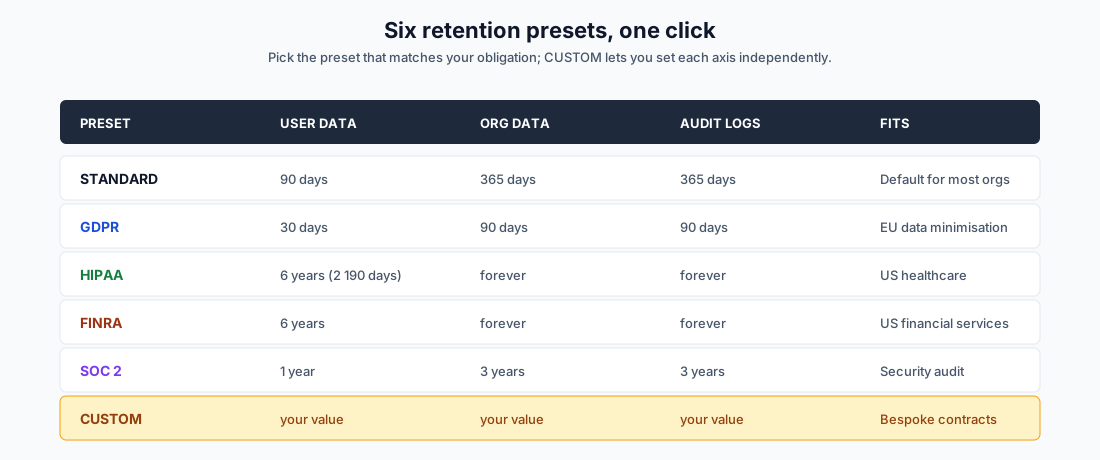
The daily retention worker reads each org's preset (or CUSTOM values) and:
- Hard-deletes soft-deleted organizations past
orgDataDays - Hard-deletes deactivated, fully-orphaned users past
userDataDays, using a per-userpurgeAftertimestamp computed at the moment the user becomes orphaned, capturing the strictest policy across their full membership history. A user once in a HIPAA org keeps the 6-year retention even after their last active membership goes away. - Hard-deletes audit logs past
auditLogDays(per org + a STANDARD platform fallback for orphan rows) - Purges revoked sessions older than 90 days and zombie sessions with
lastSeenAtolder than 365 days - Purges user notifications and per-org activity logs on the same cadence
Customer-facing controls dashboard. OrgSettings → Security & Compliance has four sub-tabs (OWNER/ADMIN-only):
- Controls: 2FA enforcement, session/password policies, compliance score
- Access Review: every member with their role, 2FA status, last login, dormant flag (no activity > 90 days), cross-org count, and a Reset 2FA action with the privilege guards described earlier
- Security Events: failed-login feed, suspicious activity (failed 2FA, SCIM deactivate, permission changes), filterable and exportable
- Audit Export: CSV or JSON download of the full audit log, filterable by action / resource / actor / time range
Compliance score. Runtime evaluation of 2FA adoption, API token least-privilege, login failure trend, retention policy state, IP allowlist coverage, and PAT expiry hygiene. Each control reports PASS / WARN / FAIL / MANUAL.
What's Not Here Yet
Honest list. We don't pretend to have things we don't.
- SOC 2 Type II report: we do not have one. The readiness controls are in place and the formal third-party audit is in progress; until it completes there is nothing to send but the evidence package.
- CMK: the ENTERPRISE_PLUS infrastructure is staged but not yet in customer self-service.
- Customer-facing DSAR portal: backend export paths exist; the user-initiated export UI is on the roadmap.
- HSM-backed signing keys: Azure Key Vault with HSM-backed secrets is supported today; per-customer HSM tenancy is not.
Talk to Us
If you're working through a vendor security review, send the questionnaire to support@onplana.com. We answer SIG, SIG-Lite, CAIQ, and ad-hoc spreadsheets, usually within two business days. We'd rather you ask the awkward question now than discover something six months in.
For technical depth, the Security page is the canonical reference and links straight to our privacy policy, responsible disclosure inbox, and data-processing terms.
Onplana ships SOC 2 readiness controls, six retention presets including HIPAA / FINRA / GDPR / SOC 2, full SAML 2.0 + SCIM 2.0 on Enterprise, AES-256 at rest, per-org KEKs, immutable audit trails, and CMK on Enterprise+. Get started free or contact our team for an evaluation tenant pre-loaded with sample data.
Related: Security overview · Privacy policy · Pricing · Microsoft Project Online End-of-Life 2026
Microsoft Project Online™ is a trademark of Microsoft Corporation. Onplana is not affiliated with Microsoft.
Frequently asked questions
Is Onplana SOC 2 compliant?
Not yet: the formal third-party audit is in progress and there is no report until it completes. Onplana ships SOC 2 readiness controls today. The audit log with before-and-after diff capture, access review, security events feed, retention preset for SOC 2 (1-year user / 3-year org / 3-year audit), and CSV/JSON audit export are all live in Org Settings → Security & Compliance. We can supply security questionnaires, control matrices, and evidence packages on request via support@onplana.com.
Does Onplana support SSO?
Yes, on the ENTERPRISE plan. SAML 2.0 with certificate validation, OIDC (OpenID Connect) with email-verified gating, and verified-domain checks that prevent cross-tenant takeover during JIT provisioning. Social sign-in (Google, Microsoft) is available on STARTER and above for everyday accounts.
Does Onplana support SCIM?
Yes, on the ENTERPRISE plan. Full SCIM 2.0 for Azure AD / Entra ID, Okta, and Google Workspace. Per-tenant deactivation (so deactivating in one org doesn't lock the user out of others they belong to), automatic role stash on deactivate, full audit trail on every SCIM mutation, and per-tenant rate limiting so a noisy IdP at one org can't starve another.
How does Onplana handle data retention for HIPAA / GDPR / FINRA?
Six built-in presets: STANDARD (90/365/365), GDPR (30/90/90), HIPAA (6 years / forever / forever), FINRA (6 years / forever / forever), SOC 2 (365/3y/3y), and CUSTOM (you set each axis). Picked once in Org Settings, enforced by a daily background worker that respects the strictest applicable policy. The strictest setting wins across multi-org users so a user can't 'escape' tighter retention by joining a looser org.
Where is customer data encrypted?
TLS 1.2+ in transit on every endpoint, AES-256 at rest in the database, and AES-256-GCM with a per-org key encryption key (KEK) for sensitive secondary stores like inbound-email signing keys. Encryption keys live in Azure Key Vault separately from the data they encrypt. Customer-Managed Keys (CMK) are available on the ENTERPRISE_PLUS tier for organizations that need to hold their own KEK.
Can an admin be locked out of resetting another admin's 2FA?
Yes, by design. Org ADMINs can reset 2FA for MEMBERs but not for OWNERs; that would be a privilege-escalation primitive (an ADMIN with a leaked OWNER password could take over the org). Only OWNERs can reset OWNER 2FA. Cross-tenant 2FA reset is also blocked: if a user belongs to multiple orgs, no single tenant admin can wipe their global TOTP secret without the other orgs' consent. Cross-tenant resets escalate to Onplana platform support with full audit trail.
What happens when a user is deactivated?
Two paths. SCIM deactivate flips the per-tenant membership flag; the user immediately loses access to that org but keeps their other org memberships. PATs scoped to that org are revoked, and the role is stashed for clean reactivation. The membership row is preserved (not deleted) so audit trails remain intact. When the user has zero active memberships across any org, the daily purge worker schedules them for deletion under the strictest userDataDays policy across their full membership history, so a user once in a HIPAA org gets 6-year retention even after their last membership goes inactive.
Does Onplana train AI models on customer data?
No. Customer project data is never used to train AI models. AI features (chat, plan generation, risk detection) call whichever provider API Onplana is running (Anthropic Claude or Azure OpenAI) at request time, and the data is not retained for model training under either provider's enterprise data terms. Onplana runs on both providers and manages which one serves each request; admins can audit AI token usage from /admin/ai-usage.
Are audit logs immutable?
AuditLog rows are append-only at the application layer; no UPDATE or DELETE statements exist in the application code paths. The retention worker may purge rows past the org's auditLogDays cutoff (zero = retain forever, the default for HIPAA / FINRA presets). Every policy mutation (retention, password, session, 2FA enforcement) writes a row with a structured `{ before, after }` diff, so an auditor can reconstruct the chronology of every config change in one query.
What if I want to leave Onplana?
All your data exports cleanly: projects to .mpp / Project XML, audit logs to CSV or JSON, full org export via Onplana platform admin tooling. There is no vendor lock-in. We treat data portability as a security control, not a competitive moat.
Ready to make the switch?
Start your free Onplana account and import your existing projects in minutes.