Onplana's AI-First Architecture: Memory, RAG, and Limits
Walkthrough of Onplana's AI: persistent memory, hybrid retrieval over org data, 24-action tool dispatcher, closed-loop feedback, and what we didn't build.
The phrase "AI-native" is everywhere in B2B SaaS marketing right now. Most of the time it means a chat sidebar wrapped around chat.completions.create. Sometimes it means a tool that only works if you ask it nicely in plain English. Rarely does it describe what the AI actually has access to, what it can do, what it costs, or what happens when it's wrong.
This post is the technical version of that conversation for Onplana. We'll walk through how the AI is wired, what it can do today, and, equally important, what we deliberately didn't build and why we don't claim "100% AI-native" even though we're more aggressive on AI than most PM tools.
If you only have ninety seconds: Onplana is AI-first, not AI-native. AI is built into the substrate (memory, retrieval, tool use, feedback), but the product also works as a perfectly competent project management tool with the AI features turned off. That's an honest line. Anyone selling you a "100% AI-native" product whose default workflow is still drag-a-card-on-a-Kanban is using the phrase as a marketing label.
What "AI-native" should actually mean
There's no industry standard for this term, but the working definition that holds up under scrutiny is roughly:
- AI has access to your data, not just a generic prompt
- AI can take actions beyond surfacing text
- AI improves from usage in some non-trivial way
- AI is woven into core workflows, not a feature you click to access
- The product would be meaningfully worse without AI, not just less convenient
Onplana hits the first three solidly, the fourth partially, the fifth only for some workflows. Hence "AI-first" rather than "100% AI-native." A product where you can run an entire project from creation to delivery without invoking a single AI feature isn't 100% AI-native, no matter how powerful the AI bits are when you do invoke them.
How retrieval works (the part that actually matters)
The most common failure mode in AI products is the chat that confidently makes things up about your data. We solved this with Retrieval-Augmented Generation (RAG): the model only answers from a slice of your data we explicitly hand it.
Here's the full pipeline for a single chat turn:
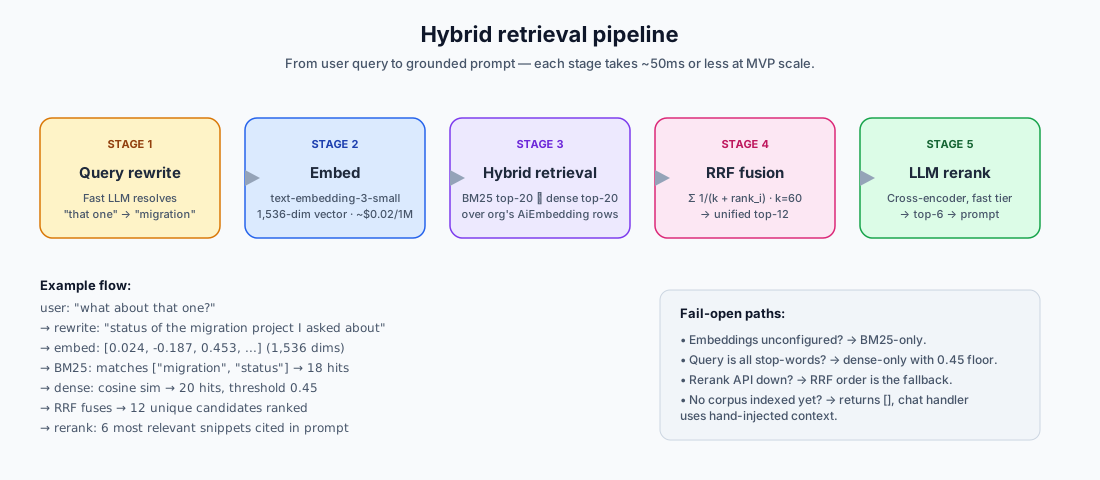
Five stages:
Query rewrite. A fast LLM call rewrites the user's last message into a self-contained search query using prior conversation turns. So "what about that one?" becomes "what's the status of the migration project I asked about earlier?" Without this step, retrieval against pronoun-heavy follow-ups returns garbage.
Embed. The rewritten query is embedded with
text-embedding-3-small(1,536-dim, $0.02 / 1M tokens). The cost is recorded against the org's monthly ledger so the spend shows up in the AI & Usage panel alongside chat completions.Hybrid retrieval. Two channels run in parallel:
- Dense semantic, cosine similarity against every embedded entity in your org (Project / Risk / Goal / Comment). At ≤5,000 entities the brute-force JavaScript scan runs in ~50ms. Past that scale we'd switch to pgvector with
ivfflatindexing. - BM25 lexical, Lucene-compatible keyword scoring (
k1=1.2,b=0.75) over the same content. Catches the cases pure embeddings miss: exact identifiers, person names, enum values like "BLOCKED" that get compressed away in vector space.
- Dense semantic, cosine similarity against every embedded entity in your org (Project / Risk / Goal / Comment). At ≤5,000 entities the brute-force JavaScript scan runs in ~50ms. Past that scale we'd switch to pgvector with
Reciprocal Rank Fusion, the dense and lexical rankings combine into a single ordered list using RRF (
k=60, the canonical Cormack constant). Pure rank-based fusion ignores raw scores entirely, so the difference in magnitude between cosine[0,1]and BM25[0,30]doesn't bias the result.LLM cross-encoder rerank, the top 12 fused candidates are batched into a single fast-tier model call ("rate each snippet 0-10 for relevance"). The reranker's order wins; the fused order is the fallback if the rerank API fails. Default top-6 of those rows are injected into the prompt as cited context.
The retrieval threshold (0.45 cosine for dense-only fallback), the rerank toggle, and the candidate pool size are all admin-tunable from /admin/ai-usage → Operations. Tunable in production, not just in code.
Memory: conversations are server-side state
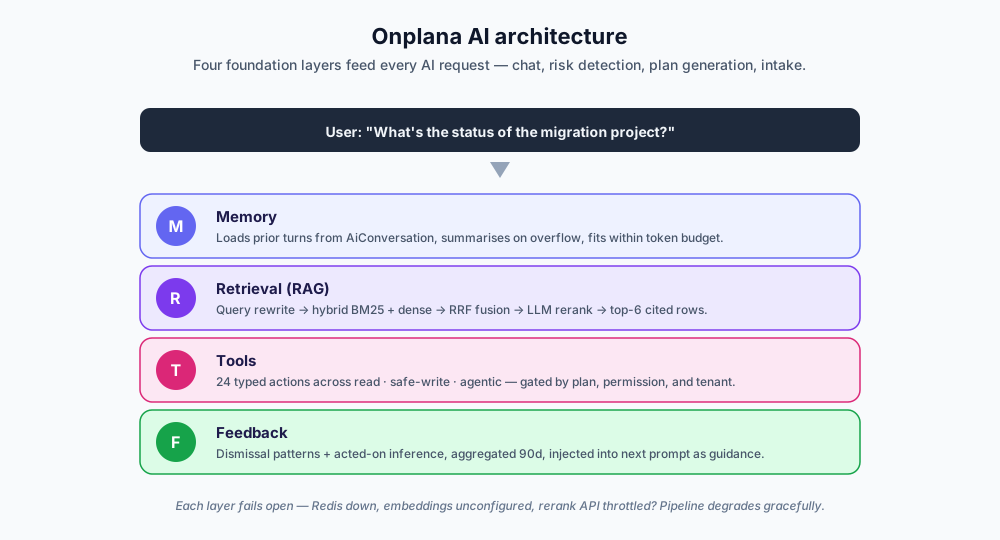
Most AI chat features are amnesiac: close the tab, the context vanishes. Onplana persists conversations server-side in the AiConversation and AiMessage tables. Each turn:
- The server loads the prior turns
- Fits them into the model's token budget
- If we'd exceed the budget, the oldest turns are summarized in place (replaced with a system note like "earlier in this conversation: …")
- Appends the new user turn
- Calls the model
The summarization is conservative: we keep the most recent turns verbatim and only collapse older ones. The eval harness runs precision@K and recall@K against a synthetic vector fixture in CI so we know summarization isn't degrading retrieval over time.
There's also a per-conversation cap of 200,000 input tokens, same as Claude Sonnet's context window. Past that, even with summarization, the model can't hold the conversation coherently anyway, and the cumulative spend on a runaway thread is non-trivial. The cap is hard; the user is told "start a new chat to continue" and the prior message stays visible above so they can copy it across.
Tools: AI that acts, not just answers
Reading is half the story. The other half is doing. Onplana's tool dispatcher exposes 24 typed tools across three phases:
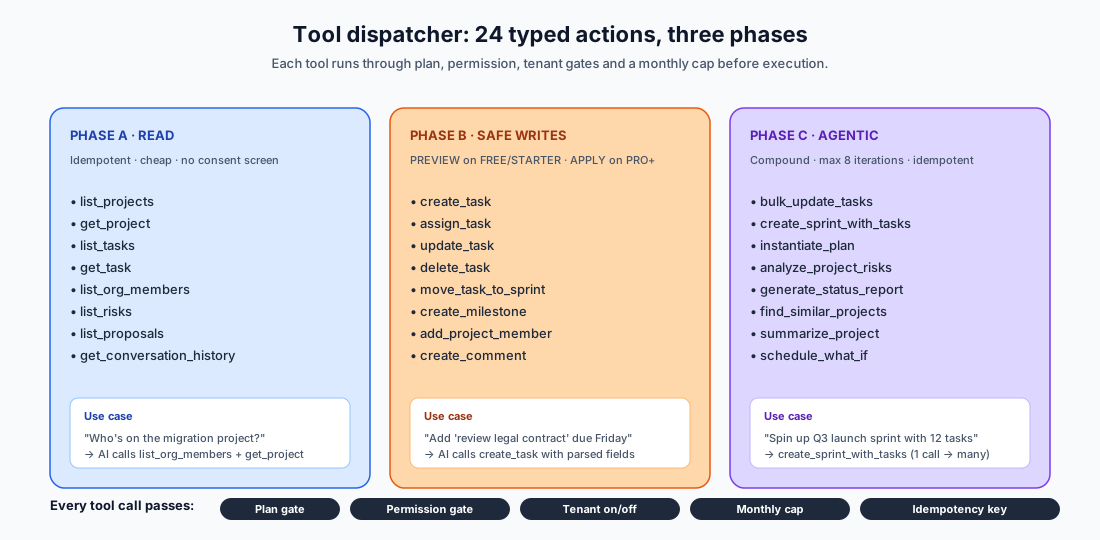
Phase A, Read. list_projects, get_project, list_tasks, get_task, list_org_members, list_risks. Cheap, idempotent, no consent screen. The AI can answer questions like "who's on the migration project?" by calling the tool rather than guessing.
Phase B, Safe writes. create_task, assign_task, delete_task, update_task, move_task_to_sprint, create_milestone, add_project_member, create_comment. Mutations that change one entity at a time. On FREE / STARTER plans these default to PREVIEW mode: the AI shows what it would do as a ghost-card; the user clicks Apply. On PRO+ plans the default is APPLY because the per-seat cap absorbs accidental over-execution.
Phase C, Agentic chains. bulk_update_tasks, create_sprint_with_tasks, instantiate_plan, analyze_project_risks, generate_status_report, find_similar_projects, summarize_project, schedule_what_if. Compound actions that loop multiple Phase A/B calls together. Capped at 8 iterations per chain so a confused model can't burn the budget.
Every tool carries:
- Plan gate, required feature flag (e.g.
analyze_project_risksrequires BUSINESS+'saiAdvanced) - Permission gate, org-role + project-role check via the same matrix that governs manual UI access
- Tenant gate, admins can disable any individual endpoint per organization
- Monthly cap, per-tool invocation ceiling on FREE/STARTER tiers
- Idempotency key, duplicate invocations resolve to the original result
That stack means an AI tool-call is held to the exact same authorization standard as a manual API call. There's no "AI bypass" path.
What an AI session actually looks like
The chat panel users see is a percent-only budget bar (no dollar amounts to keep tenant-side surfaces compliant with our no-dollars-to-clients policy), the conversation, and the message input. Under the hood it's all of the above happening per turn:
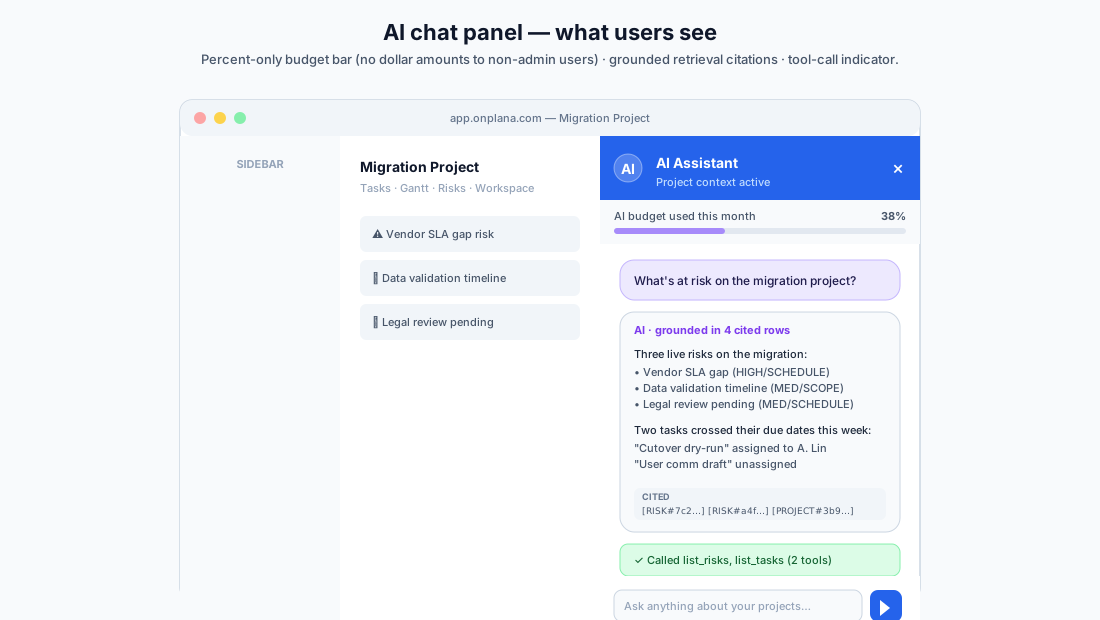
The percent bar at the top reads from the same lite-mode controls feed Layout uses for the chat-icon gate (one HTTP request shared across every component on the page, 60-second cache). The "AI used 12% of monthly budget" framing matters because admins set the dollar cap themselves in /org/settings → AI & Usage, and we don't surface dollar figures to non-admin users.
Closed-loop feedback (without RLHF)
Most AI products either don't learn from usage at all, or rely on a heavy training pipeline (RLHF, fine-tuning) that requires ML infrastructure most B2B vendors don't have.
Onplana takes a middle path that doesn't get talked about enough: prompt-injected dismissal patterns. When admins dismiss AI-generated risks or task suggestions, the dismissal is recorded with a category extracted from the suggestion's content (first significant word of the title, or the explicit kind field). Over a 90-day window, categories with ≥5 dismissals get aggregated into a guidance line that's prepended to future prompts:
User feedback signals (avoid generating these):
- 12 SCHEDULE risks dismissed in 90d
- 8 documentation tasks dismissed in 90d
Tailor your suggestions to avoid generic patterns this org has rejected.
A daily worker also infers acted-on signals: PENDING task suggestions where a similar task was created within 7 days (Jaccard ≥ 0.5 on lowercased word sets) get marked ACTED_ON automatically. Older PENDING ones get IGNORED.
It's not RLHF. It's not fine-tuning. But it's a real signal-to-prompt loop that improves output quality on a per-org basis without standing up an ML stack. The eval harness measures whether the loop is actually helping (precision@K shouldn't degrade over time) and the result feeds back into the same Admin → AI → Operations panel admins use to monitor the rest of the pipeline.
Cost governance: the part nobody enjoys building
AI features without cost governance burn down by month 3. Onplana's cost stack:
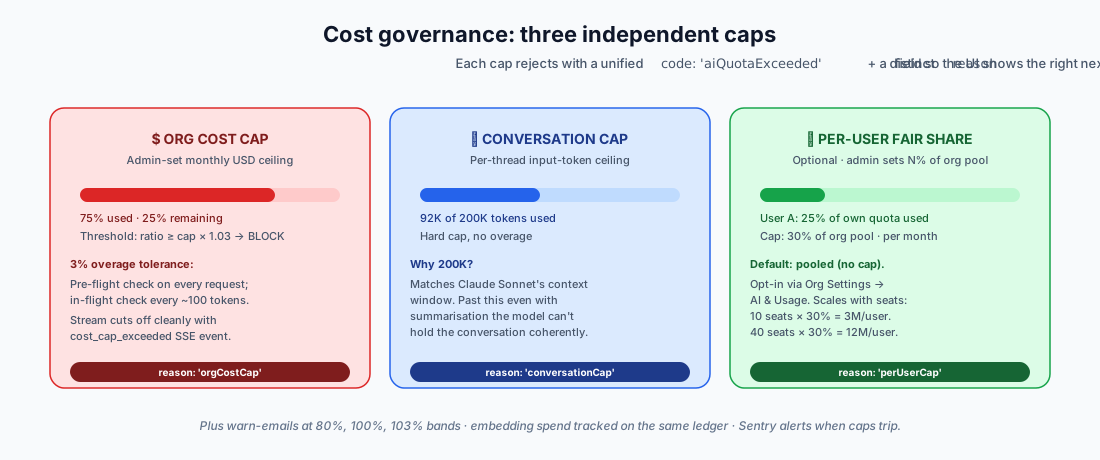
- Per-org monthly cost cap with WARN (email-only) or BLOCK enforcement. Pre-flight rejects when month-to-date spend ≥ cap × 1.03. The 3% overage tolerance absorbs in-flight stream calls, the user gets to finish the current response, just not start a new one. Mid-stream tracking checks every ~100 output tokens and emits a
cost_cap_exceededSSE event when crossed. - Per-conversation 200K-token cap so a single open-all-day thread doesn't drain the org's budget on quadratically-growing context windows.
- Per-user fair-share, admins cap each user at N% of the org pool; prevents one heavy user monopolizing the month's allowance.
- Email throttling worker notifies OWNER/ADMIN at 80%, 100%, and 103% bands, at most one email per band per period, reset on month rollover.
- Embedding spend on the same ledger, text-embedding-3-small calls write
service:embedEntity:*rows so the dollar cap sees indexing cost too. No silent under-billing.
There are also Sentry alerts at every accept-the-risk point (lost ledger writes, cost-cap overage above the buffer) so we catch the failure modes we deferred fixing if they ever materialize in production. Build-or-defer triggered by real signal, not speculation.
What we deliberately didn't build
This is the section most "AI-native" blog posts skip. It's also the section that matters most.
No proactive surfacing. AI runs when invoked. It doesn't tap you on the shoulder with "this milestone is going to slip" or "this scope just expanded 30%" without you asking. Risk detection is the closest, and even that is pull-based per-project. Proactive AI is on the roadmap; we'd rather ship the reactive surface well than a half-baked notification stream.
No multi-day agentic workflows. Tool chains execute in a single turn. There's no "set a quarterly OKR: AI manages the project plan over time, opens tasks, follows up on stale items, escalates to humans only when stuck." That's the feature that would justify dropping the "first" and just calling it AI-native. It requires a step-up in observability and rollback affordances we haven't built yet.
No fine-tuning per organization. The dismissal-pattern feedback loop is one-step learning. We don't train per-org adapters, don't run RLHF, don't have any active learning beyond "next prompt sees the latest aggregation." Adding this would be 3-6 months of ML infrastructure work; the current loop captures most of the value at none of the cost.
No replacement of core CRUD flows. You can still create a project by typing into a form. You probably mostly will. The AI flow ("describe the project, Onplana drafts the plan") is faster for greenfield projects, but the form flow is still the default.
We could have built any of these. We chose to build the foundation first (memory + retrieval + tools + governance) because there's no point in agentic workflows without a reliable retrieval layer underneath, and there's no point in fine-tuning without observable feedback signal.
Why we deliberately don't say "100% AI-native"
Three reasons:
The default workflow doesn't need AI. A team can run a project from creation to delivery without ever invoking an AI feature. That's not 100% native; that's optional augmentation, even if it's deeply integrated optional augmentation.
"Native" implies the product would not function meaningfully without AI. Onplana would. It would be a perfectly competent PM tool, competitive with Asana, Monday, Wrike on pure non-AI surfaces. The Gantt chart, Kanban board, sprint management, governance pipeline, RBAC matrix, billing: none of that depends on AI.
The phrase is becoming a tell in 2026. Buyers are starting to recognize "AI-native" the way they recognized "blockchain-enabled" in 2018 or "cloud-first" in 2014, a marketing label that often signals less than it claims. Claiming 100% when the obvious test ("turn AI off for a day, does the product still function?") shows it does is the kind of thing that erodes trust during the sales cycle.
What we do say:
- AI-first project management platform, accurate
- Deeply AI-augmented, accurate
- AI is a primary interface, not just a feature, accurate (chat-to-act for the workflows that have tool coverage)
- Onplana's AI is grounded in your data and acts on it, accurate and differentiating
Pick your own scrutiny test
If you're evaluating any AI-claiming product, here are five questions that separate substance from marketing:
- What does the AI have access to? Is it grounded in your data via real retrieval, or is it a generic chat that you copy-paste your project into?
- Can the AI act? Or is it just a smarter search box?
- Where do the API keys live? If they're in the vendor's database, that's a security tell. They should be in a key vault, never visible in admin UIs.
- Is the vendor locked to a single AI provider? Depending on one AI model is a real risk in a field that turns over every 3-6 months. A vendor that runs on more than one provider, and can fail over between them, signals an architecture that takes resilience seriously.
- How does cost get capped? "Unlimited AI" is either a loss-leader or a near-future surprise bill. Look for transparent caps, per-user fair-share, and admin-controlled budget ceilings.
Onplana answers yes to 1 and 2, key vault for 3, multi-provider with Onplana-managed failover for 4, and a four-layer cost stack for 5. We'd rather you check a competitor against the same five questions than take our word for it.
Roadmap: what would push us toward "AI-native"
If you ask us in 12 months whether the "AI-first" label still fits or whether we've crossed into AI-native territory, the answer depends on whether these ship:
- Daily AI brief per user, pushed, not pulled. What's at risk in your projects, what needs your decision today, what changed in your team's work since you last logged in.
- Multi-day agentic workflows, set a goal once; AI maintains the project plan, opens tasks against it, follows up on stale items, escalates to humans only when stuck.
- Per-org learned patterns beyond the dismissal loop, embedding-based adaptation of vocabulary ("this org calls migrations 'lifts'") without explicit prompts.
- Replace at least one core CRUD flow with a strictly-better natural-language equivalent, e.g. weekly status updates done by telling AI what changed, not by editing 12 task fields.
Three of those four would justify the "AI-native" label. We're building toward them, but we don't claim them yet.
Want to see Onplana's AI in action on your own data? Start free, AI chat grounded in your project data runs on every plan including Free (metered by your AI token balance rather than gated by tier), and the eval harness numbers we show in the docs run against the same code path your tenant will use. See pricing for the full tier breakdown.
Related reading:
- How AI Actually Runs Project Management Inside Onplana, the use-case-level companion to this engineering deep-dive
- A Day in the Life of an AI-Augmented Project Manager, what these layers feel like across a working day
- Best AI Project Management Software in 2026, how the architecture above compares to the rest of the market
- How AI Is Transforming Project Management in 2026, the broader category primer
Frequently asked questions
Is Onplana an AI-native project management platform?
Onplana is AI-first: AI is built into the substrate (RAG over your org data, persistent conversation memory, a 24-tool action dispatcher, closed-loop feedback), not bolted on as a chat sidebar. We deliberately don't claim '100% AI-native' because the product still works as a competent PM tool without AI. AI is a primary interface; not the only one.
How does Onplana's AI access my organization's data?
Through Retrieval-Augmented Generation (RAG). Projects, risks, goals, and comments are indexed as semantic embeddings (Azure OpenAI text-embedding-3-small, 1,536-dim vectors). When you chat or trigger AI, the system rewrites your query with conversation context, runs hybrid retrieval (BM25 lexical + dense semantic + Reciprocal Rank Fusion), reranks the top candidates with a fast LLM cross-encoder, and injects the result into the prompt, so answers are grounded in your data, not guessed.
Can the AI take actions, or just answer questions?
Both. Onplana's tool dispatcher exposes 24 actions across three phases: read tools (list projects, get task), safe-write tools (create task, post comment), and agentic tools (bulk task updates, generate plans, schedule what-if scenarios). Tools are gated by plan, permission, and per-tenant on/off settings. FREE/STARTER plans default to PREVIEW mode for mutations so a model can't burn through quota silently.
Which AI provider does Onplana use?
Both Anthropic Claude and Azure OpenAI. Onplana runs on both providers and manages which one serves each request, using one as primary with the other as automatic failover if a provider is degraded. This is handled by Onplana at the platform level, not configured by the customer. API keys live in Azure Key Vault, never in the database, never visible in the admin UI.
How does Onplana prevent AI runaway costs?
Three layers: (1) per-organization monthly cost cap with WARN or BLOCK enforcement, including a 3% overage tolerance for in-flight stream calls; (2) per-conversation 200,000-token cap so a single runaway thread can't drain the org budget; (3) admin-tunable per-user fair-share limits as a percentage of the org pool. All three reject with a unified `aiQuotaExceeded` code so the UI can render the right empty-state copy.
Does the AI improve from feedback?
It learns from dismissals, when admins dismiss AI-generated risks or task suggestions, the dismissal pattern is aggregated by category over a 90-day window and injected into future prompts as guidance ('this org has dismissed 12 SCHEDULE risks recently, bias toward other categories'). Not RLHF, not fine-tuning, but a real signal-to-prompt loop that improves the org's own results without per-org model training.
Ready to make the switch?
Start your free Onplana account and import your existing projects in minutes.