A Day With an AI-Augmented Project Manager in Onplana
Hour-by-hour walkthrough of a PM's day with Onplana's AI: Monday triage, mid-morning intake, mid-afternoon risk review, and the end-of-week status report.
Most "AI in project management" content stays at the marketing level, AI predicts, AI summarizes, AI accelerates. Useful as positioning, useless if you're trying to figure out whether to actually adopt the thing.
This post is the inverse. It's one full working day for Priya, a senior PM running 14 active projects across two business units in a mid-sized SaaS company. She switched her team to Onplana 3 months ago after Microsoft Project Online retirement got close enough to be unavoidable. We're going to walk through what she does, what the AI does, and what specifically falls back to manual work.
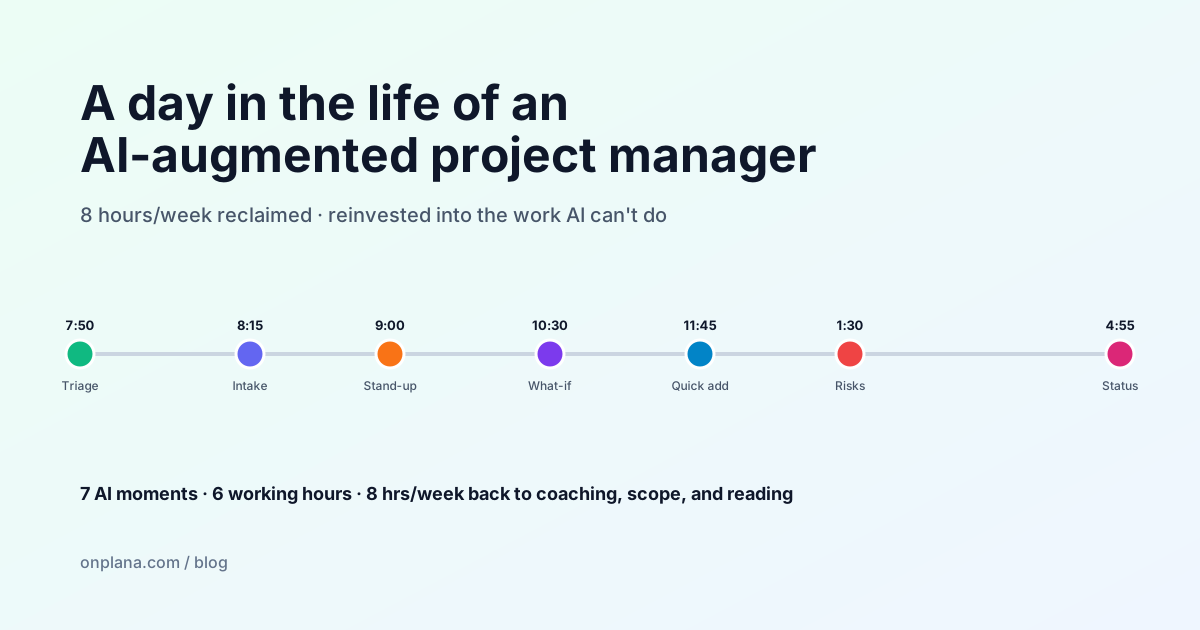
The 90-second answer. AI gives Priya about 8–10 hours back per week. She reinvests every minute of it into stakeholder conversations and team coaching, the parts of PM work that don't compress. The shape of the day looks similar to her old workflow; the texture is different.
Jump to: morning triage · intake · stand-up · risk review · status reports · weekly accounting · what stays manual
7:50, Open the laptop, open Onplana, open Recommendations
Old workflow: open Project Online, look at the homepage, hop to her three biggest active projects, scan each one for fires, repeat for the next three. Fifteen minutes. The 8th–14th projects rarely got the same attention.
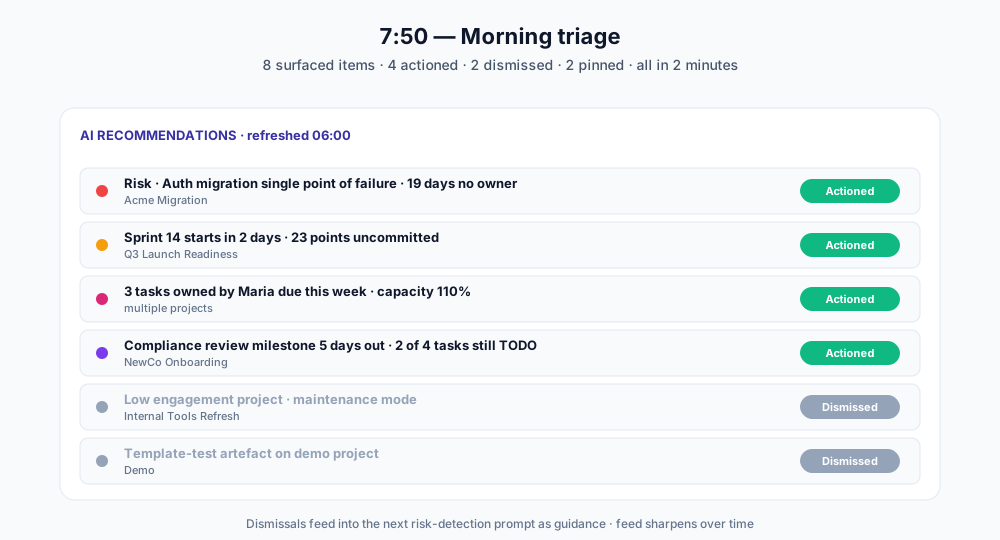
New workflow: open Onplana, click the Recommendations tab on the dashboard. The AI shows her the 8 highest-priority actions across the portfolio:
- Risk Auth migration single point of failure has been open 19 days without an owner, Acme Migration
- Sprint 14 starts in 2 days; 23 points uncommitted, Q3 Launch Readiness
- 3 tasks owned by Maria due this week, capacity at 110%, multiple projects
- Compliance review milestone 5 days out, 2 of 4 blocking tasks still TODO, NewCo Onboarding
- Burn rate exceeds remaining budget, Globex Phase 2
- No status update in 14 days, Internal Tools Refresh
- Migration project externally synced from Planner has new tasks, Acme Migration
- Stakeholder mention in comment from yesterday, Q3 Launch Readiness
Priya reads the feed top-down. Two minutes. She picks the four she's going to action this morning, dismisses the two that aren't real ("low engagement project is fine, it's a maintenance one"), and pins the remaining for after stand-up.
The dismissals matter: Onplana feeds the dismissal pattern back into the next risk-detection run as guidance. After three months on the platform, the feed is sharper than it was on day one.
→ See how risk-feedback works in our AI architecture deep-dive
8:15, Slack mention, intake, AI Project Kickstart
A product manager DMs her: "Hey, sales just closed a new logo, we need a fast onboarding plan, kicked it through the intake form."
Priya opens the Intake Forms page. The submission is there, a four-paragraph description of the customer's setup, urgency, and required milestones. In her old workflow, this is where she'd spend 45–60 minutes drafting the project structure: phases, tasks, dependencies, owners.
She clicks AI Project Kickstart. Onplana reads the intake submission, runs it through the project-generator, and proposes a populated project: 4 phases, 14 tasks, 2 milestones, 2 risks, with assignee suggestions where the email addresses match org members. There's a banner with three clarifying questions, "Is the SOC 2 review a blocker for go-live or run-in-parallel?", that the AI flagged rather than guessed.
She reviews the proposal in the Drafts view, fixes the SOC 2 phasing, swaps two assignees, and clicks Accept and create project. Total elapsed time: 8 minutes from intake notification to a real project on the board.
That single hour-saved-per-intake adds up. Priya does 2–3 of these a week.
9:00, Stand-up
Stand-up is a human meeting. AI doesn't run the meeting; AI helps her prepare for it.
Five minutes before the call, she opens the AI Chat panel and types:
Summarise blockers across my active sprints
The chat reads her project portfolio (RAG over the live database, scoped to projects she has read access to) and returns a short paragraph with three bullets and inline citations. She skims, mentally tags the two she'll bring up live, and joins the call.
After stand-up, she logs the team's blockers as comments on the relevant tasks. Onplana's NL parser reads each comment as it's saved, a comment like "Mike said the API spec slipped to next Wed, blocked by approval from legal" automatically updates the task's due date and adds a finish-to-start dependency to the legal-review task.
She didn't write a single field by hand. She wrote a sentence per blocker.
10:30, Mid-morning deep work, schedule what-if
The Globex Phase 2 budget alert from this morning's Recommendations needs a real decision. The PM lead is asking: "Can we still hit the November 12 launch if we cut scope on items 3, 7, and 9?"
Priya opens the Globex project's Gantt and clicks Run scenario. She marks tasks 3, 7, and 9 as out of scope. The AI runs the schedule what-if and reports back:
- Critical path shortens by 11 working days
- November 12 launch becomes feasible with 4 days of buffer
- Two downstream tasks need rescoping (the AI flags them with specifics)
- One milestone moves earlier; one stakeholder mention auto-flagged as needing comms
She accepts the scenario as a draft, adds a comment summarizing the trade-offs, and shares the link with the PM lead and exec sponsor. The decision now sits with the PM lead and sponsor, AI ran the simulation; humans make the call. Twenty minutes of work; previously a half-day.
→ Related read: our project risk management guide
11:45, Mid-day burst, natural-language task adds
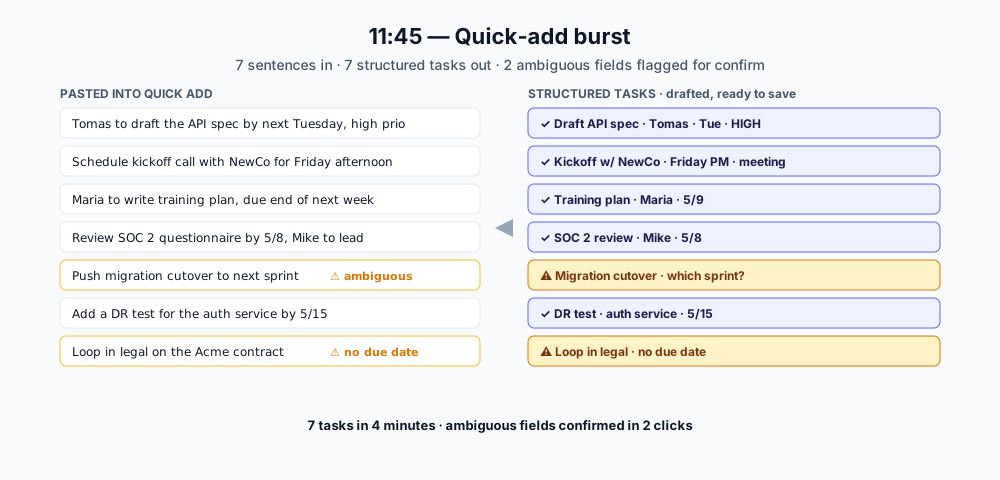
Between two meetings, Priya has 15 minutes to clear her notebook into the system. She has a list of seven tasks scribbled from this morning's intake conversation. Old workflow: open the task form seven times, fill seven sets of fields. New workflow: paste each line into the Quick Add dialog:
Have Tomas draft the API spec by next Tuesday, high priority, blocked by the auth review
Schedule kickoff call with NewCo for Friday afternoon, both leads invited, milestone for go-live readiness
Maria to write the training plan, due end of next week, priority high, attached to onboarding-newco
The parser handles the rest, assignee from name, date from relative-day phrase, priority from the explicit token, dependency by linking against the most recent matching task. Anything ambiguous lands as a draft with the unresolved field highlighted; she confirms in two clicks.
Seven tasks in 4 minutes, no form fatigue. Priya estimates this one feature alone saves her 2 hours a week.
1:30, After lunch, risk review
Risk Detection ran its scheduled scan at 6am. Priya skims the Risks tab on each of her four most active projects. Forty-three new candidate risks across the portfolio; she reads them grouped by dimension:
- Schedule (16), three new ones; she accepts two and dismisses one as a known seasonal pattern
- Resource (12), Maria's overallocation surfaces here too; she opens it, escalates to the resource lead via Onplana's comment-with-mention, and accepts
- Budget (8), Globex is the only real one; the dismissed ones are template-test artifacts on a low-priority project
- Scope (5), two are from the Acme Migration; she pings the engineering lead in a comment
- Dependency (2), one circular chain detected on Q3 Launch; she opens it, the chain is real, fixes the predecessor wiring
Total: 25 minutes. The AI did the scanning; Priya did the triage, accepting, dismissing, and routing. That's the right division of labor.
A subtler payoff: Maria's overallocation showed up in the morning Recommendations and the risk feed, framed differently. The two surfaces reinforce, not duplicate. Priya doesn't have to remember to look in two places for the same problem.
3:00, Three meetings back-to-back
Meetings are AI-free. AI doesn't attend, doesn't transcribe, doesn't summarize. It sits at the back of the conversation; humans do the human work.
After the third meeting wraps at 4:45, Priya has a pile of decisions to log. She opens the relevant projects and uses the Quick Add parser again, except now she's also recording decisions, not just tasks. Onplana doesn't have a separate decision log model; decisions live as comments tagged with #decision on the relevant project, which makes them filterable later. Task comments vs a chat channel covers why that thread beats typing the same decision into a Teams channel.
Twelve decisions logged in 6 minutes.
4:55, End-of-day, status report draft
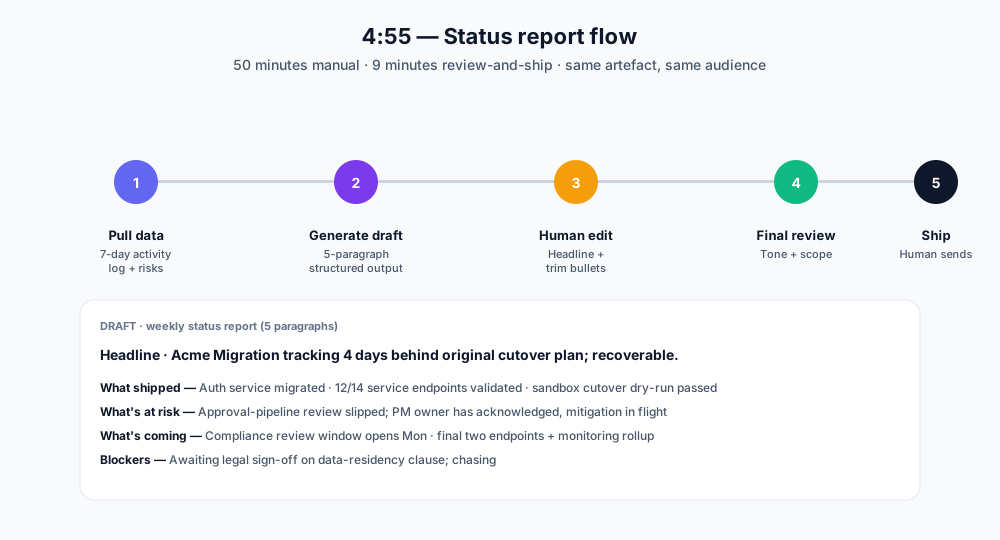
Friday afternoon she ships weekly status reports for two of her highest-stakeholder projects. Old workflow: open Word, copy-paste from Project Online, write the headline, format, send. 50 minutes per report.
New workflow: open the project, click Generate weekly status. Onplana reads the last 7 days of activity log, completed/created tasks, status changes, milestone hits, and surfaced risks, then drafts a 5-paragraph report:
- Headline, single sentence, written for an exec audience
- What shipped, milestones and major task completions, grouped by phase
- What's at risk, top 3 risks, with framing tuned to severity
- What's coming, next week's planned work, calendar-aware
- Blockers, items that need stakeholder action
The draft loads in the rich-text editor. Priya rewrites the headline (the AI's was technically accurate but not punchy enough), trims one bullet from "What shipped" that's too granular for execs, and ships. 9 minutes per report.
Across two reports a week, that's roughly 80 minutes saved every Friday.
→ Try the public version of the same engine: AI Status Report Writer
The weekly accounting
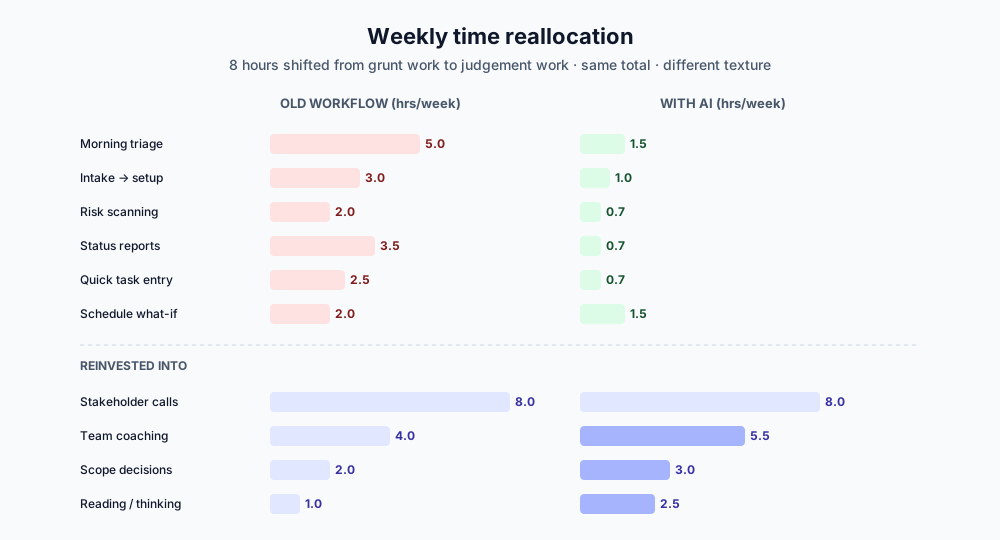
Priya's whiteboard estimate of where her time used to go vs where it goes now:
| Activity | Old (hrs/week) | With AI (hrs/week) | Delta |
|---|---|---|---|
| Morning portfolio triage | 5.0 | 1.5 | -3.5 |
| Intake → project setup | 3.0 | 1.0 | -2.0 |
| Risk scanning | 2.0 | 0.7 | -1.3 |
| Status report writing | 3.5 | 0.7 | -2.8 |
| Quick task entry | 2.5 | 0.7 | -1.8 |
| Schedule what-if + decisions | 2.0 | 1.5 | -0.5 |
| Stakeholder calls | 8.0 | 8.0 | 0 |
| Team coaching + escalations | 4.0 | 5.5 | +1.5 |
| Scope decisions | 2.0 | 3.0 | +1.0 |
| Reading + thinking | 1.0 | 2.5 | +1.5 |
| Total | 33.0 | 25.1 | -7.9 hrs |
Eight hours a week reclaimed. Note where the time increases, coaching, scope decisions, reading. The AI doesn't do those, and they're the parts of the job that compound. Priya isn't doing eight more hours of grunt work elsewhere; she's reinvesting in the parts of PM that aren't compressible.
What still belongs to Priya
A complete picture of day in the life includes the parts AI doesn't touch:
- Stakeholder conversations, the boardroom version of "we have to deprioritise launch readiness" needs a human in the room
- Final review of every AI artifact going external, status reports, project briefs, meeting summaries all have human-on-the-loop before they ship past her
- Cross-project priority calls: AI ranks within a project; ranking across is political and contextual
- Team coaching, engineers asking "is my estimate realistic" need a human who can read tone
- Escalations, the ones that go up the org chart, not lateral; AI drafts the language but Priya owns the message
- Auto-anything, by design, no AI in Onplana auto-sends, auto-publishes, auto-emails, or auto-mutates without a human in the loop. Drafts and proposals only. That's a product decision, not a capability gap.
The shape of Priya's day looks like the shape of her old day. The texture is different, the parts that used to feel like typing the same thing into seven forms now feel like making decisions and editing first drafts. That's the thing that matters when you live with the tool for six months instead of demoing it for an hour.
Key takeaways
- Time reclaim is real and quantifiable. For Priya, an AI-augmented project manager workflow on Onplana shifts roughly 8 hours per week out of grunt work (status reports, intake parsing, risk scanning, morning triage) and into judgment work (coaching, scope decisions, stakeholder conversations).
- AI does production, humans do judgment. Every external artifact (status reports, meeting summaries, project briefs) is AI-drafted and human-edited before it ships. Nothing auto-sends; that's a product decision, not a capability gap.
- The biggest single saving is status reports. Onplana's
Generate weekly statuscollapses a 50-minute report into a 9-minute review. Across two reports a week, that alone returns ~80 minutes every Friday. - Morning AI Recommendations replaces project-hopping. A 2-minute triage of an 8-item feed replaces 15+ minutes of cycling through 14 active projects, and the feed gets sharper over time as dismissal patterns feed back into risk detection.
- What AI does not touch: stakeholder calls, escalations, cross-project priority decisions, team coaching, contract negotiation, and final review of every AI-drafted artifact going external. The shape of the PM's day is preserved; the texture changes.
Trying this for yourself
The fastest test: import a real project (Project Online OData, .mpp file, or the new Microsoft Planner / Project for the Web importers we just shipped) and run a real week against it. Onplana's free tier covers 2 projects with AI core features so you can run an actual workflow before paying anything.
If you're a PM evaluating tools right now, two parallel things are worth your attention:
- The AI architecture deep-dive, for the engineering side of how this works (memory, RAG, tools, feedback loop)
- The seven AI workflows post, for the feature-level catalog without the day-in-the-life framing
Either way, the test that matters is use it for a week on something real. That's the only way to find out whether the time savings show up in your specific role.
→ Create a free Onplana account
Related reading:
- How AI Actually Runs Project Management Inside Onplana, the feature-by-feature catalog
- Inside Onplana's AI-First Architecture, the engineering side of how the AI surfaces are wired
- Best AI Project Management Software in 2026, comparative roundup if you're shopping
- Why Status Reports Take 90 Minutes Every Week (and How to Cut It to 10), the hour Priya gets back on Friday
- Project Risk Management: A Practical Guide, the methodology behind her 1:30pm risk review
- Goals, Milestones, and Status Reports: The Discipline That Ships Projects, the human side of what AI doesn't replace
- Microsoft 365 integration paths: Planner · Project for the Web Premium · Microsoft To Do
Microsoft Project Online™ is a trademark of Microsoft Corporation. Onplana is not affiliated with Microsoft.
Frequently asked questions
How much time does AI save a project manager per week using Onplana?
Roughly 8–10 hours of weekly grunt work shifts to AI, mainly status reports (saves about 3 hours weekly), intake-to-tasks parsing (1–2 hours), risk surfacing (1–2 hours of manual scanning replaced), and morning triage via AI Recommendations (1–2 hours of project hopping replaced). PMs typically reinvest those hours into stakeholder conversations, scope decisions, and team coaching, the work AI can't do.
What's a typical PM's first action with Onplana's AI in the morning?
Open the AI Recommendations feed before opening any individual project. The feed surfaces the 5–10 highest-priority next actions across the entire portfolio, overdue risks, upcoming milestones with no work attached, capacity bottlenecks. PMs read it like a triage inbox instead of project-hopping their way through 20+ active projects.
Does Onplana's AI run automatically in the background or only when triggered?
Both, with sensible defaults. AI Risk Detection runs on a weekly schedule (Mondays at 6am org-local). Recommendations refresh hourly. Status summaries, plan generation, and natural-language parsing are explicit, a human triggers them. Chat is conversational. The split keeps unattended AI use predictable and auditable; nothing material happens without a paper trail.
Can AI handle stakeholder communication for me?
It can draft, but it shouldn't send. Onplana writes first-draft status reports, project briefs, and meeting summaries. A human edits and ships. We don't auto-send AI-generated communication; the cost of one badly-toned exec email is much higher than the time saved by automating delivery. The same pattern applies to client-facing comments and inbound email replies.
What does a PM still do manually after adopting Onplana's AI?
Stakeholder conversations, scope and priority decisions, team coaching, escalations, contract negotiations, and final review of every AI-drafted artifact before it ships externally. AI accelerates the production of artifacts; the judgment about what to produce, what to leave out, and how to position it remains a human job.
How does Onplana's AI know which projects are most important to me?
It doesn't infer from behavior; it reads the ProjectMember table. Projects you own surface first in Recommendations, your assigned tasks lead morning triage, and the chat panel scopes retrieval to projects you have read access to. No engagement-based ranking, no engagement signals harvested. Permission-aware retrieval is the only filter.
Ready to make the switch?
Start your free Onplana account and import your existing projects in minutes.