Microsoft To Do Sync With Onplana: Bi-Directional and Per-User
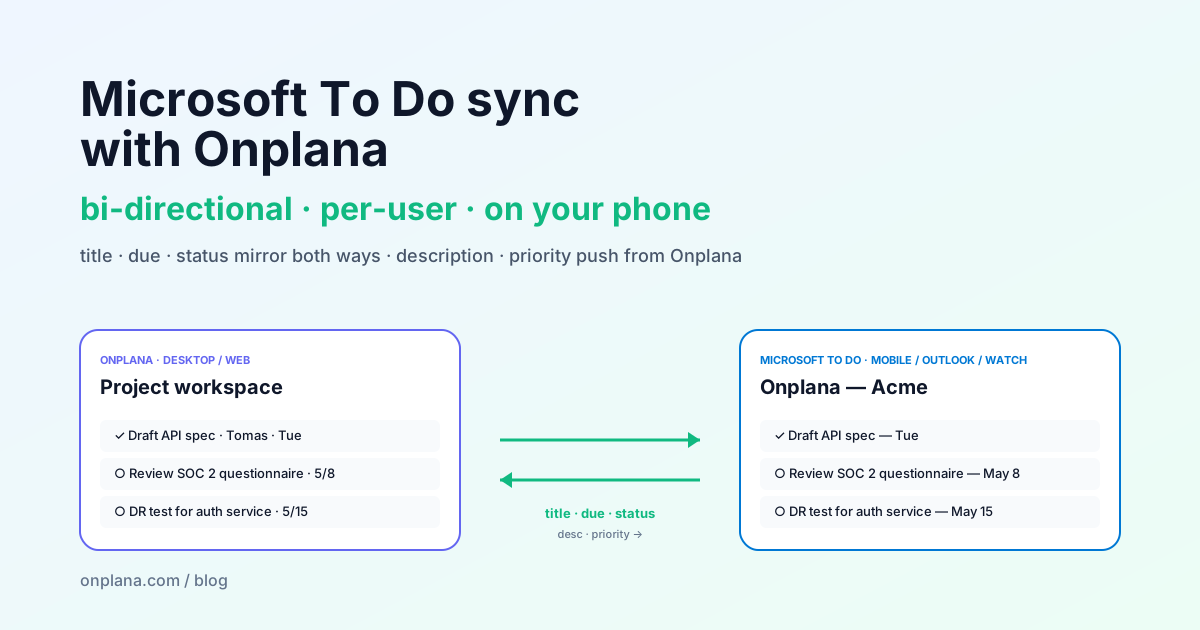
Onplana's bi-directional Microsoft To Do sync mirrors title, due date, and completion both ways. Description and priority push from Onplana into a per-org list.
Project management lives on a desktop. Personal task management lives on a phone. The bridge between the two is the half-hour every PM loses each day re-typing their actually-priority-this-week tasks into their personal task list, then re-typing their progress back into the project tool.
Onplana's bi-directional Microsoft To Do sync removes that bridge. Tasks assigned to a user mirror to their personal Onplana, <org> list in Microsoft To Do automatically; checking one off in To Do moves it to DONE in Onplana; editing the title in either place updates the other.
This post covers what mirrors, what doesn't, why we drew the line where we did, and the operational details (loop suppression, multi-org, opt-in flow) that make bi-directional sync actually work in practice.
The conservative bi-directional scope (and why)
Most "bi-directional sync" features fall into one of two failure modes: they sync everything (and create constant merge conflicts whenever both sides edit the same field) or they sync only one way (and fail to deliver the actual user benefit, which is editing in either place).
Onplana's To Do sync is deliberately middle-ground:
| Field | Both ways | Onplana → To Do only | Not synced |
|---|---|---|---|
| Title | ✓ | ||
| Due date | ✓ | ||
| Completion status | ✓ | ||
| Description | ✓ | ||
| Priority / importance | ✓ | ||
| Subtasks | ✗ | ||
| Categories | ✗ | ||
| File attachments | ✗ |
The reasoning per row:
- Title, due, status are the fields a user actually changes on their phone. Mirror both ways or the feature doesn't help.
- Description and priority belong to the project record. Stakeholders write the description in Onplana; the mobile UI's typing flow isn't the right surface for a 200-word description. We push so the field is visible in To Do; we don't pull because the originating intent is on the Onplana side.
- Subtasks are flat in To Do (one level only) and arbitrarily deep in Onplana. There's no reasonable mapping; we'd corrupt one side or the other. Skipped.
- Categories are 25-named-list-per-plan in Microsoft Planner and org-scoped tags in Onplana. The data shapes don't reconcile cleanly. Skipped.
- File attachments in To Do are stored as URLs to OneDrive or external services. Onplana stores them as workspace documents. The cross-mapping would be brittle. Skipped.
That's the design rationale. The blog comment thread on this post is the right place to argue for a different line; we're not married to the current scope.
The architecture (one diagram)
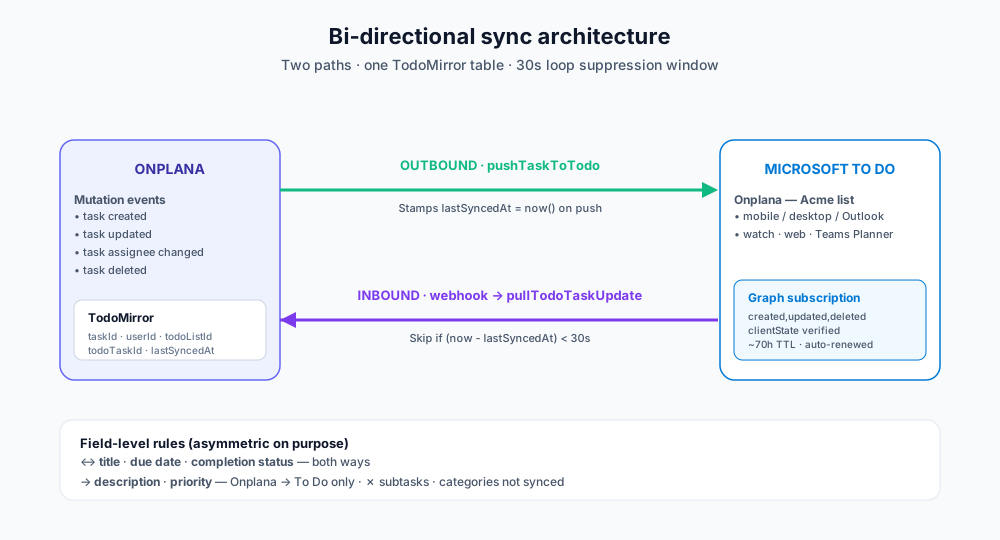
Two paths:
Outbound (Onplana → To Do). Every task create/update on the Onplana side fires a fire-and-forget call to pushTaskToTodo(taskId). The push function:
- Loads the task and verifies the assignee has To Do sync enabled and the project has To Do sync enabled (per-user + per-project flags both default sensibly)
- Finds-or-creates the user's Onplana, <org> list via Microsoft Graph
- POSTs (new task) or PATCHes (existing mirror) the To Do task with the title/due/status/description/priority payload
- Stamps
lastSyncedAt = now()on the TodoMirror row
If the user has no Microsoft connection or the tasks scope is missing, the push no-ops silently. Outbound is non-blocking; the Onplana task save never fails because the To Do mirror failed.
Inbound (To Do → Onplana). When the user changes a To Do task (mobile, desktop, Outlook, watch, any client), Microsoft fires a Graph webhook to Onplana's public ingress:
- The webhook endpoint validates the
clientStatesecret (32-byte random, set at subscription create); forged notifications are dropped silently - Acknowledges 202 within 30s (Graph's hard timeout)
- Looks up the TodoMirror row by
(userId, todoListId, todoTaskId) - Loop suppression check: if
lastSyncedAtis within 30 seconds, the change is the one we just pushed; skip - Fetches the current state from Graph and updates the Onplana task's title/due/status only (not description, not priority; those are outbound-only)
A single user has one webhook subscription per org they're in, scoped to the Onplana, <org> list. A user in two orgs has two subscriptions and two lists.
Loop suppression, the 30-second window
The most subtle piece of the sync is making sure outbound and inbound don't echo into infinite loops. The naïve implementation:
- PM updates task title in Onplana →
pushTaskToTodoPATCHes Microsoft → Microsoft firesupdatedwebhook → Onplana sees title change → updates Onplana → which firespushTaskToTodoagain → which PATCHes Microsoft → which fires another webhook → …
Onplana solves this with a 30-second window:
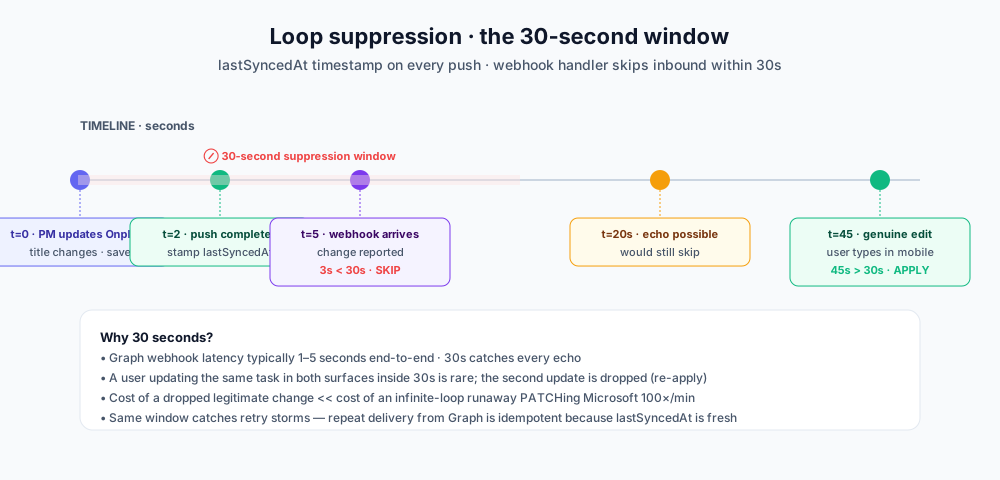
Every TodoMirror row carries lastSyncedAt, stamped on every outbound push. The webhook handler checks now() - lastSyncedAt:
- < 30 seconds → the change Microsoft is reporting is almost certainly our own echo. Skip.
- >= 30 seconds → the change came from the user genuinely editing in To Do. Apply.
30 seconds is conservative on purpose. Microsoft Graph webhook latency is typically 1–5 seconds end-to-end. A user who updates the same task in both surfaces inside 30s is rare; if it happens, the second update is dropped as an echo (the user can re-apply). The cost of an occasional dropped legitimate change is much lower than the cost of an infinite-loop runaway that PATCHes Microsoft 100 times per minute.
The same window catches retry storms. If our inbound handler crashes mid-update and Microsoft retries, the second delivery sees lastSyncedAt = now() from our just-completed push and skips. Idempotent.
Status mapping, the asymmetric one
To Do has five status states; Onplana has five. They don't line up cleanly.
Outbound (Onplana → To Do):
| Onplana | To Do |
|---|---|
| TODO | notStarted |
| IN_PROGRESS | inProgress |
| REVIEW | inProgress (To Do has no review) |
| DONE | completed |
| BLOCKED | waitingOnOthers |
Inbound (To Do → Onplana), conservative:
| To Do | Onplana |
|---|---|
| notStarted | TODO |
| inProgress | (skip, don't overwrite) |
| completed | DONE (+ progress=100) |
| waitingOnOthers | BLOCKED |
| deferred | (skip, don't overwrite) |
The asymmetry is intentional. Inbound inProgress is dropped because To Do users routinely tap a task as "started" while running for the train; that shouldn't flip the Onplana task out of REVIEW or BLOCKED states a PM has carefully set. We only let inbound override Onplana when the To Do state carries clear authoritative meaning: not started, completed, or blocked.
The trade-off: a user who does genuinely move a task to in-progress on their phone won't see Onplana update. They'll find it stuck on TODO. We surface this in the docs (and in the blog you're reading); if it becomes a real friction point we'll revisit.
Opt-in flow, what users actually do
Three steps, one minute total:
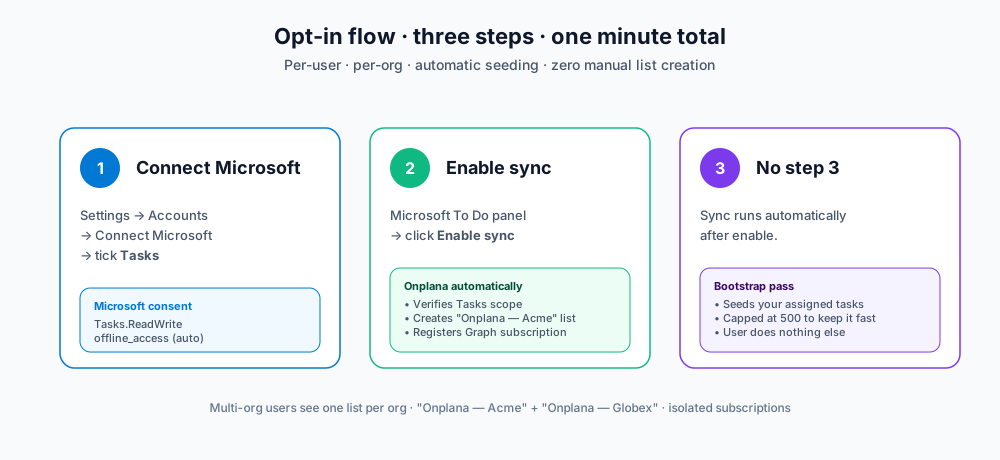
Step 1, connect Microsoft (skip if you already imported a Planner plan)
Settings → Accounts → Connect Microsoft → tick Tasks. This is the same scope that powers Planner import; users who already have a Microsoft connection for Planner already have it.
Step 2, flip the To Do sync toggle
Settings → Accounts → scroll to the Microsoft To Do sync panel. Click Enable sync. Onplana:
- Verifies the
Tasks.ReadWritescope is present (412 with re-consent prompt if not) - Flips the user-level
todoSyncEnabledflag totrue - Registers a Microsoft Graph subscription on the user's Onplana, <Org Name> list (creating the list if it doesn't exist)
- Runs the bootstrap pass: every task currently assigned to the user across the org seeds into the To Do list (capped at 500 to keep the pass quick)
If subscription registration fails for any reason, Onplana rolls back the flag; better to require a retry than have the user think sync is on while no webhook is registered.
Step 3, there is no step 3
After enable, sync runs automatically. New tasks assigned to the user push to To Do within seconds. Changes in To Do mirror back. The user does not have to do anything else.
Multi-org behavior
Each org gets its own list. A user who works in two Onplana orgs (say Acme and Globex) and enables sync in both sees:
- Onplana, Acme in their Microsoft To Do
- Onplana, Globex in their Microsoft To Do
Two separate Graph subscriptions, two separate lists, complete isolation. Cross-org leakage is impossible at the subscription level: the inbound webhook handler looks up the subscription by id, finds the (userId, organizationId) pair, and scopes the mirror update to that org.
This matters for compliance. A user with confidential project data in Org A doesn't see those tasks leaking into a personal Microsoft account that's also signed into Org B's tenant. Each org is its own walled garden.
When sync stops
Three cases trigger automatic teardown:
- User disables from Settings → Accounts: clean teardown. The Graph subscription is DELETEd, the local TodoSubscription row is removed, and the existing To Do tasks stay (they become regular To Do tasks no longer mirrored).
- Microsoft connection revoked: the renewal worker detects the dead connection on the next 6-hourly cycle. After 3 consecutive failures, the local subscription row is dropped. Re-connect Microsoft and re-enable sync to start fresh.
- Subscription expires past Graph's 3-day cap: shouldn't happen because the renewal worker patches expiry every 6 hours, but if it does (extended outage), Graph 404s the subscription and the renewer drops the row.
In all three cases, the user's tasks in To Do stay; only the live mirror stops. The user can re-enable sync any time; the bootstrap pass on re-enable seeds whatever's currently assigned.
Stacking with the rest of the integration story
Microsoft To Do sync is the third surface in Onplana's Microsoft 365 deep integration:
- For PMs running plans: Microsoft Planner basic import + live sync
- For Premium teams with rich schedule data: Project for the Web Premium import
- For individual contributors managing their day: this post, Microsoft To Do bi-directional sync
- For team meetings: Onplana's Teams app embed, personal tabs + channel pinning + SSO
The four stack: a project imported from Planner with live sync mirrors changes inbound; the per-task assignment surfaces on the assignee's phone via To Do sync; the team meets in Teams with the Onplana tab open. One Microsoft connection, one consent, four entry points.
Try it on yourself first
The fastest way to evaluate To Do sync is to enable it on your own account against a low-stakes project. Onplana's free tier covers 2 projects with full To Do sync, no upgrade needed for the test.
Things to verify in the first 10 minutes:
- Open Microsoft To Do (mobile or desktop). Confirm the Onplana, <Org> list shows up
- Mark a task complete in Onplana → verify it goes from notStarted to completed in To Do
- Reassign a task to yourself in Onplana → verify it appears in To Do within seconds
- Edit a task title in To Do → verify it updates in Onplana within ~10 seconds
- Mark a To Do task complete → verify it goes to DONE in Onplana
If those five round-trip cleanly, sync is working as designed. If anything looks off, the What's New page is the integration changelog, and our team responds to support questions within one business day.
→ Create a free Onplana account · See all integrations
Related reading:
- Migrate Microsoft Planner to Onplana, pair To Do sync with a Planner import for end-to-end Microsoft 365 coverage
- Import Microsoft Project for the Web (Premium) into Onplana, the rich-schedule path for Premium customers
- How AI Actually Runs Project Management Inside Onplana, the seven AI surfaces that operate on your imported tasks
- A Day in the Life of an AI-Augmented Project Manager, how mobile-first task views fit into a working day
- Microsoft Project Online vs. the New Microsoft Planner, context on Microsoft's consolidation of Planner / To Do / Project for the Web
- From Signup to Running Project in Under 2 Minutes, the AI Kickstart flow new users see on day one
Microsoft Project Online™ is a trademark of Microsoft Corporation. Onplana is not affiliated with Microsoft.
Frequently asked questions
How does Microsoft To Do sync with Onplana work?
Each user opts in from Settings → Accounts. Onplana finds or creates a 'Onplana, <Org Name>' list in their Microsoft To Do, registers a Microsoft Graph subscription on that list, and seeds every task currently assigned to the user (capped at 500 to keep the seed pass quick). After that, Onplana pushes outbound on every task create/update/delete, and Microsoft pushes inbound via webhook on every To Do change. Bi-directional, per-user, scoped to the org.
What syncs both ways and what's outbound only?
Both ways: title, due date, completion status. Outbound only (Onplana → To Do): description, priority. Not synced at all: subtasks, categories, file attachments. The asymmetric scope is intentional: title/due/status are the fields the user actually toggles on their phone or watch; description and priority belong to the project record on the Onplana side, where stakeholders write and change them. Mirroring those bidirectionally would create more conflicts than it would save typing.
Won't this create infinite sync loops?
No. Onplana suppresses inbound notifications that arrive within 30 seconds of an outbound push. Every TodoMirror row stamps lastSyncedAt on push; the webhook handler checks that timestamp on every notification and skips if the change Microsoft is reporting is the one we just sent. 30s is conservative; Graph webhook latency is typically measured in single-digit seconds, so the window catches the echo without dropping legitimate user changes that happen to land seconds after our push.
What happens if a user deletes the To Do task, does Onplana delete the project task too?
No. Deleting a task in To Do marks the corresponding Onplana task as DONE rather than deleting it. Task history, comments, time logs, and dependency wiring are too valuable to trash on what might be a casual swipe on a phone. The mirror row is removed so future syncs don't try to find the deleted To Do task; the Onplana task stays with progress=100 and status=DONE. If you really want to delete the project task, do it from the Onplana side; that triggers the bidirectional delete cleanly.
Does multi-org affect anything?
Each org gets its own 'Onplana, <Org Name>' list in the user's Microsoft To Do. A user who works in two Onplana orgs and toggles sync on for both will see two separate lists in To Do: Onplana, Acme and Onplana, Globex, with their respective tasks. Subscriptions are per-(user, org) so cross-org leakage is impossible at the subscription level.
What permissions does the To Do sync need?
Tasks.ReadWrite delegated permission on the user's Microsoft account. The same scope as Microsoft Planner basic import, so users who already connected Microsoft for Planner don't need a second consent. The Microsoft connection must also have offline_access (the standard refresh token grant) so the renewal worker can refresh subscriptions before the ~3-day Graph cap; this is included in every Onplana Microsoft connection by default.
Ready to make the switch?
Start your free Onplana account and import your existing projects in minutes.