How AI Runs Project Management in Onplana: 7 Workflows
Seven project-management workflows Onplana hands off to AI: one-sentence project kickoffs, risk detection, schedule what-if, status reports, and three more.
"AI in project management" is a phrase doing a lot of marketing work. Most tools mean a chat sidebar that summarizes text. Some mean an autocomplete on a comment box. A few mean genuine workflow automation, but you have to read past the homepage to figure out which.
This post is the inverse. It's a feature-level walkthrough of the seven project-management jobs Onplana actually hands to AI today. No abstract claims, no future roadmap dressed up as current capability. If a workflow is in the post, it's shipped.
If you only have ninety seconds: AI in Onplana isn't one feature. It's seven distinct surfaces, each tied to a real PM pain point, each gated and metered separately. The result feels less like "a tool with AI bolted on" and more like a project management product where the AI is part of how the work gets done.
All seven surfaces in motion, end to end: a one-sentence brief, the planner generates the tasks, the recommendations surface assigns work to the right agent, ChatGPT and Claude execute their pieces, Onplana's own AI drafts status, and the human reviews and ships. Watch before reading the seven-surface walkthrough below.
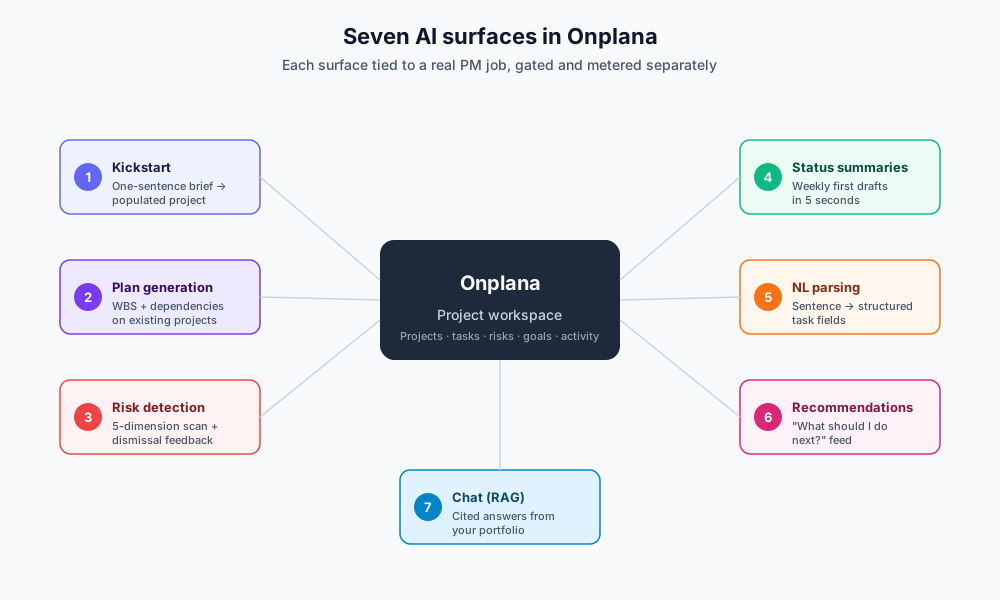
1. AI Project Kickstart, from one sentence to a populated project
The single biggest hidden cost in project management is the cold-start. New project, blinking cursor, what tasks even go in here. Project Online ships with a 30-something template gallery; most are stale. Most teams roll their own.
Onplana's first-run flow uses AI Project Kickstart: describe the project in a sentence or two, and the AI generates a starter plan, typically 8–16 tasks across 2–4 phases, with realistic dependencies, durations, and 1–3 risks attached.
The intake form takes free text like:
We're migrating a 12-team engineering org from Jira Server to GitHub Issues by end of Q3. Compliance review needed for SOX-tagged repos. Two engineers per team need access training.
What comes back is a real project, phase 1 Audit & inventory, phase 2 Compliance review pass, phase 3 Migration cutover, phase 4 Training & sign-off, with assignee suggestions where Onplana finds matching email addresses, milestones at the phase boundaries, and a clarifying-questions banner ("Are SOX-tagged repos cutover in a single window or staggered?") that surfaces unknowns instead of guessing.
It's not magic and it's not always right. But it gets a usable plan in front of you in roughly the time it takes to make coffee, which is the difference between starting and putting it off until Monday.
→ Read the full Kickstart walkthrough
2. AI Plan Generation, fill in the gaps on existing projects
Kickstart is for cold projects. AI Plan Generation is for projects that exist but feel sparse. You have a few high-level milestones; the AI fleshes the work breakdown structure underneath.
The flow:
- You name the goal in plain English from the project page (
Generate plan ➜) - AI considers the existing milestones, status, team size, and timeline
- Returns a tree of suggested tasks with parent/child structure, durations, and dependency types (Finish-to-Start, Start-to-Start, etc.)
- You accept the proposal as a draft, every generated task lands in TODO status with an AI-drafted badge until a human reviews
Two design decisions worth flagging. First, the AI proposes; humans accept. The PM is never blocked from editing the suggestions. Second, the generated plan respects your project's calendar, non-working days are honored, so the schedule is real on day one rather than slipping the moment you open the Gantt.
Plan generation lives on every plan, including Free. We deliberately moved it all the way down the ladder rather than parking it behind a paywall; what meters it is your AI token balance, not your plan tier. It's the kind of feature that earns the upgrade by being available, not by being locked behind a top-tier paywall.
3. AI Risk Detection, the one most teams underestimate
Risk detection is where AI in PM stops being a productivity feature and starts being a quality feature. A project on track is rarely surprising. The painful misses are the ones nobody flagged in time.
Onplana's risk detector runs on a schedule (weekly by default; on demand from the project page) and looks across five dimensions:
- Schedule, slipped dependencies, no-progress-in-N-days, milestones approaching with no work attached
- Budget, burn-rate vs remaining work, rate-card extrapolation against committed budget
- Scope, task volume changes, requirement-style comments piling up without WBS updates
- Resource, overallocation, bottleneck individuals, capacity vs commitment
- Dependency, circular chains, deeply nested predecessor trees, single points of failure
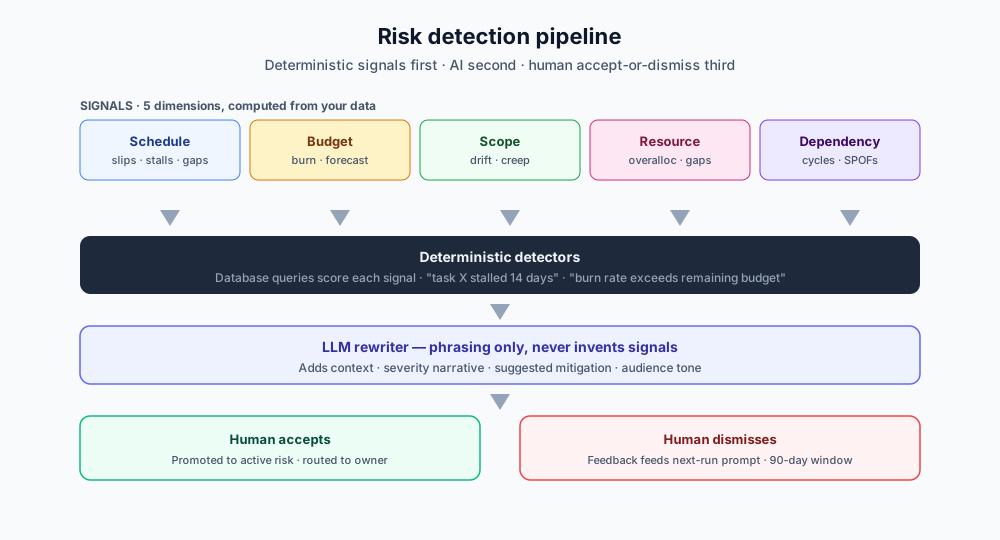
The detection pipeline is deterministic first, AI second. A signal like "task X has been in IN_PROGRESS for 14 days with no update" is computed from the database, the AI doesn't decide whether it's a risk, just whether to surface it and how to phrase it. That's why detected risks don't hallucinate: they're grounded in real rows. The AI's job is the readable wrapper, not the diagnosis.
Each surfaced risk lands in the project's Risks tab as a draft. Admins accept, dismiss, or edit. Crucially, dismissals feed back into the model's prompt. If your org has dismissed twelve schedule risks in the last 90 days as "false positives", the next risk-detection run is told as much in the system prompt and biases its surfacing accordingly. Not RLHF; not fine-tuning. A tight, observable feedback loop that improves your org's results without per-org model training.
→ See the longer treatment in our project risk management guide
4. AI Status Summaries, first-draft weekly reports in seconds
The weekly status report is the most-postponed task on a PM's calendar. It shouldn't take an hour, but it always does, gathering progress, framing the headline, deciding what to leave out, formatting for the audience.
Onplana writes a first draft in roughly five seconds:
- Source, last 7 days of activity log, completed/created tasks, status changes, milestone hits, surfaced risks, comment threads
- Output, a 5-paragraph report: headline, what shipped, what's at risk, what's coming, blockers
- Tone, adapts to audience selection (exec, contributor, customer-facing)
- Edit, the draft loads in a rich-text editor; the PM rewrites the headline, deletes irrelevant items, and ships
You're not getting a finished report. You're getting a finished first draft, the one that takes 50 minutes to write from scratch is now ten minutes of editing. Across a 20-PM org doing weekly reports, that's 200 hours back per quarter.
The same pipeline drives the AI Status Report Writer freebie tool we ship as a marketing demo. Try the public version on a sample project before you sign up:
→ Try the AI Status Report Writer
5. AI NL Parsing, type a sentence, get a structured task
Adding a task in any traditional PM tool is a friction tax: open the form, type a title, pick a project, set a date, choose an assignee, set a priority, save. Five clicks for one piece of work.
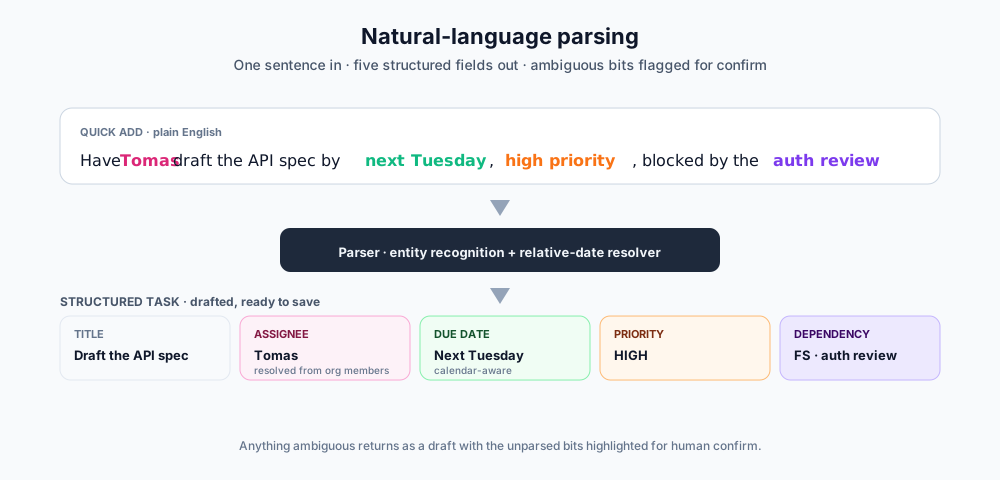
Onplana's natural-language parser shortcuts the tax. Type, anywhere a task can go:
Have Tomas draft the API spec by next Tuesday, high priority, blocked by the auth review
And the system extracts:
- Title, "Draft the API spec"
- Assignee: Tomas (resolved against org members by name + email)
- Due date, next Tuesday (relative-date parser, calendar-aware)
- Priority: HIGH
- Dependency: Finish-to-Start link to the most recent task containing "auth review"
Anything ambiguous comes back as a draft with the unparsed bits highlighted, so you confirm before save.
This is the unglamorous AI feature that gets used 50× more than the sexy ones. It runs every time a PM opens the quick add dialog or a comment with a checkbox-style line in it. Onplana also feeds it into the inbound email pipeline, forward an email to your project's address and it becomes a task with the same parser running over the body.
6. AI Recommendations, the "what should I do next" feature
Open a project Monday morning. What's the most important thing to look at? Across 30 active projects, what's actually drifting?
AI Recommendations is a per-project and portfolio-level feed of next-best-actions. Examples it surfaces:
- "Risk Auth migration single point of failure has been open 28 days without an owner assigned"
- "Sprint 14 has 23 points uncommitted and starts in 3 days"
- "Three tasks owned by Maria are due this week; her capacity is at 110%"
- "The Compliance review milestone is 5 days out and 2 of its blocking tasks are still TODO"
The recommendations are not generated from raw model imagination: same pattern as risk detection, signals first, AI rewrites the framing. The PM gets a prioritized inbox of project decisions to make today, not yet another notification stream.
A subtler payoff: recommendations replace the manual "I should look at every project on Monday morning" sweep that doesn't scale past about 8–10 active projects. With AI Recommendations, a PM can plausibly own 20+ projects without losing track of which ones need attention.
7. AI Chat, answer portfolio questions with citations
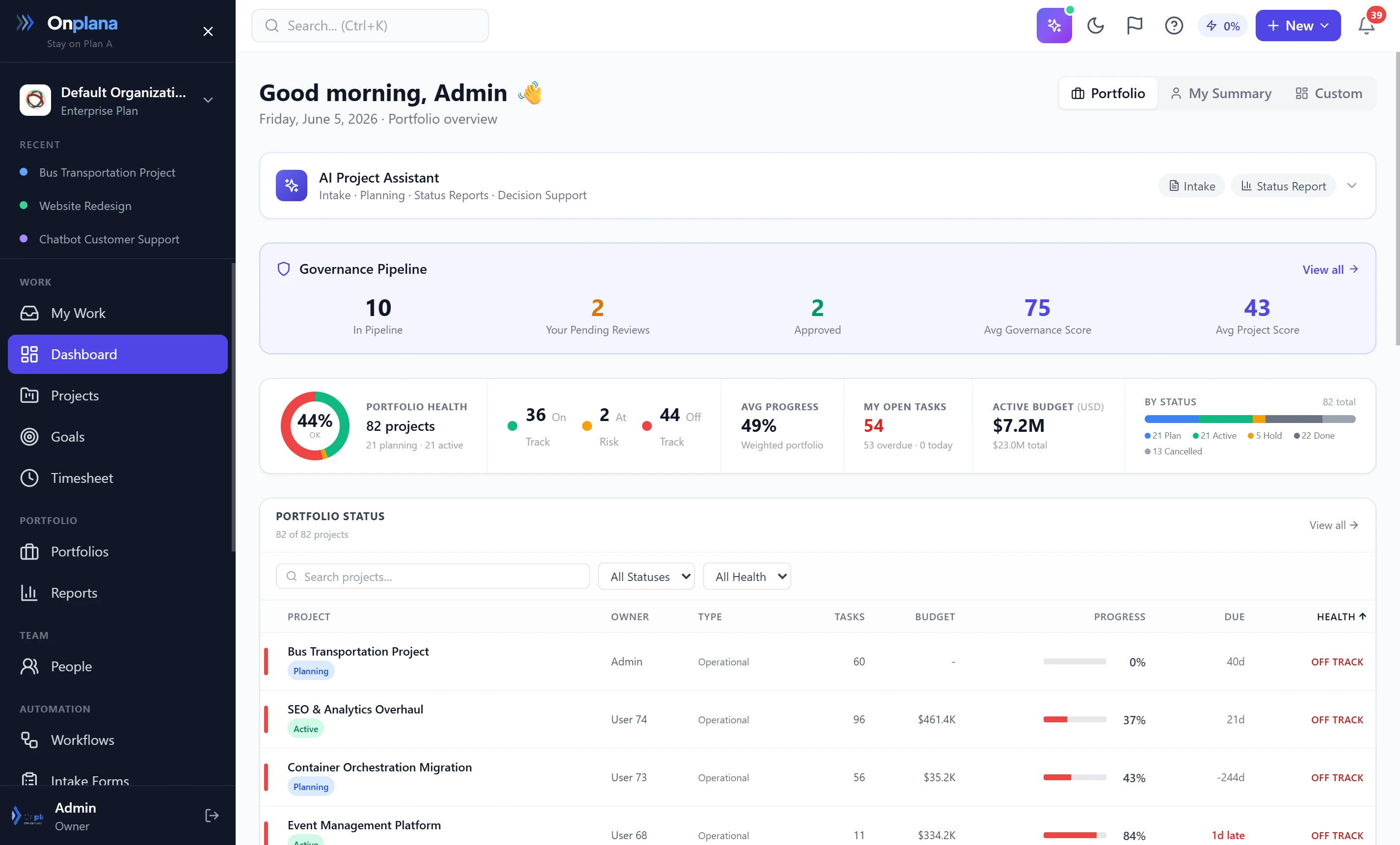
The portfolio dashboard with the AI Project Assistant open: health rollup cards on top, the chat answering a portfolio question on the right, every claim linked to the underlying project or risk row.
The seventh and most familiar surface: a chat panel anchored to your portfolio. But unlike the generic chat-on-everything pattern most B2B tools shipped in 2023, Onplana's chat is grounded in your data via Retrieval-Augmented Generation.
Examples that work:
- "Which projects are at risk and why?"
- "How much did we spend on the Acme account in Q1?"
- "List the projects ending this month with their current health"
- "Who are the most-allocated people next week?"
- "Summarize the Migration project for our board update"
Every answer ships with inline citations, the rows from your database that grounded the response. Click a citation to jump to the source project, task, or risk. No citation? The answer is a flag for skepticism; we surface that explicitly with an "answered without retrieval, verify" footer.
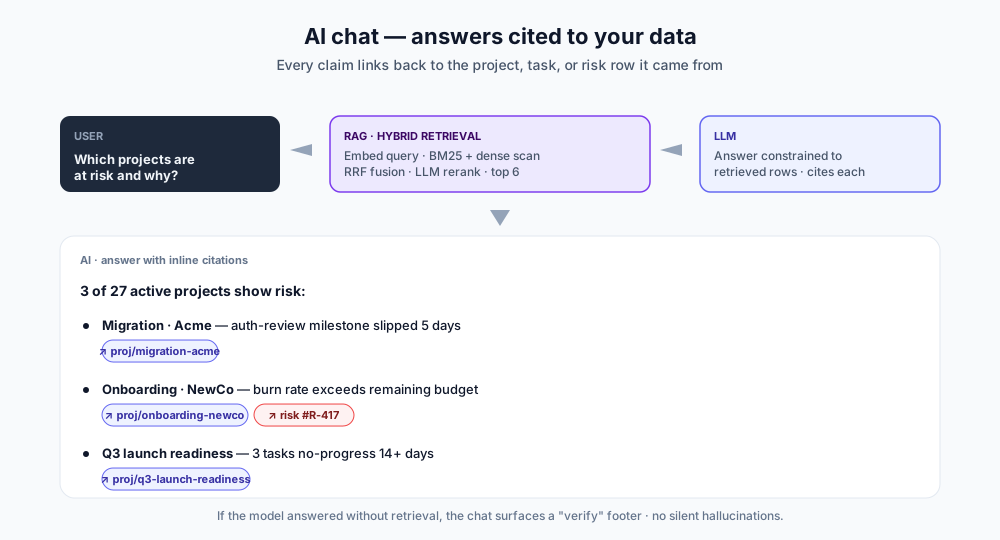
The technical guts of how this works (query rewrite, hybrid BM25 + dense retrieval, RRF fusion, LLM rerank) are covered in detail in our AI-first architecture deep-dive. This post is the use-case version; that one is the engineering version.
What we deliberately didn't build
A complete picture of "how AI runs project management" includes the things AI doesn't do, on purpose.
- No AI auto-assignment without human accept. The model can suggest the right assignee for a generated task, but mutating tools default to PREVIEW mode on FREE/STARTER plans. A human ratifies before the change persists.
- No AI auto-status-update. AI generates the report; a PM publishes it. We won't ship the version that auto-emails an executive without a human read.
- No portfolio-wide auto-rescheduling. Schedule what-if is interactive, the AI proposes a re-baseline, the PM accepts on a per-project basis.
- No auto-dismiss of risks. Even when the AI thinks a risk is low-priority, it stays visible until a human dismisses it. The cost of accidentally hiding a real risk is much higher than the cost of one extra row to scan.
These aren't capability gaps. They're product decisions. The PM is in the loop because keeping them in the loop is how you build trust in the AI surfaces over months, and trust is the thing AI features actually ship to earn.
Honest limits
A few things AI in Onplana does not do well, in case you're evaluating us against a competitor that promises otherwise:
- Estimation. AI-generated task durations are a starting point. They're calibrated against the project context, but they don't know your team's velocity. Adjust before you publish a plan to stakeholders.
- Prioritization across projects. AI Recommendations rank within a project. Cross-project priority is a human call, because the trade-offs are political and contextual.
- Highly customized processes. If your org has a 12-stage governance workflow with bespoke field requirements, plan generation will produce reasonable defaults but won't match your shape. Use templates for that, Onplana ships an editable template system that plays well with AI rather than competing with it.
Cost discipline, three guardrails that prevent bill shock
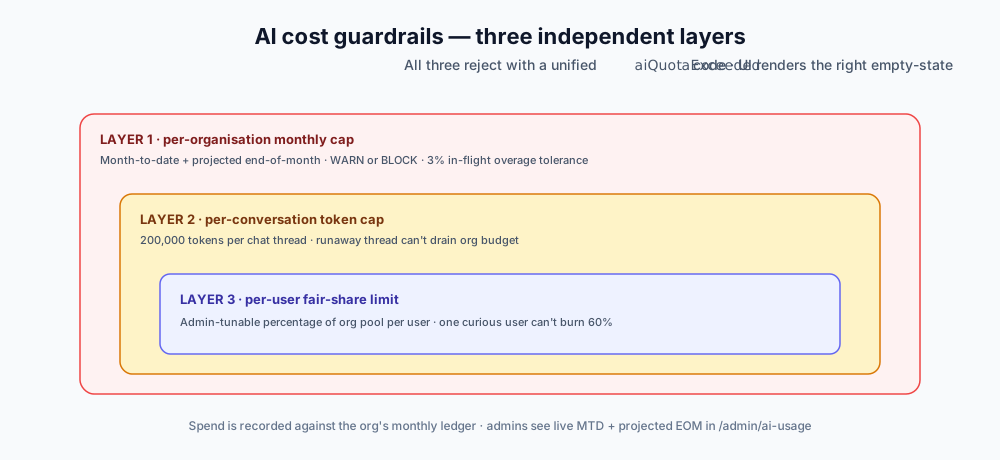
The thing most AI products don't talk about is what happens when the model is left running unsupervised. Onplana's answer is three independent caps:
- Per-org monthly cap, the AI & Usage admin panel shows month-to-date spend and projected end-of-month. WARN or BLOCK enforcement, with a 3% overage tolerance for in-flight stream calls so a final response isn't truncated mid-sentence.
- Per-conversation token cap, 200,000 tokens per chat thread. A single runaway thread can't drain the org budget.
- Per-user fair-share limit, admin-tunable percentage of the org pool per user. One curious user can't burn 60% of the org's monthly AI quota by chatting all afternoon.
All three layers reject with a unified error code so the UI can render the right empty-state. No cryptic 429s.
Try it, no credit card, no sales call
The fastest way to evaluate AI in a project management product is to give it a real project and watch it work. Onplana's free tier includes 2 projects with unlimited tasks in each, plus AI core features (chat, kickstart, NL parsing, status summaries), so you can run an actual workflow end-to-end before paying anything.
If you're migrating away from a Microsoft project management tool that's retiring or no longer fits, our migration guide covers the import paths from Project Online, Project for the Web, and Microsoft Planner, including the two-way Microsoft To Do sync that just shipped.
Either way, the test that matters is use it for a week on something real. AI features are easy to demo; they're harder to live with. We'd rather you spend a week with us before signing a contract than two months locked into a tool whose AI sidebar turned out to be wallpaper.
→ Create a free Onplana account
Related reading:
- A Day in the Life of an AI-Augmented Project Manager, hour-by-hour view of these features at work
- Inside Onplana's AI-First Architecture, the engineering deep-dive on memory, RAG, tools, and the dual-provider stack
- Best AI Project Management Software in 2026, how Onplana stacks up against 7 other AI-PM tools
- How AI Is Transforming Project Management in 2026, the broader category primer
- Project Risk Management: A Practical Guide, the methodology behind the risk-detection feature
- Why Status Reports Take 90 Minutes, the workflow the AI Status Summaries feature compresses
- Microsoft Planner import + live sync · Project for the Web Premium import · Microsoft To Do bi-directional sync
Microsoft Project Online™ is a trademark of Microsoft Corporation. Onplana is not affiliated with Microsoft.
Frequently asked questions
What does AI actually do in a project management tool like Onplana?
Seven things, concretely: (1) generate a starter plan with tasks, milestones, and risks from a one-sentence brief; (2) detect risks across schedule, budget, scope, resource, and dependency dimensions; (3) summarize project status into an exec-ready paragraph; (4) parse natural-language input ('add a task for Sara to review the API spec by Friday') into structured task data; (5) recommend the next best action on each project; (6) run schedule what-if scenarios; (7) answer questions about your portfolio with citations from your own data via RAG. Each is a distinct AI surface, not a single chatbot.
Does Onplana AI replace the project manager?
No. AI handles the high-volume, low-judgment parts of PM work, drafting plans, scanning for early risk signals, writing first-draft status reports, parsing intake into tasks. Decisions about priority, scope, and stakeholder communication still belong to a human PM. The product is built so it works perfectly well with AI features turned off; AI accelerates the PM, not replaces them.
How does Onplana AI know about my projects without me uploading data?
Onplana stores your projects, tasks, risks, goals, and comments in its own database. The AI features access that data through Retrieval-Augmented Generation (RAG) over semantic embeddings of every entity in your organization. You never paste a project export into a prompt; the AI sees the live data through scoped, permission-aware retrieval.
Which AI provider runs Onplana's project management features?
Both Anthropic Claude and Azure OpenAI. Onplana runs on both providers and manages which one serves each request (for example, risk detection on Claude, plan generation on the GPT family), using one as primary with the other as automatic failover if a provider is degraded. This is handled by Onplana at the platform level, not configured by the customer. API keys live in Azure Key Vault, never the application database.
Is AI project management gated to the most expensive plan?
No. AI core features (chat, plan generation, status summaries, intake, NL parsing, recommendations) are on every plan, including Free, subject to your AI token balance. Advanced AI features (risk detection, portfolio insights) are on Business ($20/seat/month) and up. Every plan carries the same AI cost guardrails, per-org monthly cap, per-conversation token cap, and per-user fair-share limits, so AI usage never produces bill shock.
What stops the AI from creating fake risks or hallucinated tasks?
Three layers. RAG anchors every AI response to actual rows in your database, with citations. Risk detection runs against deterministic signals (overdue tasks, missed milestones, no-progress-in-N-days, budget burn rate) before the model rewrites them in human language. Mutating tools default to PREVIEW mode on smaller plans; the AI proposes the change as a draft a human accepts. The combination keeps AI grounded in real data and a human in the loop for changes that matter.
Ready to make the switch?
Start your free Onplana account and import your existing projects in minutes.