What Happens to Project Online Timesheets During Migration
Project Online timesheet migration is the most under-planned part of every PWA migration. Here's what survives, what you must export, and what must be rebuilt.
Project Online timesheet migration rarely makes it onto the first version of a migration checklist. Projects get exported, resources get migrated, custom fields get mapped. The timesheets, with their years of approved actuals and locked periods, don't appear in the project files. They're invisible in a .mpp export. They live in a different part of the PWA database, require a separate export path, and will not be in the new tool on day one.
The scenario that follows is predictable: a finance team asks for Q3 actuals six weeks after cutover. The PM checks the new tool. There's nothing there for any period before the go-live date. Historical timesheet data wasn't on the migration scope. Nobody thought to export it. The old PWA tenant is already in read-only mode.
Context: this post is one piece of the every 2026 Microsoft Project deprecation, the consolidated reference covering all three Microsoft Project ecosystem retirements happening in 2026. The comprehensive comprehensive resource capacity planning guide covers this topic end-to-end.
TL;DR: Project Online timesheet history does not come along in a .mpp or XML import. It lived in a separate PWA database and required a dedicated OData export before retirement. Active-period data and locked-period history have different migration paths. Approval workflows don't migrate at all and must be rebuilt. Rate-card history must be archived separately if finance teams need it for historical cost reporting.
How Project Online Timesheets Work (and Why Migration Is Hard)
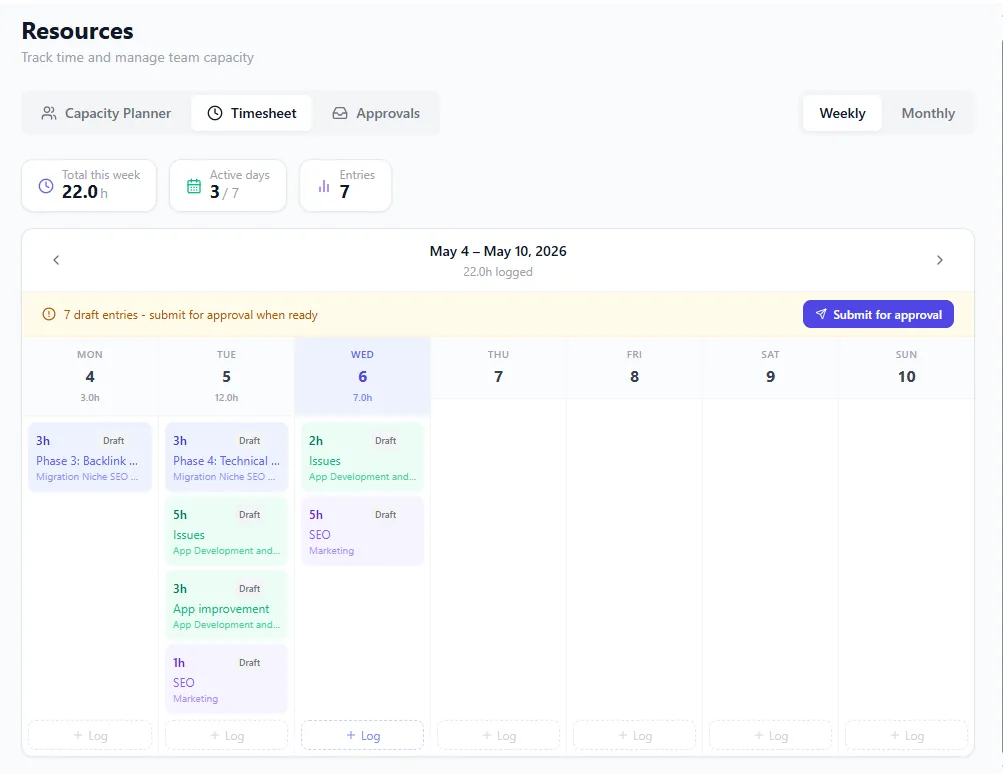
The destination shape: a weekly timesheet with per-day hours against projects and admin categories, approval status per row, locked-period indicators on the left. This is the surface PWA timesheet history needs to migrate INTO.
Project Online timesheets are not task updates. They're a separate system within PWA: a time-tracking layer where team members enter hours against tasks, administrative categories, and non-project time. PMs and resource managers approve or reject those entries. The approved hours feed into actuals, which roll up into schedule performance metrics.
This structural separation is what makes Project Online timesheet migration difficult. When you export a project to .mpp or MSPDI XML, you get the schedule: tasks, dependencies, assignments, baselines, calendars. You do not get the timesheet entries. They live in the SharePoint data store under a different schema and require a different export path.
The PWA timesheet data model has five distinct layers that matter for migration planning:
Timesheet periods. PWA is configured with time periods (typically weekly or bi-weekly) across which timesheets are opened, filled, and approved. The period configuration (open, closed, locked, or future) is an administrative artifact. It doesn't export with the projects.
Active-period data. Any timesheet period currently open (team members can still edit) contains live, uncommitted actuals. This is the data most at risk of being lost if migration happens while periods are still active.
Locked-period data. Periods that have been locked by the timesheet manager are frozen and can no longer be edited. This is your historical record, the data finance teams query for actuals. It is not in the standard project export.
Administrative time categories. Vacation, sick leave, training, and bench time are separate from project tasks in the PWA timesheet but get combined in reports. They have their own migration challenge because many destination tools handle non-project time differently or not at all.
Rate-card history. Resource cost rates in PWA are versioned over time. When a resource's rate changed in 2023, Project Online tracked both the old rate and the effective date of the new one. Historical cost calculations used the rate active during the timesheet period. Flat-rate imports lose this history.
The diagram below shows what migrates automatically versus what requires separate action:
What Project Online Timesheet Migration Actually Moves
A standard Project Online migration moves project data: tasks, dependencies, resources, assignments, custom fields, baselines, and calendars. All of that can be packaged in .mpp binary files or MSPDI XML and imported into a destination tool.
Timesheet data does not travel with the project. The PWA reporting schema stores timesheet entries in tables like Timesheets, TimesheetLines, and TimesheetPeriods. This data lives in the SharePoint content database, separate from the project data stores that .mpp export reads from.
When your migration team exports projects and imports them to the new tool, the historical timesheet entries are simply not touched. From the new tool's perspective, every project starts with a clean actuals slate. There are no historical hours.
This creates a specific problem for PMOs that use actual hours as the basis for estimates on future projects. If your estimating model depends on "the last three similar projects took X hours per phase," and all of that actuals data was in locked PWA timesheet periods, it had to be exported before Project Online retired. Check that your export has it.
The Locked-Period Problem
Locked timesheet periods are intended to prevent retroactive changes to approved actuals. A timesheet manager closes and locks a period, and no further edits are possible. For compliance-heavy PMOs, locking periods is a regulatory requirement; the locked record is the audit trail.
The problem: locked doesn't mean exported.
Most migration teams export project files and move on. The locked timesheet history remains in the PWA database, in a format that requires OData queries or a specific admin export to retrieve. Without this export, the history is not in your hands: anything that read Project Online live stopped with it; anything already exported or imported did not.
For PMOs operating under financial audit requirements (SOX, FAS, IFRS for project-capitalized work), this is not a theoretical risk. It is a compliance gap.
The export that mattered was a dedicated OData export of all timesheet history by period. The _api/ProjectData/Timesheets endpoint returned period summaries; individual line-level actuals were in _api/ProjectData/TimesheetLines. Check that your export includes both.
Store the export in a format your finance team can actually use: a data warehouse, a Power BI dataset, or at minimum a set of well-organized CSV files organized by project, period, and resource. Don't archive it in a format only IT can read.
Rate-Card History: The Silent Data Loss
Every Project Online resource has a rate table. The table stores the cost per hour for that resource, plus an effective date for each rate change. When Project Online calculates historical costs, it uses the rate that was in effect during the timesheet period, not the current rate.
Most destination tools use a flat cost rate per resource. When you import a resource and set their rate to their current value, any historical cost calculation in the new tool uses that current rate for all past periods. Historical cost reports will be wrong for any period where the resource's rate was different.
This doesn't affect schedule data. It affects finance reporting: project capitalization, earned-value cost performance, actual-vs-budget variance. If your PMO uses these metrics, rate-card history needs to be archived alongside timesheet data.
The export path was similar to timesheet history: rate tables came from the Resource Rate Tables endpoint via OData. Load what you exported into a structure your BI layer can join with the timesheet history by resource and period. This step is absent from most migration checklists and matters to anyone who will ever need to run a historical cost report.
How to Archive the Timesheet History You Exported
Here is the practical sequence for turning the timesheet data you exported into an archive:
Identify the reporting scope. Decide how many years of history you need to preserve. Common answers: 3 years (standard audit window), 7 years (SOX), or all available history (for PMOs using actuals for estimating models). Longer windows mean larger exports.
Build the period inventory. List all timesheet periods in your export: period name, start date, end date, and status (open, closed, or locked). This becomes the index for your archive.
Check approved timesheet data. Confirm the export holds
TimesheetLinesfor approved and locked periods, with resource name, project name, task name, period, hours, and line status. Script the check rather than doing it manually; you likely have hundreds of periods to process.Check rate-card history. Confirm
ResourceRatescame across for each resource, with effective dates stored alongside each rate value so historical cost recalculation remains possible.Check administrative time. Administrative categories (vacation, sick, training) are in
TimesheetLineswith a different task classification. Confirm they are in the export if your HR or finance team needs non-project time records.Validate the export. Cross-reference totals against any PWA reporting summaries or Power BI reports you saved, for at least a sample of projects. If your export shows 12,450 hours for a given project and the saved summary matches, the export is clean.
Archive in an accessible format. SQL Server, Azure Data Lake, SharePoint Lists, or Power BI import-ready CSV all work. The test is whether your finance or PMO team can query it independently now that the PWA tenant is gone.
Rebuilding the Approval Workflow in the New Tool
Project Online's timesheet approval workflow runs on SharePoint Workflow Foundation. When a team member submits a timesheet, a workflow fires: it routes the submission to the resource manager, records the approval or rejection, and writes the decision back to the timesheet record.
This workflow does not migrate. SharePoint Workflow Foundation itself is being deprecated, and no destination tool imports SharePoint workflow definitions. The entire approval chain must be rebuilt in the new tool's native workflow system or in Power Automate.
Before rebuilding, document the current workflow: who approves for which resources, what the delegation chain looks like, what happens when an approver is out of office, and what the notification triggers are. Most PWA timesheet approval setups are more complex than they appear on paper, with role-based routing that has been adjusted over years of use.
The destination tool's approval model may not match PWA's exactly. Common gaps: PWA allows PM and resource manager as separate approval roles for the same timesheet; some tools only support one approver. PWA allows partial approvals (approve some lines, reject others); some tools only support full-period approve/reject.
Map your current workflow to the destination model before cutover. If there's a gap, decide whether to approximate it, redesign it, or accept the process change explicitly with stakeholders.
Connecting Timesheet Migration to the Broader Migration Plan
Timesheet migration is rarely a standalone workstream. It connects to resource pool migration (who the resources are, how they're identified), custom field migration (what metadata is tracked per timesheet line), and reporting migration (what Power BI reports need the historical data as a source).
The project-online-resource-pool-migration-2026 post covers the resource identity problem specifically: if your resource names change between source and destination, your timesheet export needs a mapping table so historical actuals join correctly to the new resource records.
The full checklist approach is in project-online-migration-checklist-2026, which treats timesheet export as one of the commonly missed migration items and pairs it with the resource pool and reporting sections.
Microsoft Project Online retired on September 30, 2026, per Microsoft's official announcement. Anything that read it live stopped with it; anything already exported or imported did not. The timesheet history you exported is the copy you control, so archive it first. Project Online Data: Import What You Exported covers bringing the project files in alongside it.
The Migration Preview tool can help you assess the scope of your migration and surface data categories that are commonly overlooked in a standard .mpp export, including the resource pool structure that your timesheet history depends on.
Run the free Migration Preview Map out what's in the files you exported before anything moves. The Migration Preview surfaces resource pools, custom fields, and data categories that standard project exports miss. No signup required. → Open the Migration Preview
Microsoft Project Online™ is a trademark of Microsoft Corporation. Onplana is not affiliated with Microsoft.
Frequently asked questions
Do Project Online timesheets migrate to a new tool?
Historical timesheet data does not migrate automatically. Most tools import task and schedule data from .mpp or XML files; timesheet history lives in a separate PWA database and requires a dedicated OData export.
What is the Project Online timesheet export format?
Timesheet history can be exported via the OData API using the ProjectData reporting schema. PowerShell or Power BI is typically used to extract data at scale across all periods.
What happens to locked timesheet periods during a Project Online migration?
Locked periods freeze the data in PWA but do not export with the projects. Locked-period actuals had to be exported separately via OData before the tenant retired.
What happens to approval workflows for timesheets after migration?
PWA timesheet approval workflows run on SharePoint Workflow Foundation, which is also being deprecated. They do not migrate and must be rebuilt in Power Automate or in the destination tool's native workflow system.
Can I recover historical timesheet data now that Project Online has retired?
Only from what you exported. Anything that read Project Online live stopped with it on September 30, 2026; anything already exported or imported did not. Treat your timesheet export as the record.
What is rate-card history in Project Online and why does it matter for migration?
Project Online stores versioned cost rates per resource with effective dates. Historical cost calculations use the rate active during each period. Most destination tools use a flat rate, so historical cost reports will be wrong unless you archive the rate history separately.
Ready to make the switch?
Start your free Onplana account and import your existing projects in minutes.