Project Online Retirement: Dates, What Stops, What to Export
Project Online retirement: PWA, OData and timesheets stopped on September 30, 2026, with no read-only window. The dates, the export list and a free migration preview.
If you opened the Microsoft 365 admin center any time in the year before the date, you saw the banner: Microsoft Project Online retires on September 30, 2026. On that date Project Web Access (PWA), the OData reporting feed and timesheet workflows stopped, and Microsoft did not commit to a read-only window, a grace period, or any post-retirement retention.
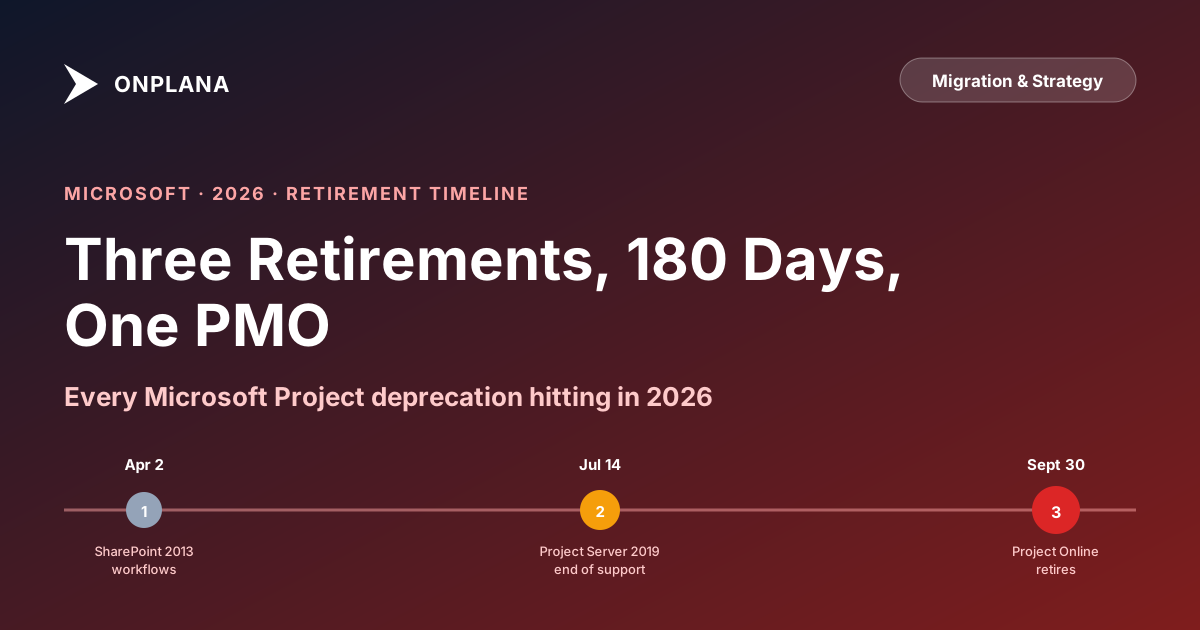
What gets discussed less is that the Project Online retirement is not a single event. It is the third and largest of three retirements inside a six-month window, each of which broke a different layer of the SharePoint-based PPM stack that PMOs have run on for the last decade.
Three events, exact dates, what each one stopped, what to export, and a plan that works from either side of the date.
TL;DR: the Project Online retirement in 30 seconds
- Hard date: September 30, 2026. PWA, OData and timesheets all stopped. SharePoint 2013 workflows retired on April 2, 2026; Project Server 2019 left mainstream support on July 14, 2026.
- Data after: Microsoft did not commit to a read-only window, a grace period, or any post-retirement retention. SharePoint project sites survive; the scheduling database, the resource pool and the timesheets do not.
- Export list: an .mpp per project, Project XML, an OData snapshot, custom field and lookup table definitions, the resource pool, timesheet history. What was exported is what you have.
- Opening the exports: an exported .mpp still opens without a Project licence in Onplana Schedule, a free desktop app for Windows and Mac.
- Planner Premium is not a drop-in replacement: no resource pool, no timesheets, no OData feed, no stage gates.
- Plan: inventory, one destination decision, a pilot on real projects, the active portfolio in waves, the rest archived. The order holds whether you are mid-migration or rebuilding from exports.
- Start here: take stock of what you exported, then run one file through the free migration preview to see what comes across. Project Online Data: Import What You Exported covers each format.
The three dates, in order:
| Date | Event | What stops |
|---|---|---|
| April 2, 2026 | SharePoint 2013 workflows retired | Workflow-based governance routing |
| July 14, 2026 | Project Server 2019 end of mainstream support | Feature requests and non-security updates |
| September 30, 2026 | Microsoft Project Online retired | PWA, the OData feed, and timesheet workflows |
April 2, 2026: SharePoint 2013 workflows retired
The first event has already happened. On April 2, 2026, Microsoft turned off SharePoint 2013 workflows across all Microsoft 365 tenants. Any Project Online site using those workflows for governance (project request approval, stage gate routing, status submission, change request approval) lost those workflows that day.
The check, while PWA was still reachable, was to open the Project Online PWA admin site, navigate to Workflow Settings, and look at the workflow platform column. Anything marked "SharePoint 2013 Workflow" stopped executing on April 2. The workflow definitions stayed visible in admin, but they no longer ran.
What broke specifically:
- Enterprise Project Type (EPT) stage gates: any EPT bound to a 2013 workflow skipped stage routing entirely from that day. New project requests went straight to "Planning" without approval.
- Status submission flows: PM-to-portfolio-manager status routing that ran on a 2013 workflow stopped firing.
- Custom approval routing: any custom workflow built on the 2013 platform.
What to do now: if those flows still matter to the projects you are moving, rebuild the routing in the destination platform rather than on Power Automate. Many PMOs let governance run manually between April and September for exactly that reason: a Power Automate rebuild bound to a tenant that retired with Project Online is rarely worth the effort, before or after the date.
Full detail: SharePoint 2013 Workflows Retire April 2, 2026: What Breaks for Project Online Governance.
July 14, 2026: Project Server 2019 end of mainstream support
The second event landed on July 14, 2026, when Project Server 2019, the on-premises sibling of Project Online, reached end of mainstream support. Microsoft Support no longer accepts new feature requests or issues non-security updates. Security patches continue through the extended support window (multiple years out), but mainstream support is the bar that matters for most organizations on a vendor risk register.
This event affected fewer PMOs than the Project Online retirement, because most on-premises Project deployments had already moved to the cloud, but the ones still on Project Server 2019 faced a particular problem: their natural upgrade target was Project Online, which retired 77 days later. Two cliffs in roughly two and a half months.
The successor inside Microsoft's stack is Project Server Subscription Edition, which has a different licensing model and is not a backwards-compatible upgrade. Migration to Subscription Edition is non-trivial, and after it you still face the question of whether Subscription Edition is the long-term destination or a stopgap on the way to a cloud product.
What to do now: if you are on Project Server 2019, the end of mainstream support is the forcing function for the destination decision. The math never worked for migrating to Subscription Edition first and to a cloud product afterwards; pick the final destination once, and make it the same decision as the Project Online estate, because the two end up in one place.
Full detail: Project Online vs Project Server End of Life: What PMOs Need to Know.
September 30, 2026: Microsoft Project Online retired
The big one. On September 30, 2026, Microsoft Project Online retired. What that meant:
- Project Web Access (PWA) was part of the service and retired with it.
- The OData REST API retired with it too. Anything that read
https://yourtenant.sharepoint.com/sites/pwa/_api/ProjectData/live stopped with it; anything already exported or imported did not. - Timesheet workflows retired with the service. The timesheet history you exported is what you have.
- Project Online data had no committed read-only window, grace period, or post-retirement retention, so plan around what you exported.
Microsoft published the retirement notice (MC812729) through the Microsoft 365 message center on July 10, 2024, withdrew new Project Online Professional and Premium subscriptions from sale in October 2025 with no renewals past the retirement date, and has updated the Project Online service description several times since without moving the date.
There was no extension, no successor SKU that picks the data up, and no migration tool from Microsoft. This retirement affected the most PMOs by a wide margin, and it was a hard cutover, not a quiet move to a new license: whatever lived inside Project Online now lives only where you exported or imported it.
The video below is the one-minute version of what happens to Project Online and where your projects go next. The note under it says where to start.
Start from what you exported Your exports are now the inventory. Project Online Data: Import What You Exported covers bringing each format in. Run one file through the free migration preview first to see what comes across.
The work itself, in rough order (the complete Project Online migration guide covers each step in depth):
- Discovery: inventory active projects, custom fields, baselines, resource pool, EPTs, reports. Decide which subset to migrate and which to archive.
- Destination selection: Microsoft Planner Premium, a third-party tool (Onplana, Smartsheet, Monday, Asana, Jira, Wrike), or roll your own. Decisions take 4 to 6 weeks alone.
- Pilot: migrate one or two real projects to the destination, validate fidelity, get PM sign-off.
- Full migration: usually batched across waves to avoid moving 100 projects in one shot.
- Parallel operation: 2 to 4 weeks where projects live in both systems while the team validates.
- Cutover: freeze writes on Project Online, redirect logins, decommission.
A serious migration runs 8 to 12 weeks of focused effort, depending on the volume of active projects and the complexity of the customizations; a mid-size PMO with hundreds of projects, a shared resource pool and enterprise custom fields runs 12 to 16. Cutting scope to the active portfolio is what makes the sequence fit, on either side of the date: archived projects go to storage and get migrated later, if ever.
The canonical migration playbook: How to Move Off Project Online: The 6-Week Plan.
Other essential reading per migration stage:
- Strategy: Why Project Online Migrations Fail
- Business case: The Cost of Migrating from MS Project Online (now also the cost of ignoring the retirement, CFO objections and ROI) · CFO-Proof Project Online Business Case
- Planning: Project Online 90-Day Migration Plan (now also parallel running, go/no-go criteria, stakeholder comms and training) · Project Online Migration Checklist 2026 · Project Online Shutdown Checklist · Pilot Project Selection · Cutover Day Runbook · Rollback Plan
- Migration mechanics: Custom Fields Migration (now also data mapping, baselines, dependencies, permissions, portfolios, views and filters) · Resource Pool Migration · Calendar Migration · Timesheet Migration · Workflow Migration · Document Library Migration
- Post-shutdown: Project Online Licensing After Retirement · Tenant Archive Strategy · What Happens After Project Online Retires · Power BI Reports After Migration
What actually happens to your Project Online data after September 30?
The scheduling data goes with the service and the SharePoint content does not; the table below draws the line item by item.
| Stopped on September 30, 2026 | Continues after the retirement |
|---|---|
| Project Web App (PWA) interface | SharePoint project sites, documents, issue lists and risk logs |
OData reporting API (/_api/ProjectData) |
Locally saved .mpp files, with no expiry |
| Enterprise Resource Pool | The Project desktop client, for local .mpp files only |
| Timesheet workflows and approvals | The Microsoft 365 tenant and every other Microsoft 365 app |
| Portfolio management, PDPs, stage gates and demand management | Power BI datasets and Excel extracts already holding OData data (no further refreshes) |
| Desktop Client online sync to PWA (check-in, check-out, publish) | Project Plan 3 and Plan 5 invoices, until an admin removes the license assignments |
Schedules and the resource pool
Your project plans lived in Project Online's SQL database, which Microsoft operates and you never had direct access to. The two extraction paths were per-project .mpp export through the Project Online Desktop Client and a pull of XML or reporting data through the OData feed; both stopped with the service, and a PMO that ran the exports holds the only surviving copy. The enterprise resource pool (resource names, calendars, cost rates, skill codes, custom resource fields) is the hardest item to recover: it existed only inside Project Online, with no officially supported export format, so an OData pull is the only thing the successor's resource model can be rebuilt from.
Timesheets, custom fields and BI
Timesheet history is gone unless it was exported. It drives billable-hours reconciliation, audit evidence and utilization reporting, and where SOX or ISO 9001 scope includes timesheet retention the export needs at least three years of history in CSV or Parquet with a documented chain of custody. Enterprise custom fields, lookup tables and view definitions are metadata, easy to enumerate; the work is mapping each field into the destination's data model. Every Power BI dashboard, Excel pivot table and custom report that read from the OData feed stopped refreshing when the service retired and has to be rebuilt against the new source, which rebuilding Project Online Power BI reports after migration covers.
SharePoint project sites
These are safe. They live in SharePoint Online, so documents, issue lists, risk logs and team sites continue to work; what breaks is the link between those sites and the schedule, because the "sync issues to SharePoint" feature stopped.
On the question everyone asks next: Microsoft did not commit to a read-only window, a grace period, or any post-retirement retention, so plan around what you exported by September 30. Anything that responds after the date is a courtesy nobody contracted for.
What should you have exported from Project Online?
Project Online retired on September 30, 2026, so this list is now the check of what you should hold. The .mpp files and an OData snapshot come first, because between them they cover every schedule and enterprise field value; then Project XML, the field and lookup table definitions, the resource pool and the timesheet history. In priority order:
- An .mpp file for every active project. One file per project, through the Project Online Desktop Client; the .mpp is the format every scheduler and import tool reads. How to export every project from Project Online as .mpp files walks the batch.
- An OData snapshot of the reporting data. Projects, tasks, assignments, resources, timesheet lines and enterprise custom field values in one pull from
/_api/ProjectData; the Project Online OData export guide has the queries. - Project XML (MSPDI) for the projects you will import elsewhere. XML carries a schedule cleanly into a third-party platform; using MSPDI XML to migrate Project Online explains when it beats the binary .mpp.
- The custom field and lookup table definitions. Names, types, formulas, lookup values and which EPTs use them; the definitions are small, and the mapping into the destination is where the time goes.
- The enterprise resource pool, pulled through OData. Names, calendars, cost rate tables, skill codes and custom resource fields. There was no other export path.
- The timesheet history. At least three years where SOX, ISO 9001 or client billing requires it, to CSV or Parquet, with the chain of custody documented.
Project Online Data: Import What You Exported covers bringing each format in. Check the list against what you have, and look in the two places exports hide: PMs' locally saved .mpp files and Power BI datasets holding the last OData refresh. The export deadline, and what if you missed it covers the partial-export cases.
Microsoft's recommended path: Planner Premium and Project Plan 3/5
Microsoft is steering Project Online customers toward Microsoft Planner Premium, accessed via Project Plan 1, Plan 3 (formerly Project Online Professional), or Plan 5 (formerly Project Online Premium) licenses. That path is workable for a PMO that used Project Online as a lightweight task tracker with a Gantt view, and a downgrade for one that ran portfolios, a shared resource pool, timesheets or stage gates.
Planner Premium merges the original Planner (Kanban task boards), Project for the Web (lightweight cloud scheduling), and Microsoft To Do into a single product surface. It is a more capable scheduler than it is usually credited with. It carries all four dependency types with lead and lag, a critical path in the timeline view, a baseline, sprints, and goals, so a Project Online schedule's relationship logic transfers rather than needing reconstruction. Against Project Online's full feature set it still falls short in specific places:
- No portfolio analysis at Project Online's depth. Planner Premium does have Portfolios, which give a consolidated view of premium plans with a roadmap and manual status. What is missing is Portfolio Analyzer: prioritisation against business drivers, cost and resource optimisation, and scenario modelling of the pipeline.
- No baselines beyond Baseline 1 (Project Online supports Baseline 0 through 10).
- No enterprise resource pool, so no cross-project capacity view and no timephased resource leveling.
- No stage-gate governance, no Enterprise Project Types and no demand-management pipeline.
- No timesheets, so no approved actuals feeding schedule health or earned value.
- No OData reporting feed (a significant break for BI and custom reporting).
- A 3,000-task ceiling per plan, which is lower than the 9,000 Planner Basic allows, and 10 custom fields, against Project Online's enterprise custom field model.
The same gaps, with the Plan 3 and Plan 5 desktop client alongside:
| Capability | Project Online | Planner Premium (2026) | Project desktop client (Plan 3/5) |
|---|---|---|---|
| Enterprise resource pool | Yes | No | No |
| OData reporting feed | Yes | No | No |
| Timesheet workflows | Yes | No | No |
| Stage-gate governance, EPTs and demand management | Yes | No | No |
| Cross-portfolio rollup and capacity | Yes | Limited: a Portfolios view, no Portfolio Analyzer and no capacity view | No |
| Critical path | Yes | Yes, in the timeline view | Yes, single project |
| Baselines | Baseline 0 through 10 | Baseline 1 only | Yes, single project |
| Custom fields | Enterprise custom field model with lookup tables | 10 per plan | No enterprise fields |
The desktop client is not the missing half. Project Plan 3 and Plan 5 include the Project desktop application. It solves the "I need a Gantt chart and a critical path" problem and it is a single-project tool, not a portfolio system: no PWA equivalent, no timesheet approval workflow, no enterprise-wide reporting. Microsoft has signaled that portfolio features will come to Planner over time, but as of September 2026 they are not there, and a cutover plan built on an unshipped roadmap is a bet most PMO directors decline.
The honest read: Planner Premium is a credible destination for PMOs whose Project Online usage was already lightweight. For PMOs running portfolios, enterprise governance, or sophisticated scheduling, Planner is a downgrade, and the gap did not close in time to change that verdict.
For sector-specific considerations (the compliance regime, schedule pattern and cost model change; the sequence does not), Project Online Migration by Industry: 7 Sector Guides covers construction, energy, engineering, financial services, healthcare, manufacturing and nonprofits.
For a complete walkthrough of every Microsoft Project SKU (Plans 1/3/5, Planner Premium, the two desktop tiers, Project 2024 LTSC, and Project Server Subscription Edition) with a decision tree and side-by-side matrix, see the dedicated Microsoft Project Licensing 2026: which SKU should you be on reference.
Full detail: Microsoft Planner Premium Falls Short for Enterprise PMOs · Project Online Migration to Planner: What Transfers · Migrate Microsoft Planner to Onplana.
Your real options after Project Online
Strip away the Microsoft-preferred narrative and there are three honest paths, each a decision about who does the product-engineering work.
Option 1: stay on Microsoft and accept the downgrade. Move to Planner Premium plus Project Plan 3 or Plan 5, accept that portfolio features, enterprise resource management and governance workflows are gone until Microsoft adds them back, and fill the gaps with Power BI and custom SharePoint or Power Apps. The licensing bill stays roughly flat; you pay in custom-development time and reduced PMO capability. Realistic total cost of ownership: high, because every gap becomes a Power Platform project with its own maintenance burden.
Option 2: move to a purpose-built PPM platform. A platform that replicates what Project Online did (Gantt, resource pool, timesheets, portfolios, governance) and adds what it never had. This is where Onplana fits, alongside Smartsheet for spreadsheet-oriented teams and Planview for larger enterprises; the Microsoft Project alternatives after the retirement roundup covers the trade-offs, and the list of MS Project alternatives with no licence cost covers the zero-budget case. Realistic total cost of ownership: low to medium, depending on team size.
Option 3: build your own on SharePoint and Power Platform. Large enterprises with strong Power Platform teams rebuild PPM on Dataverse, Power Apps and Power Automate. It is technically feasible, and it is slow, fragile and expensive, because you are reinventing a PPM product with two developers and a fixed deadline. Realistic total cost of ownership: very high.
The risk that decides between them is not data loss; the export tools were adequate. It is process continuity: the stage-gate reviews, the timesheet approval workflow, the steering-committee cadence, ten years of habit built around Project Online's UX. A migration that moves the data but not the process fails quietly six months later. So every vendor on the shortlist shows five things in a demo on your data:
- Direct import of the .mpp and Project XML files you exported.
- Preservation of your EPTs, custom fields and lookup tables.
- Recreation of your stage-gate workflow (DRAFT to SUBMITTED to REVIEW to APPROVED to IMPLEMENTATION to CLOSED, or your flavor of it).
- Gate approval by designated member-role users, without full admin access.
- Timesheets flowing into billable-rate reporting with your current resource-rate logic.
A vendor that cannot show all five is a task-management tool dressed up as a Project Online replacement.
What the three retirements have in common
Three different products, three different dates, but one shared pattern. The SharePoint-based PPM stack that Project Online was built on is being unwound layer by layer. The order:
- Workflow layer (April 2): the governance and automation glue.
- On-premises sibling (July 14): the self-hosted product that some PMOs used as a stopgap.
- Cloud product (September 30): the headline retirement.
A one-sentence read of Microsoft's direction: the SharePoint-PPM cloud era is over, and Microsoft is consolidating its cloud PM offering around Planner / Project for the Web with Power Platform as the automation layer. Project Server Subscription Edition continues for on-premises customers, but it is a different product and a different decision.
This matters operationally because the deprecation cadence is going to continue. Tenants running on the SharePoint-PPM stack today should expect their workflow integrations, custom solutions, and reporting infrastructure to be deprecated piece by piece over the next 18 months. The "we'll deal with it later" path does not work because there are more deprecations behind these three.
What Onplana ships for each event
Onplana is purpose-built as a modern Microsoft Project alternative for PMOs leaving the SharePoint-PPM stack. For each of the three events:
For the SharePoint 2013 workflow retirement: Onplana provides native stage-gate and governance approval primitives, so the EPT routing that broke in April can be rebuilt on Onplana's own workflow engine rather than on Power Automate.
For Project Server 2019 end of support: Onplana imports .mpp and Project XML files directly. All four dependency types with lag and custom fields come across. Costs come across, and a .mpp or Project XML file imported into a new project brings its baseline as a baseline in Onplana. The compatibility audit at Microsoft Project Migration Compatibility Audit 2026 covers exactly what survives the import and what needs manual rebuild.
For Project Online retirement: Onplana imports the files you exported: .mpp, .mpx, Project XML, Excel and CSV, up to 50 MB, on every plan including Free. Project Online Data: Import What You Exported covers each format. The Migration Cost Calculator produces a three-year line-item budget in about three minutes; the Schedule Health Check runs seven structural integrity checks against your .mpp files in 30 seconds.
For the head-to-head against Microsoft's own destinations: Onplana vs Microsoft Planner and Onplana vs Microsoft Project Online Comparison 2026.
The 30-60-90 day action plan, from either side of the date
The plan below is the one we have seen work for teams of 50 to 500 users; its order matters more than its day counts. Enter it at the phase that matches your situation:
- Not started: run Days 0 to 30 in full, with week 1 as a stock-take of what you exported.
- Evaluating, not committed: you are in week 3; run real files through the candidates.
- Mid-migration: you are in Days 31 to 90; finish the active-project waves before the archive.
- After the date, exports in hand: skip the export steps, treat the exported .mpp files, XML and OData snapshots as the source of record, and validate against the last published status reports, since the parallel run against Project Online is no longer available.
- After the date, no exports: start from what still exists (SharePoint project sites, locally saved .mpp files, cached Power BI datasets); Project Online no longer available: now what sorts out which situation you are in.
Days 0 to 30: inventory and decision
- Week 1: Take stock of what you exported: which projects have an .mpp file, which have XML, what the OData snapshot covers, which reports cached what. This is your backup if everything else fails.
- Week 2: Inventory your custom fields, EPTs, lookup tables and resource pool from the exported files. The free migration preview shows what each file holds and what comes across. Prune the legacy fields nobody queries, and decide what not to migrate: closing old projects and archiving historical baselines cuts the scope. The 35-item Project Online pre-migration inventory covers the commonly missed items (shadow Power Automate flows, retired SharePoint 2013 workflows, downstream ERP connectors).
- Week 3: Run a vendor shortlist (Onplana, the Microsoft-native path, Smartsheet, one other) and demo each against three of your real project plans; the 10-tool project management software comparison is a starting set. Run the same files through the free Schedule Health Check and the migration preview first, so you know what each file contains.
- Week 4: Make the platform decision, once. Get sponsor and procurement sign-off; a defensible business case needs the 6-category migration cost breakdown behind its number.
Days 31 to 60: pilot
- Pick two or three real projects representing different EPTs and migrate them; fidelity testing on your own files matters more than the vendor's demo.
- Recreate the stage-gate workflow, the resource pool and one portfolio rollup.
- Compare the pilot projects against the last exported status snapshot: schedule variance, utilization, burn-down.
- Identify process gaps before they become production gaps.
Days 61 to 90: cutover
- Migrate the remaining active projects in waves (20 to 40 per week keeps training manageable), grouped by department or portfolio rather than by date.
- Confirm that the archive you hold of timesheet history and completed projects is complete, queryable and in long-term storage (S3 plus Parquet, or an Azure Storage equivalent).
- Redirect all users to the new platform. Cutover is the moment the new platform becomes the system of record and the archive becomes reference-only. Preserve the exported archives: they are the only copy.
The cost of waiting
Every week between the export and the cutover compounds three risks.
- Vendor availability. Every mid-size PMO moved at the same time, so implementation partners, trainers and data-migration specialists booked up around the deadline; the ones starting later pay premiums, accept compressed timelines or wait for the backlog to clear.
- Data loss. A compressed export phase missed custom fields, timesheet history and the workflow configurations nobody documented. Now, every week the exported snapshot ages, PMs start shadow spreadsheets, and reconciling those back into the destination costs more than the migration itself.
- Business disruption. A 90-day migration done calmly is boring and predictable; a 30-day migration done in panic is a reputation event, and the PMO director who waited gets blamed for both the downtime and the data loss.
Without a signed-off budget the migration team cannot book vendors or commit to a destination, so if executive buy-in is the bottleneck, defending the migration in a CFO review walks through the three numbers a finance team wants to see: cost of inaction, three-year TCO delta, risk-adjusted ROI.
What we'd do in your position
Our playbook would be short. The deadline has passed, so the playbook is whatever you exported: take stock of the .mpp files and OData snapshots you hold; pick one successor platform in a week rather than running a bake-off; rebuild the active portfolio first; recover what you can from SharePoint sites and cached reports; send archived projects to read-only storage to migrate after cutover; and treat anything you did not export as gone.
Project Online retirement FAQ
When did Microsoft Project Online retire?
September 30, 2026. Microsoft published the date on July 10, 2024 through Microsoft 365 message center notice MC812729 and held it since; the other two retirements in the timeline, on April 2 and July 14, executed on schedule.
What stopped working when Project Online retired?
PWA, the OData endpoint at /_api/ProjectData, the enterprise resource pool, timesheet workflows, portfolio views, PDPs, stage gates and demand management were all part of the service and retired with it on the same day. Anything that read them live, including the Desktop Client's online sync, stopped with it. SharePoint project sites, the Microsoft 365 tenant and locally saved .mpp files are not Project Online artifacts and continue.
Is there a read-only period after September 30, 2026?
Microsoft did not commit to a read-only window, a grace period, or any post-retirement retention. What was exported by September 30 is the complete set; anything that responds after the date is a courtesy nobody contracted for.
What happens to my data after Project Online retired?
It depends on which data. SharePoint project sites, with their documents, issue lists and risk registers, are standard SharePoint Online content and persist; structured scheduling data (tasks, dependencies, baselines, custom field values, resource assignments) and timesheet history lived in Project Online's own database, which retired with the service, so the only copies are the ones you exported.
Can I extend my Project Online subscription past September 30, 2026?
No. Microsoft stopped selling new Project Online Professional and Premium subscriptions in October 2025, and no existing subscription could be renewed past September 30, 2026. Contract language that runs beyond that date does not keep the service running; the retirement supersedes it.
Is Planner Premium (formerly Project for the Web) a drop-in replacement?
No, and Microsoft has not claimed it is. Planner Premium absorbed Project for the Web in 2024 and carries a Gantt with all four dependency types, a critical path and one baseline. It has no enterprise resource pool, no timesheets, no OData reporting feed, no stage-gate governance and no Portfolio Analyzer, so an enterprise PMO rebuilds those in Power Platform or does without them.
How long does a Project Online migration take?
Plan on 8 to 12 weeks for a serious migration (10 or more active projects, several PMs, portfolio rollups) and 12 to 16 weeks for a mid-size PMO with hundreds of projects, a shared resource pool and enterprise custom fields; a single-PM setup with a handful of projects lands in 2 to 4 weeks. The migrations that fail compress the sequence to 6 to 8 weeks by skipping the inventory. Rebuilding from exported files after the date follows the same sequence minus the parallel run.
What should a PMO do first?
Take stock of what you exported: which projects have an .mpp file or XML, what the OData snapshot covers, which Power BI datasets cached data. Then inventory custom fields and downstream report consumers before you commit to a destination.
Is Project Online still available right now?
No. Project Online retired on September 30, 2026. Up to that date the service was fully functional, with no phased degradation. Anything that read it live stopped with it; anything already exported or imported did not.
If the date has passed, is my data still there?
SharePoint project sites are; the scheduling database is not. Tasks, dependencies, baselines, custom fields, resource assignments and timesheets lived inside Project Online's own database, which retired with the rest of the service, so what you exported before the cutoff is what you have. Project Online no longer available: now what sorts you into one of four situations and says what each still recovers; how to read a Project Online archive after shutdown covers what a queryable archive needs to contain.
Can I still open my Project Online files after September 30, 2026?
Yes, locally saved .mpp files open in the Project desktop client, because opening a local file does not depend on a live server connection. Everything that needed PWA stopped: checking a project in or out, publishing a schedule, syncing the enterprise resource pool.
What do I do with my Project Online licenses after the shutdown?
Cancel them yourself. Project Plan 3 and Plan 5 subscriptions keep billing after the service retired until an admin removes the license assignments in the Microsoft 365 admin center; the service stopping does not stop the invoice. Project Online Licensing: What to Cancel and When covers the cancellation steps and what to check before you do it.
Where this leaves your PMO
The SharePoint-PPM cloud era ended on April 2, 2026, and the last cloud product in it retired on September 30. The PMOs that come out of this transition cleanly treat all three dates as one program, not three separate events, and treat the exported archive as the asset it is.
What happens next is a program you run, on either side of the date: take stock of what you hold, pick one destination, migrate the active portfolio in waves, archive the rest, and rebuild the reports that read from OData. The Project Online migration guide covers the full motion, from the inventory of what you exported through the .mpp and Project XML imports to resource pool and stage-gate reconstruction.
Microsoft Project Online is a trademark of Microsoft Corporation. Onplana is not affiliated with Microsoft.
Frequently asked questions
When did Microsoft Project Online retire?
September 30, 2026. Microsoft announced the date in July 2024 through Microsoft 365 message center notice MC812729 and did not change it. Project Web Access (PWA), the OData reporting feed and timesheet workflows retired with the service.
What Microsoft Project products were retired in 2026?
Three things on three dates: SharePoint 2013 workflows retired on April 2, 2026; Project Server 2019 reached end of mainstream support on July 14, 2026; Microsoft Project Online retired on September 30, 2026. The first two removed layers underneath Project Online, and the third retired Project Online itself.
Is there a read-only period after Project Online retired?
Microsoft did not commit to a read-only window, a grace period, or any post-retirement retention. Plan around what you exported by September 30, 2026. Files you exported still import, with dependencies, custom fields and costs, and a .mpp or Project XML file imported into a new project brings its baseline as a baseline in Onplana.
What happens to my Project Online data after September 30, 2026?
SharePoint project sites survive, because they are ordinary SharePoint Online content; the scheduling database does not. Tasks, dependencies, baselines, custom fields, resource assignments and timesheets lived in Project Online's own database, which retired with the service. Anything that read it live stopped with it; what you exported (.mpp files, Project XML, OData snapshots) did not.
What should I have exported from Project Online?
Project Online retired on September 30, 2026, so this is now a check of what you hold. An .mpp file for every active project and an OData snapshot of the reporting data come first, because between them they cover the schedules and the enterprise field values. Then Project XML for the projects you will import elsewhere, the custom field and lookup table definitions, the enterprise resource pool (through OData, since it had no other export path), and at least three years of timesheet history where compliance requires it.
Is Microsoft Planner Premium the replacement for Project Online?
Microsoft positions Planner Premium (through Project Plan 1, 3 or 5 licenses) as the successor, but it is not a forced move and feature parity is incomplete. It carries all four dependency types with lag, a critical path and a single baseline; it lacks the enterprise resource pool, timesheets, the OData reporting feed, stage-gate governance, Portfolio Analyzer and baselines beyond Baseline 1.
Can I still open my Project Online files after the retirement?
Yes, locally saved .mpp files open in the Project desktop client, because opening a local file does not need a live PWA connection. Anything that needed the server (checking a project in or out, publishing, syncing the resource pool) stopped working, and Project Plan 3 and Plan 5 licenses keep billing until an admin removes them.
How long does a Project Online migration take?
Plan on 8 to 12 weeks for a serious migration (10 or more active projects, several PMs, portfolio rollups) and 12 to 16 weeks for a mid-size PMO with hundreds of projects, a shared resource pool and enterprise custom fields. A single-PM setup with a handful of projects can land in 2 to 4 weeks, and rebuilding from exported files after the retirement date follows the same sequence minus the parallel-run phase.
Ready to make the switch?
Start your free Onplana account and import your existing projects in minutes.