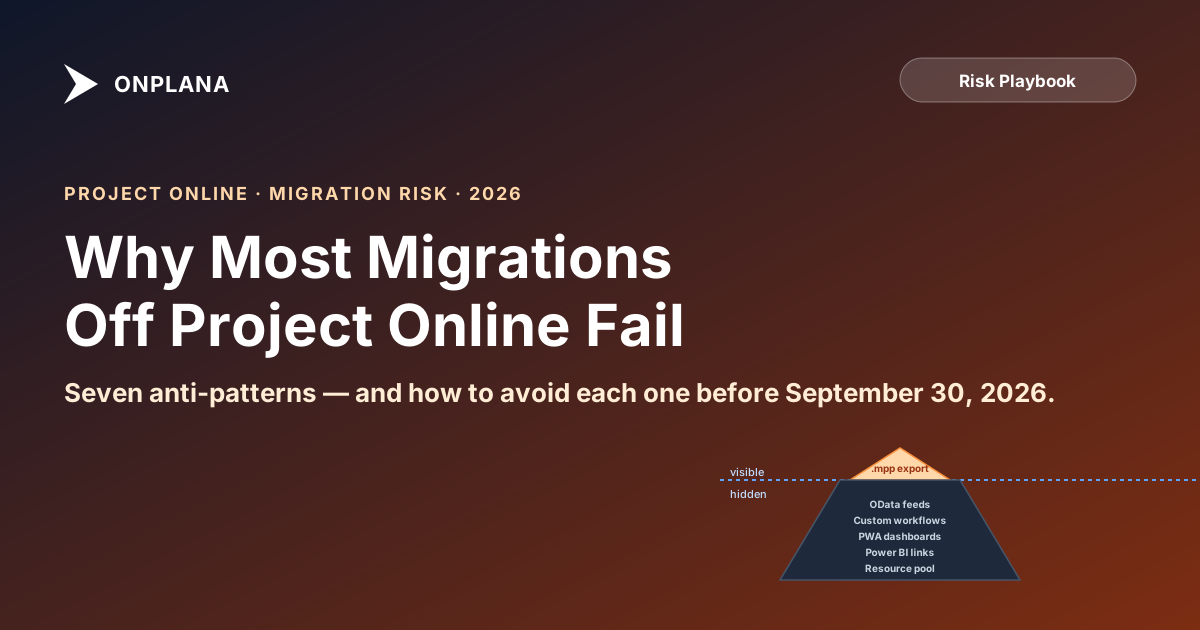
Why Most Project Online Migrations Fail (And How to Avoid It)
Seven anti-patterns that derail Project Online migrations, the failure mode each produces (missed schedule, blown budget, lost data fidelity), and the fix.
Microsoft Project Online retires September 30, 2026, the headline event in Microsoft's 2026 retirement timeline. Every PMO running on it is migrating, and most are heading for the same set of mistakes.
We've watched dozens of these migrations from the inside, tracking the patterns that produce calm Monday-morning go-lives versus the ones that produce all-hands war rooms. The difference isn't budget or team size. It's whether the team recognized one of seven well-documented anti-patterns and avoided it.
This post is the failure-mode guide. Read it before you finalise your migration plan.
The 30-Second Summary
- Most migrations don't fail loudly. They miss schedule, lose ~30% of dependency fidelity, and quietly demoralise the PMO. A "successful" go-live with degraded data is the most common outcome.
- Seven failure modes account for ~80% of migration pain. Each is preventable if you know to look for it.
- Skipping the pilot phase is #1. Three to five real projects validated side-by-side will catch what no feature checklist can.
- Brochures lie by omission. "Imports .mpp" is technically true and operationally useless if it drops lag values.
- The deadline is real. Past Sep 30, 2026, Microsoft archives the data and the recovery clock starts.
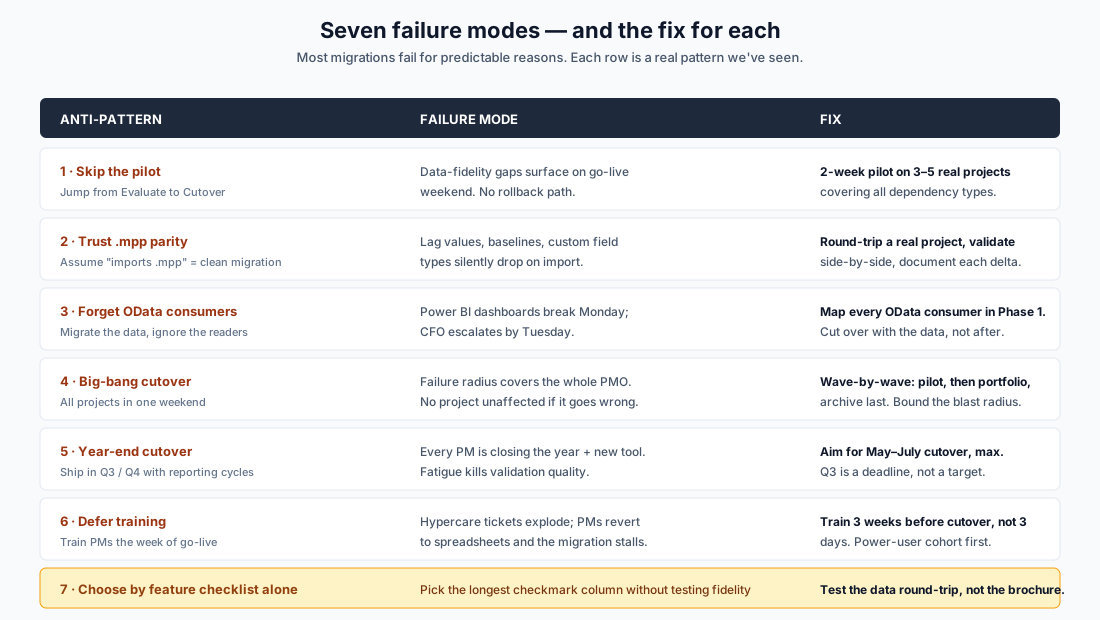
#1: Skipping the Pilot
What it looks like: the team finishes Evaluate (tool selection) in week 4, declares victory, schedules cutover for week 8.
What goes wrong: week 8 is a Friday. The bulk import runs Friday night. Saturday morning the validation team finds:
- Lag values on Finish-to-Start dependencies have all dropped to zero (the tool stores FS but not the +2-day or −3-day modifiers).
- Baselines imported as flat copies, not historical shadows; variance reporting is now meaningless.
- Three custom fields with calculated formulas came in as empty strings.
- The critical path on the largest project shifted because of a missing dependency.
By Saturday afternoon the team knows it can't validate the portfolio. By Sunday it's a war room. By Monday the PMs are working in the old Project Online (still in read-only mode) and shadow spreadsheets, and the migration is officially in trouble.
The fix: a 2-week pilot in Phase 3 of the 90-day plan on three to five representative projects. Each project hand-validated against the source. Every gap documented and dispositioned (fix, work around, accept). Pilot exits when the project owners sign off on the new tool as the production system for those projects.
The pilot phase is what teams cut when they're behind schedule. It's the wrong thing to cut.
#2: Trusting .mpp Parity
What it looks like: "Tool X imports .mpp files. Done, we're covered."
What goes wrong: .mpp is a Microsoft binary format with two decades of accumulated complexity. Different tools implement different subsets. Imports .mpp covers a wide range of behaviors, from "round-trips perfectly with full fidelity" to "lifts task names and dates and silently drops the rest."
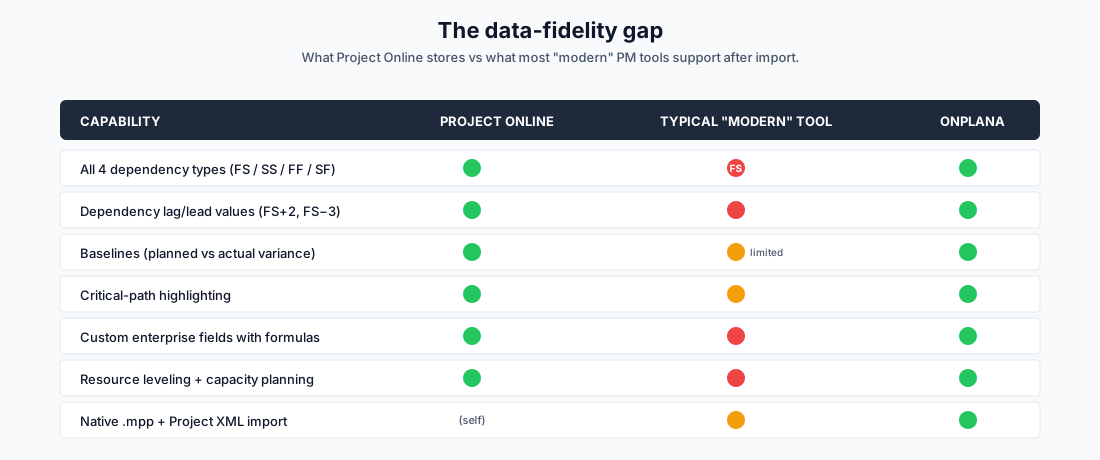
The typical gaps:
- Dependency lag/lead values: the tool supports FS but not "FS+2 days." About 20–30% of typical Project Online schedules use lag.
- Baselines: imported as flat copies of the current schedule rather than the historical "planned" shadow. Variance reporting becomes impossible.
- Custom enterprise fields: coerced to plain strings. Formulas, lookup tables, and field-level validation are lost.
- Resource leveling: the assignment percentages come in but the leveling delays don't, so the new schedule looks earlier than it actually is.
- Subtasks and summary roll-ups: the hierarchy survives, but progress percentages on summary tasks may be recomputed differently.
The fix: round-trip a real, complex project. Pick one with all four dependency types, lag values, baselines, custom fields, and resource leveling. Import it into each shortlisted tool. Compare side-by-side against the source. Document every delta. That is the meaningful tool comparison, not the feature page. The free Migration Preview does this round-trip against Onplana specifically: upload the .mpp, get a feature-by-feature compatibility report in 30 seconds, no signup.
#3: Forgetting OData Consumers
What it looks like: Phase 1 (Inventory) catalogs the projects but not the consumers of the project data: the Power BI dashboards, Excel data connections, custom .NET reports, and Power Automate flows that pull from the OData feed.
What goes wrong: cutover weekend, the project data migrates cleanly. Monday morning, the CFO opens the executive dashboard in Power BI. Empty. The schema doesn't exist anymore: the OData URL pointed at Project Online, and Project Online is now read-only. The CFO escalates by Tuesday. By Wednesday the migration is "in trouble," not because the data moved poorly but because the readers weren't migrated with it.
This is the most common "I forgot about that" failure mode. Project Online's OData feed is exposed enough that consumers proliferate without central tracking: finance teams, compliance teams, and individual managers all build their own reports.
The fix: in Week 1 of Inventory, identify every OData consumer. Cross-reference with the Power BI workspace list, the Excel-connection registry, and the Power Automate flows. For each consumer:
- Document the consumer (the dashboard / report) and the owner.
- Confirm whether the new tool exposes equivalent data (most do, but the schema is different).
- Plan the cutover for that consumer in the same window as the project data.
Migrate the data and the readers together. Not after.
#4: Big-Bang Cutover
What it looks like: all projects move in a single weekend. Often presented as efficiency ("less time in transition") but really it's risk concentration.
What goes wrong: one validation failure stops the whole weekend. Maybe it's a single project with corrupted custom-field data. Maybe it's a Power BI dashboard that doesn't reconnect. Maybe it's an integration partner pushing back on their cutover timing. Whatever it is, in a big-bang cutover the failure radius is the entire PMO.
The fix: wave-by-wave cutover. Pilot wave (Phase 3, 3–5 projects). Portfolio wave (Phase 5, all active projects). Archive wave (post-cutover, archived projects + read-only history). Each wave has independent rollback. If wave 2 has a problem, wave 1 is still running cleanly on the new tool; the failure radius is bounded.
For 1,000+ project PMOs, even Phase 5 splits across two weekends. Half the portfolio per weekend, with a working week of validation between them. Slower; safer; recoverable.
#5: Year-End Cutover
What it looks like: the migration plan, drawn up in March 2026, schedules cutover for "Q3 2026": somewhere between late September and the year-end. Sounds reasonable on paper.
What goes wrong: Q3 is when every PM is also doing year-end planning, fiscal close coordination, performance review prep, and budget defense. Their attention is split. Their stress is high. Their willingness to deal with a new tool is low. Hypercare ticket volume during a Q3 / Q4 cutover runs ~3× higher than the same migration done in Q2.
There's also a vendor-side problem: every PMO is migrating off Project Online in 2026, and consultancies that specialize in this work get fully booked by July. Day rates rise. Project leads get reassigned mid-engagement. Market dynamics conspire against you.
The fix: target May–July cutover, with buffer to Sep 30. The deadline is a deadline, not a target. Q3 is the contingency window for slippage from Q2; it's not the planning window.
#6: Deferring Training
What it looks like: training is planned for "the week of go-live": a one-hour overview session on Monday morning, with PMs then expected to use the new tool from Monday afternoon onward.
What goes wrong: PMs are already doing Monday-morning project updates. They have an hour for the training, an hour for the validation pass, and the rest of their normal workload on top. A new tool with new keyboard shortcuts and a new dependency editor is the last straw. They revert to spreadsheets. The migration stalls: the data moved, but the users didn't.
The fix: train three weeks before cutover, not three days. Build a power-user cohort during Phase 3 (Pilot): 5–10 PMs who use the new tool as their daily driver on the pilot projects. By cutover, that cohort has muscle memory and acts as peer trainers for the rest. Cutover-week training is for new joiners and edge cases, not the bulk of the team.
The investment looks expensive in week 5 and obviously cheap by week 11.
#7: Choosing by Feature Checklist Alone
What it looks like: the procurement team builds a 60-row feature matrix. Each tool gets a checkmark column. The tool with the most checkmarks wins.
What goes wrong: every tool has a green checkmark on "Gantt charts with dependencies." Some support all four dependency types with lag and lead. Some support only FS without lag. Both get the green checkmark on the matrix.
The checklist measures the brochure. Migration success depends on the implementation.
The fix: the data-fidelity round-trip described in #2 isn't just the meaningful tool comparison; it's the only reliable one. A tool that round-trips your real data with full fidelity beats a tool with a longer feature list but lossy import.
A useful augmentation: ask each shortlisted vendor to demo your real .mpp file in their tool. Their performance on that demo (what they preserve, what they lose, and how they communicate the gaps) tells you more than any sales meeting.
What "Successful" Looks Like
A clean migration off Project Online in 2026 has these properties on the Monday after cutover:
- Every active project visible in the new tool with the same data the project owner saw on Friday.
- Dependencies, baselines, custom fields, and resource assignments preserved.
- Power BI dashboards and Excel connections rewired to the new data source.
- PMs already trained: Monday is "use the tool," not "learn the tool."
- A read-only Project Online tenant available as fallback for a documented rollback window.
- Hypercare team in place with elevated capacity for week 1.
- A retrospective scheduled for the following week.
Notice the absence of dramatic words. A successful migration is calm.
How to Diagnose Whether You're on Track
Run this audit today. Honest answers, not optimistic ones.
- Have we identified our shortlisted tool, or are we still evaluating? If still evaluating in week 6, you're behind.
- Have we run a data-fidelity spike on a real project? If not, you're trusting the brochure.
- Have we documented every OData / Power BI consumer? If not, expect Monday surprises.
- Do we have a written rollback plan? If not, you're betting cutover goes perfectly.
- Are we cutting over before August 1, 2026? If not, you're in the danger zone.
- Have power users been hands-on with the new tool for at least 2 weeks before cutover? If not, hypercare will be brutal.
- Is the chosen tool round-trip-tested on a real, complex project? If not, you have data-fidelity exposure you haven't measured yet.
Three "no" answers is a warning. Five is a project that needs urgent intervention.
A Realistic Disclaimer
Some PMOs will not avoid all seven of these. That's fine: the goal isn't perfection, it's avoiding the load-bearing ones (#1, #2, #3) and recovering quickly from the others.
The ones you can't recover from cheaply: skipping the pilot (you find data corruption on go-live with no rollback), trusting .mpp parity (your schedules are quietly broken in the new tool), forgetting OData consumers (the CFO finds out Monday).
Everything else is fixable in flight.
Two free tools to avoid the load-bearing failure modes Round-trip your
.mppto catch the data-fidelity gaps; model the 3-year cost so the budget conversation is defensible. No signup, runs on real data. → Migration Preview · Migration Cost Calculator
Onplana built its migration tooling specifically for the Project Online sunset. Native .mpp and Project XML import preserves all four dependency types with lag, baselines as Gantt shadows, custom fields with type fidelity, and resource assignments with leveling. We round-trip your real schedule before you commit. Run the spike free → or book a migration walkthrough.
Related: The 90-Day Migration Plan · Microsoft Project Online End-of-Life: What You Need to Know · How to Migrate from Microsoft Project Online · Best Microsoft Project Alternatives in 2026 · Cost of Migrating from MS Project Online
Microsoft Project Online™ is a trademark of Microsoft Corporation. Onplana is not affiliated with Microsoft.
Frequently asked questions
What's the single biggest reason Project Online migrations fail?
Skipping the pilot phase. Teams move from Evaluate (tool selection) directly to Cutover (production migration) without running 3–5 representative projects through the new tool first. Data-fidelity gaps (dependency lag values dropped on import, baselines collapsed, custom field types lost) surface on go-live weekend with no rollback path because Project Online is in read-only mode by then.
Are .mpp imports actually reliable?
It depends on what the tool implements. Most modern PM tools support .mpp basic structure (tasks, dates, resources) but lose lag/lead values on dependencies, collapse baselines, and silently coerce custom enterprise fields to plain strings. Onplana's parser preserves all four dependency types with lag, baselines as phantom-bar shadows on the Gantt, and custom fields with type fidelity. Always validate on a real, complex project before committing.
Can we migrate everything in one weekend?
Below ~50 projects, yes. Above that, the failure radius gets too wide for a single window: one validation failure stalls the whole portfolio. Wave-by-wave cutover (pilot → portfolio → archive) with each wave having an independent rollback plan is the standard for 100+ project PMOs. The 'big-bang' weekend that worked for the original Project Online deployment in 2013 is not the right pattern for migrating off it in 2026.
Why is choosing the tool by feature checklist a mistake?
Brochures lie by omission. A tool may list 'Gantt charts with dependencies' on its feature page but only support FS-without-lag in practice, which silently corrupts ~30% of typical Project Online schedules on import. The only reliable evaluation is to round-trip a real, complex project through each shortlisted tool and validate the result side-by-side against the source. This is exactly what Phase 3 (Pilot) of the [90-day plan](/blog/project-online-retirement-90-day-plan) is for.
What about Power BI dashboards built on the Project Online OData feed?
They will break the moment you cut over. The OData feed schema is Project Online-specific; the URL changes; the tables and columns are different in the new tool. Every Power BI report, every Excel data connection, every custom .NET reporter needs a cutover plan agreed with the consuming team in Phase 1, not discovered Monday after go-live. This is the most common 'I forgot about that' failure we see.
When is the worst time to cut over?
Year-end. Q3 / Q4 cutovers collide with annual reporting cycles, performance reviews, fiscal close, and PMO peak load. PMs are exhausted, validation quality drops, hypercare tickets pile up. Aim for May–July with a buffer to the Sep 30 deadline. The buffer is what lets you survive a slipped weekend without missing the cliff.
How do we avoid the 'PMs revert to spreadsheets' failure?
Train three weeks before cutover, not three days. Recruit a power-user cohort first: 5–10 PMs who get hands-on access to the new tool during Phase 3 (Pilot). They become the trainers and advocates for the rest. Cutover-week training is too late: every PM is also closing tasks, validating their data, and dealing with a new UI on top of their normal workload.
What if we miss September 30?
Microsoft archives the data. Self-service recovery shrinks; restoration requires a support ticket; the response window is finite. The next 6 months become a continuous emergency. We have not seen a migration recover gracefully from a missed Sep 30. If you are in late Q3 and Aug 1 is no longer reachable, descope: migrate the **active** portfolio first, archive the rest, and migrate archives post-deadline as time permits. A clean small migration beats a chaotic big one.
Ready to make the switch?
Start your free Onplana account and import your existing projects in minutes.