Stage-Gate Project Management: Why PM Tools Skip Governance
Stage-gate project management software requires real governance at every gate. Here's what that means in practice, and which tools actually support it.
Here is the pattern that plays out in PMOs that lack stage-gate project management software or any equivalent governance structure. A project clears discovery and enters planning. Scope creep begins quietly in month two. By month four, the project is 30% over its original budget estimate and the scope has expanded to cover three capabilities that were not in the original proposal. Nobody remembers exactly when those additions happened, because nobody held a formal review between "project approved" and "project in trouble."
The absence of stage-gate governance is the absence of a structural mechanism to ask "should this project continue on its current trajectory?" at defined intervals. Without that mechanism, projects accumulate scope, cost, and schedule risk invisibly, because the next scheduled moment to evaluate them is the steering committee meeting at which they will already be in crisis.
Stage-gate project management software solves this by making the review mandatory, the criteria explicit, and the decision recorded. The challenge is that most PM tools treat governance as an afterthought, if they treat it at all.
TL;DR: Stage-gate project management
- What it is: a structured approach where projects pass formal decision gates between phases. Proceed, hold, or kill at each gate based on defined criteria.
- Who uses it: pharma R&D, capital construction, aerospace, regulated financial services, and enterprise IT programs with formal governance requirements.
- Why most PM tools fail at it: they offer workflow automation (document routing) but not governance structure (gate decisions that change project status, unlock resources, and generate audit trails).
- Onplana's approach: a native 12-stage governance pipeline with configurable gate criteria, RACI per gate, document checklists, and a full audit trail. It is part of the scheduling model, not a bolt-on workflow.
What Stage-Gate Actually Is (And Why "Workflow" Is Not the Same)
The stage-gate model was formalized by Robert Cooper based on research across hundreds of product development projects. The core insight was simple: projects that fail late fail expensively. The decision to kill or significantly restructure a project in month two is cheap. The decision in month eighteen is not. A structured set of review points throughout the project lifecycle shifts that decision earlier, when the cost of changing course is still manageable.
A stage-gate process has two structural elements. Stages are defined bodies of work with specific deliverables. Gates are formal review events where a sponsor or review board evaluates whether those deliverables meet the criteria for advancing to the next stage. At each gate, three outcomes are possible: proceed to the next stage, hold for revision of specific deliverables, or kill the project.
The governance value comes from the gate decision being binding, documented, and held by the right people. A gate that a project manager can simply record as "approved" without submitting required deliverables is not a gate. It is a checkbox. A stage-gate tool must enforce the difference.
This is where most PM tools fail. They can route documents for signature. They can set up approval steps in a workflow. What they cannot do is make a gate decision structurally meaningful in the project model: changing the project's status in the portfolio, unlocking next-phase budget and resource allocation, and generating an immutable audit record of what was reviewed and what was decided.
Why Most PM Tools Don't Really Support Stage-Gate
The failure mode takes two forms.
The first is the "workflow as governance" mistake. A PM tool adds an approval workflow to its task system and markets it as governance. The approval routes a document to a manager who clicks approve. The project advances. The workflow has been followed. But nothing in the project model changed as a result of the approval. The budget is not locked to a figure reviewed and agreed at the gate. The scope baseline is not frozen at the gate's approved deliverables. The resource allocation for the next phase is not unlocked by the approval. The click has no structural consequences.
The second failure mode is the "external tool" pattern. The PMO builds the stage-gate process in SharePoint, Confluence, or a custom form. The PM tool manages the actual project schedule. The two systems share no data. Gate approvals in the document management system do not affect project status in the scheduling tool. When an auditor asks which projects passed Gate 3 with what deliverables, the answer requires pulling records from two separate systems, which may not agree.
Both failure modes produce the same result: the stage-gate process exists in documentation but not in practice. Project teams learn that gates are administrative events rather than real decision points. The process's deterrent effect on scope creep and cost overrun disappears.
Onplana's 12-Stage Governance Pipeline
Onplana ships a configurable 12-stage project lifecycle governance pipeline as part of the core product. The stages and gates are integrated with the project schedule, not bolted on as a separate workflow module.
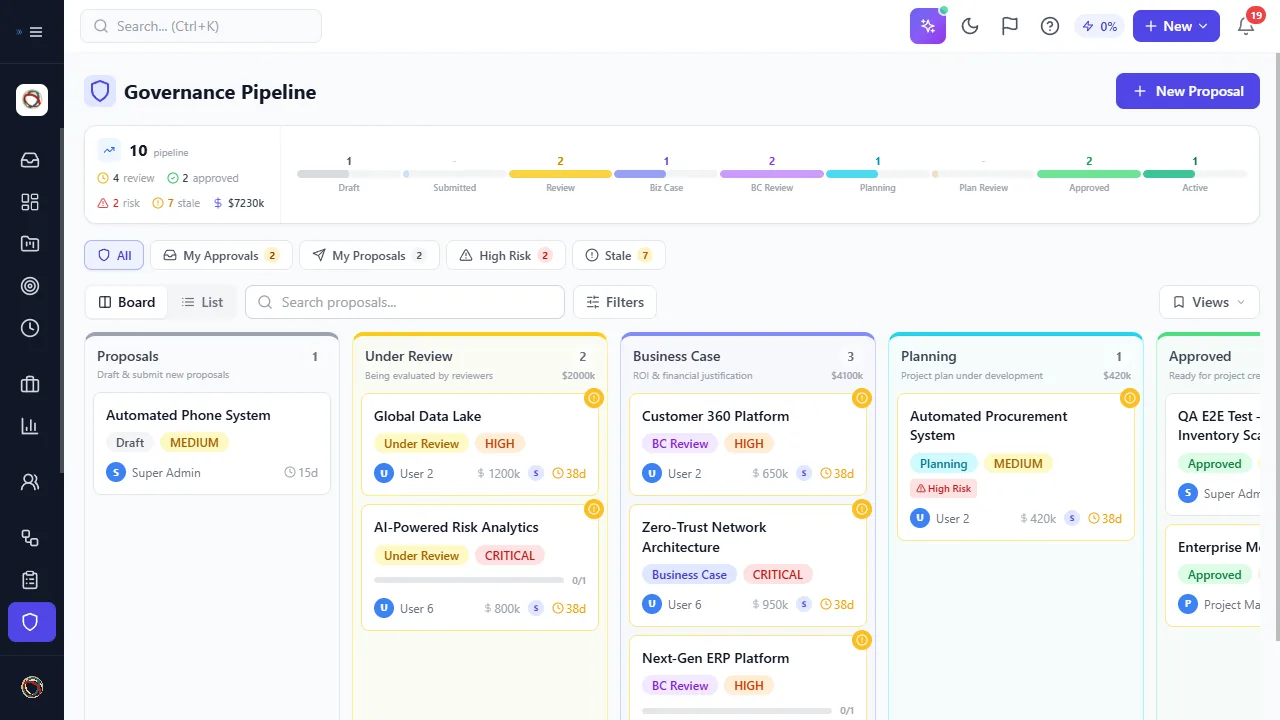
The pipeline board surfaces every project's current stage and gate-review status in a single view, with gate criteria attached to each card.
The default 12-stage pipeline covers the full project lifecycle:
- Proposal submitted
- Initial screening gate
- Scoping phase
- Business case gate
- Development phase
- Mid-development gate
- Testing and validation phase
- Pre-launch gate
- Launch preparation phase
- Launch gate
- Post-launch monitoring phase
- Project close gate
Each stage has a configurable deliverable checklist. Each gate has a defined review board (assigned by role, not by named individual, so the gate survives personnel changes), explicit pass/fail criteria, and a decision field that accepts proceed, hold, or kill. Gate decisions are timestamped and immutable: you can record a new decision if circumstances change, but the original decision remains in the audit trail.
The diagram below shows the 12-stage pipeline and how gate decisions connect each stage.
What a Gate Review Actually Requires
A gate review is not a status meeting. It is a structured decision event with defined inputs, a review board with authority to kill the project, and an outcome that changes what happens next.
The required inputs at each gate in Onplana are configurable per stage but follow a standard template:
- Stage deliverables: documents, analysis outputs, or milestone completions defined when the stage was opened. Onplana's checklist verifies completion before the gate can be submitted for review.
- Budget variance: actual versus planned spend through the end of the stage. Gate reviewers see this automatically from the project's cost tracking fields.
- Schedule variance: actual versus baseline at stage close. The scheduling engine surfaces this; the PM does not need to manually calculate it.
- Risk register update: open risks, their current probability and impact, and the mitigation status.
- Updated business case: for major gate reviews, the original investment rationale reviewed against current projections.
The review board in Onplana is defined by role. A gate might require sign-off from the Project Sponsor, the Portfolio Manager, and the Finance Representative. The specific people in those roles at review time receive the gate submission in their queue. If a person leaves the organization, the role assignment means the replacement automatically inherits the queue.
The gate decision, with rationale, is recorded as an immutable event in the project's history. This is the audit trail capability that regulated industries require and that workflow-automation tools cannot provide.
The diagram below shows the gate review decision flow.
Gate Criteria and Who Owns Each Decision
The most common failure in stage-gate implementations is ambiguous gate criteria. If the criteria for "proceed" are not explicit, the gate becomes a social event: the project team presents, the review board nods, the project advances. Nothing was actually evaluated.
Effective gate criteria are measurable and binary. At a business case gate, the criterion might be: "Updated financial model shows NPV above $2M at the approved discount rate." Either it does or it does not. There is no "mostly." At a pre-launch gate, a criterion might be: "QA sign-off document submitted with zero P1 defects open." Binary.
In Onplana, gate criteria are defined as a checklist when the stage is configured. Each criterion has a status field (met, not met, waived with justification) that the review board completes. A gate cannot advance to "pending approval" until all criteria have been addressed. Waivers are recorded with the reason, so the audit trail shows not just that the project passed but how it passed, including what was waived and why.
The role-based review assignment matters for a related reason: accountability without personalization. If a gate requires "Finance Representative" sign-off, that requirement persists regardless of which individual holds the role. Organizations that define gate authority by job title rather than person name find that gate compliance survives reorganizations, which is the only kind of governance that survives long-term.
The Industries Where Stage-Gate Is Not Optional
In most commercial PM environments, stage-gate governance is a competitive advantage: PMOs that use it deliver more projects on time and within budget, because the gates catch scope creep and bad investments before they compound. In regulated industries, stage-gate is not optional. It is a compliance requirement.
In pharmaceutical development, the IND application to the FDA requires documented evidence that each phase of clinical trials was reviewed and approved by defined authority before the next phase began. Stage-gate provides that evidence structure. A pharma PMO operating without formal gate records faces audit risk regardless of project outcomes.
In capital construction, most large projects require owner approval at defined design milestones (schematic design, design development, construction documents) before the contractor can proceed. Those milestones are gates. The approval documentation is the legal record that authorized continued expenditure.
In financial services, large IT programs subject to model risk management or regulatory change management require documented evidence of risk review and executive sign-off at defined program milestones. A workflow tool that routes approvals without maintaining an immutable audit trail does not satisfy this requirement.
The PMO maturity tiers explainer covers how stage-gate governance fits into the broader PMO maturity model, including which maturity tier it typically first appears in and what other capabilities need to be in place for it to work.
Why SharePoint Workflows Fail as Stage-Gate Tools
Many PMOs running Microsoft Project Online built their stage-gate governance in SharePoint Designer workflows. This was a pragmatic choice: the projects were already in PWA, SharePoint was already in the tenant, and the workflows could route documents to the right approvers.
The approach had three structural problems, and all three become acute with the Project Online retirement on September 30, 2026.
First, SharePoint Designer workflows are themselves deprecated. Microsoft has announced end of support for SharePoint 2013 workflows. PMOs that built their stage-gate process on these workflows must rebuild it somewhere, and "rebuild in Power Automate" is a migration project in its own right.
Second, the SharePoint workflow model is document-routing, not governance structure. A document approved in SharePoint has no automatic connection to the project's status in Project Web App. Gate approvals did not change portfolio views, did not unlock budget, and did not update resource availability in the enterprise resource pool. The two systems held different pictures of project status.
Third, the audit trail in SharePoint workflow history is difficult to export, not human-readable without tooling, and not structured for the kind of field-level querying an auditor needs. "Show me all projects that passed Gate 3 in Q1 2026 with a waived financial criterion" is not a question SharePoint workflow history can answer without significant custom development.
PMOs rebuilding their stack after Project Online are evaluating whether to recreate the same pattern (project scheduling tool plus separate governance tool) or consolidate into a platform where governance and scheduling are integrated from the start.
Implementing Stage-Gate in Onplana: The Setup
For PMOs moving to Onplana, stage-gate governance configuration follows a five-step sequence.
Define your stages. Onplana's default 12-stage pipeline covers most enterprise PM use cases. Rename stages to match your organization's terminology. Shorten to 5 or 7 stages if your process is simpler; the pipeline is configurable.
Set deliverable checklists per stage. For each stage, define what must be completed before the gate can be submitted. Deliverables can be documents (with upload verification), milestone completions (pulled from the project schedule), or manual acknowledgments.
Assign gate review roles. For each gate, define which roles must approve. Onplana maps these to user roles in the platform. When a gate submission is made, all assigned roles receive a notification and the gate sits in their review queue.
Define pass/fail criteria. For each gate, enter the explicit, measurable criteria the review board will assess. These appear on the review screen so reviewers see them while making their decision.
Configure your portfolio view. Onplana's portfolio dashboard shows all active projects and their current stage. Projects held at a gate appear distinctly from projects in active work phases, giving portfolio managers a real-time governance overview.
The full capability breakdown for enterprise project governance, including how the governance pipeline integrates with the Gantt scheduler and resource pool, is on the enterprise project governance features page. For PMOs evaluating whether their current governance maturity is ready for stage-gate, the PMO Maturity Assessment takes about 10 minutes and provides a structured readiness view.
Run the free PMO Maturity Assessment Find out which governance capabilities your PMO has in place and which gaps to address before implementing stage-gate. No signup required. Takes about 10 minutes. → Open the assessment
Microsoft Project Online™ is a trademark of Microsoft Corporation. Onplana is not affiliated with Microsoft.
Frequently asked questions
What is stage-gate project management?
Stage-gate project management structures project delivery through defined stages separated by formal decision points called gates. At each gate, a review board evaluates the project against predefined criteria and decides to proceed, hold, or kill it. Developed by Robert Cooper, it is the standard governance model in pharmaceutical R&D, capital construction, and aerospace.
Is stage-gate the same as phase-gate?
Yes. Stage-gate and phase-gate describe the same methodology. Stage-gate is Robert Cooper's original term; phase-gate is a common variant used in engineering and construction contexts. Both refer to structured approval processes where projects must pass a formal review before advancing to the next phase.
What industries use stage-gate project management software?
Pharmaceutical R&D, capital construction, aerospace and defense, banking and financial services, consumer product development, and any regulated industry where independent approval is required before project phases can proceed. Stage-gate is also standard in large enterprise IT programs with formal governance requirements.
How many stages does a typical stage-gate process have?
Classic Stage-Gate models have five stages and five gates. Enterprise implementations often extend to eight to twelve stages to accommodate regulatory review, procurement milestones, legal sign-off, and formal governance checkpoints. Onplana's governance pipeline supports twelve configurable stages.
Does Onplana support stage-gate governance natively?
Yes. Onplana ships a 12-stage project lifecycle pipeline with configurable gate criteria, role-based review assignments, document checklists per gate, and a full audit trail of gate decisions. The governance pipeline is part of the core project lifecycle model, not a bolt-on workflow.
What is the difference between a stage-gate tool and a workflow automation tool?
A workflow tool can route documents for approval but has no awareness of what a gate decision means for project scope, budget, or schedule. A stage-gate tool understands that a gate decision changes project status in the portfolio, unlocks next-phase resources, and triggers audit-required documentation. The distinction is structural, not cosmetic.
Which PM tools support stage-gate natively?
Few PM SaaS tools ship native stage-gate governance. Onplana includes it as a core feature. Microsoft Project Online required custom SharePoint workflows, which are also being deprecated alongside Project Online itself. Most SaaS PM tools treat stage-gate as a workflow automation problem rather than a governance structure problem.
How does stage-gate differ from agile sprint planning?
Agile sprint planning manages work within an approved project. Stage-gate manages the question of whether the project should continue at all. They operate at different levels of governance and are not in conflict: many teams use agile for delivery within each stage, with stage-gate gates controlling phase transitions.
Ready to make the switch?
Start your free Onplana account and import your existing projects in minutes.