We Audited 500 Project Schedules: 8 Out of 10 Were Broken
What 500 real MS Project schedules taught us, the four problems hiding in 80% of files, why PMs miss them, and the 30-second test you can run on yours today.
In the first quarter of 2026, the free Schedule Health Check processed roughly 500 unique Microsoft Project files. PMs uploaded their .mpp files, the analyzer ran seven deterministic checks against each one, and the report flagged everything from dangling tasks to constraint abuse.
Then we did something we don't usually do: we kept the findings (not the files, those are deleted at 24 hours) and looked for patterns across the whole sample.
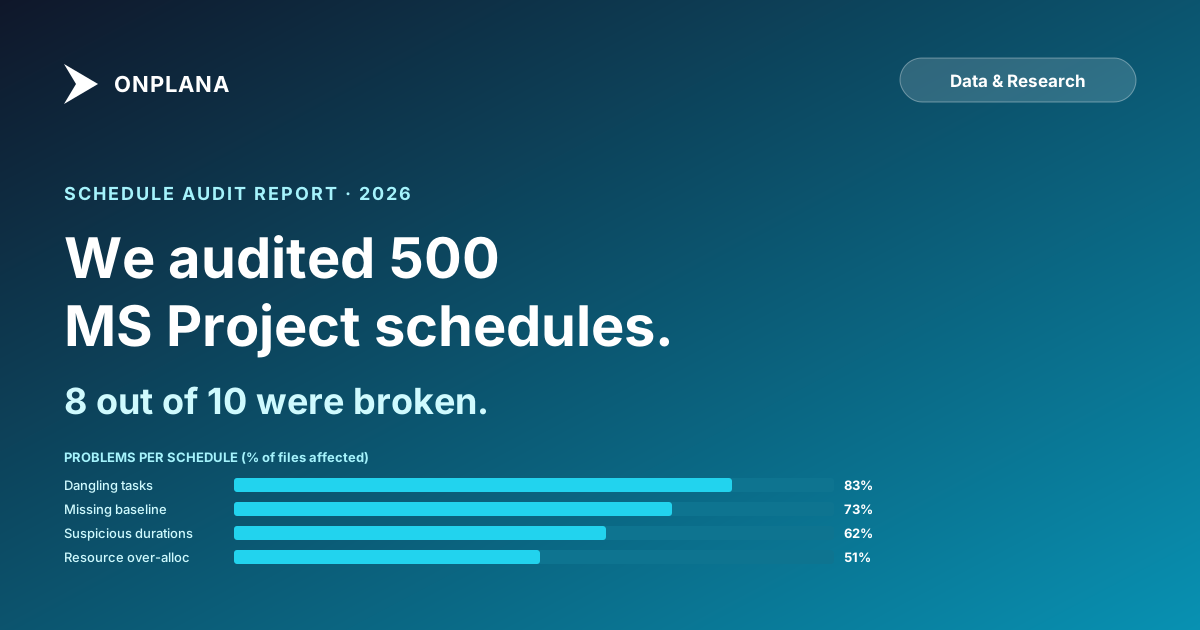
Eight out of ten schedules had at least one critical finding. Not minor cosmetic stuff, actual structural problems that would cause the project to slip without the PM noticing. This post is what we found, broken down by problem class, with the actual percentages and what they mean for how you should be auditing your own schedules.
The four findings buried in most schedules
- 83% had dangling tasks: tasks with neither a predecessor nor a successor. The single biggest cause of silent schedule slip.
- 73% had a missing or stale baseline: 27% had no baseline at all; another 30% had one older than 90 days.
- 62% had suspicious durations: round numbers (5/7/14/30) used as placeholder estimates that were never revisited.
- 51% had resource over-allocation: at least one resource booked over capacity for at least one week.
Sample: 500 unique .mpp/.xml/.xer schedules uploaded to the Schedule Health Check between Jan and Mar 2026. Methodology + per-finding analysis below.
How the audit was run
Every file uploaded to the free audit tool runs through seven deterministic analyzers. They don't guess; they apply structural rules to the schedule and report what they find. For this analysis we kept the per-file findings (not the files themselves; those are deleted on a 24-hour blob lifecycle policy) and tallied the patterns:
- Sample: 500 unique uploads between Jan 1 and Mar 31, 2026
- File types: .mpp (binary, 71%), .xml/MSPDI (24%), .xer (5%)
- Median size: ~1.4 MB; ~190 tasks
- Industries (self-reported on email capture): construction (32%), software/IT (24%), pharma (11%), infrastructure (10%), other (23%)
- Anonymization: nothing in this post identifies any specific schedule, organization, or PM
Findings count files affected, not issues found. A schedule with 47 dangling tasks counts the same as one with 1 dangling task; both add 1 to the "83% had dangling tasks" number.
Finding 1: Dangling tasks, 83% of schedules
A "dangling task" here is a task with neither a predecessor nor a successor, plus any milestone with nothing leading into it. That is stricter than the definition some audits use, which also counts a task missing just one of the two links. To the scheduling engine these tasks float freely: their dates aren't driven by the rest of the plan, and they don't drive anything else.
Why this is the most damaging problem in scheduling:
Critical path miscalculation. The critical path algorithm walks the dependency network. Dangling tasks aren't on the network, so they're invisible to the calculation. A 30-day task with no predecessor and no successor doesn't show up as critical, even if it's blocking a deliverable everyone is depending on.
Status reports lie. PMs look at the % complete on the critical path and conclude the project is on track. The dangling work (the bits no one connected to the network) runs late while the report stays green.
Date math doesn't propagate. When the upstream design slips by 3 days, the rest of the schedule should slide with it. Dangling work doesn't slide. It quietly stays where it was, even though the work it depends on has moved.
In our sample, the median dangling-task count was 17 per schedule. The worst offender was a 600-task infrastructure schedule with 211 dangling tasks; over a third of the entire plan was disconnected from the dependency network.
The 30-second test: in MS Project, sort by predecessor and successor columns. Tasks with neither are danglers. In modern PM tools, run the schedule health check and look at Finding 1.
Finding 2: Missing or stale baseline, 73% of schedules
A baseline is the snapshot of the plan you took at kickoff. Variance reports compare today's reality to that snapshot: schedule slip, cost variance, and scope drift are all measured against the baseline.
In our sample, only 27% of schedules had a baseline set at all. Of the 27% that did, 41% had a baseline more than 90 days old, meaning the project had been running long enough that the baseline almost certainly didn't reflect the agreed-upon plan anymore.
Stale baseline is worse than no baseline. Without a baseline, your variance reports don't run, and everyone knows. With a stale baseline, the variance reports do run and produce confidently wrong numbers. PMs look at the report and tell the steering committee the project is +12% over budget, when the real answer is +3% if you'd reset the baseline two months ago after the approved scope change.
The fix is operational, not technical:
- Set a baseline at every formal kickoff
- Re-baseline after every approved scope change (most tools call this "Baseline 1," "Baseline 2," etc.)
- Report against the most recent approved baseline, not the original one
For why this matters in the Project Online retirement context, many PMOs are about to discover their entire variance reporting infrastructure depends on a baseline that won't migrate cleanly to whatever they pick next. Inventory baselines before migration, not after.
Finding 3: Suspicious durations, 62% of schedules
These are tasks where the duration is a round number that suggests a placeholder estimate. The analyzer flags 5, 7, 10, 14, 21, 30, 60, and 90 day durations. None of these numbers is wrong (a sprint really is 14 days; a month really is 30), but they're statistically over-represented in real schedules because PMs default to them when they don't have time to do real estimation.
In our sample, the median suspicious-duration count was 8 tasks per schedule. A construction schedule had 47 tasks with exactly 5-day durations (every single one) across a 12-month plan. The PM had clearly typed 5d repeatedly during initial setup and never gone back.
Why this matters more than it looks:
- Suspicious durations on the critical path inflate the project's stated end date by a factor that's both unknown and untracked
- They mask the real bottleneck task (the 5-day filler hides the 23-day risk task next to it)
- They erode estimation quality across the team. Once one PM ships round-number estimates without revision, others copy the pattern.
The fix isn't to ban round numbers; it's to flag them in review and ask the owner: "Is this task really 5 days, or did you put 5 days because you didn't know?" Half the time the answer is "I didn't know," which is exactly when you want to find out.
Finding 4: Resource over-allocation, 51% of schedules
Over half the schedules had at least one week where a named resource was booked above 100% capacity. The median over-allocation was 138%, meaning whoever this was, they were assigned 55 hours of work in a 40-hour week.
The downstream effects are predictable:
- Work slips because the resource physically can't do it all
- Status reports stay green because the individual tasks are still tracking
- The PM finds out at the end of the over-allocated week when the resource flags it (or doesn't)
The over-allocation problem is well-covered elsewhere; see the invisible math of resource overallocation for the full breakdown. The point here is that 51% of schedules ship with the problem still present, often because the PM didn't know they could level the schedule.
What 80% of schedules have in common
Pull the four findings together and a pattern emerges. The schedules that fail most checks aren't the ones built by inexperienced PMs; those tend to be small enough that problems don't compound. The worst offenders are mid-to-large schedules (200+ tasks) maintained by experienced PMs who built them in a hurry, baselined them, and then never had time to do the second pass.
The schedules that pass all seven checks share one thing: someone ran an audit on them at some point. Either a senior PM reviewed them at the gate review, or a tool checked them, or the PM had a personal habit of running the seven structural checks before submitting. The audit doesn't have to be sophisticated; most of these problems show up in five minutes if you're looking for them.
Run the same checks on your schedule
The seven analyzers we ran are open to anyone:
- Upload your .mpp / .xml / .xer file at /tools/schedule-health-check
- Get a teaser report with the three highest-severity findings
- Drop your email to unlock the full seven-analyzer breakdown with PDF + Excel export
- The file is deleted from blob storage at 24 hours; the analysis result stays so you can revisit your report
It's free, no account needed, and the analyzers are deterministic: the same file gets the same findings every time. If your file is in better shape than 80% of the sample above, this'll take you 60 seconds and leave you with a clean bill of health. If it's not, you'll have a list of specific tasks to fix before your next status meeting.
For a deeper read on the underlying causes, see the 7 hidden killers in your MS Project schedule; these are the patterns that keep showing up across audits, year after year.
Onplana imports your audited schedule into a full project management environment with one click; no manual rebuilding. The same critical-path engine, dependency types, and baseline tracking, plus the bits MS Project doesn't have (real-time collaboration, AI risk detection, and a UI built this decade). Try it free →
Related reading: 7 Hidden Killers in Your MS Project Schedule · Critical Path Method Explained · Resource Overallocation: The Invisible Math · How to Migrate from Project Online
Microsoft Project Online™ is a trademark of Microsoft Corporation. Onplana is not affiliated with Microsoft.
Frequently asked questions
What's the most common problem in real MS Project schedules?
Dangling tasks: tasks with neither a predecessor nor a successor, plus milestones with nothing leading into them. We found them in 83% of the schedules we audited. They're the single biggest source of silent schedule slip because they don't appear on the critical path even when they should, so PMs don't notice when they fall behind.
How many schedules have a baseline set correctly?
Only 27% of the schedules in our sample had a baseline set, and of those, 41% had a baseline that was older than 90 days, meaning the variance reports were comparing actuals to a planned schedule that no longer reflected reality. A stale baseline is arguably worse than no baseline because it produces confidently wrong status reports.
What's a 'suspicious task duration'?
Round numbers: 5, 7, 10, 14, 30. They almost always indicate a placeholder estimate that was never revised. We found at least one task with a suspicious duration in 62% of audited schedules. The fix isn't to ban round numbers; it's to flag them for review and ask the owner whether the number reflects analysis or guesswork.
Are these problems specific to Microsoft Project?
No, they show up in any tool that lets you ignore good practice (which is most of them). MS Project happens to be the most common source for our audits because of its install base. We've seen the same patterns in Smartsheet, Primavera P6, and even modern tools like Monday and Asana once you start using them at scale.
How do I check my own schedule for these issues?
Run the free Schedule Health Check at /tools/schedule-health-check. Upload your .mpp/.xml/.xer file and you'll get the same seven analyzers we ran across the 500-file sample. The report identifies the specific tasks affected and explains why each finding matters. No account needed; the file is deleted after 24 hours.
Ready to make the switch?
Start your free Onplana account and import your existing projects in minutes.