What AI Decides in Onplana, and What It Leaves to You
The role of AI in Onplana is bounded by design: three zones set what it acts on, what it suggests, and what it never touches, enforced in code.
The first question most enterprise buyers ask about AI in a project management tool is not "what can it do." It's "what is it allowed to do." Asked plainly: which decisions does AI make on my project, and which does it leave to me?
That is a governance question, and the honest answer needs a governance answer. Marketing copy that says "AI runs your project end to end" is wrong on two fronts: it overstates the model's reliability, and it understates the cost of getting a wrong AI decision committed to a real plan. The opposite extreme, "AI only suggests, never acts," is also wrong, because then the AI never saves anyone any time.
The role of AI in Onplana is set by a three-zone model that makes the trade-off explicit. Each AI operation lives in exactly one zone, and the zone determines whether the AI acts, suggests, or stays out.
Onplana's AI lives inside three boundaries. The act zone (autonomous AI: plan drafts, natural-language parsing, status drafts) covers low-cost operations where a wrong call is cheap to undo. The suggest zone (AI proposes, you decide: risk flags, resource shifts, scenario analysis) covers medium-risk operations with a preview-then-accept loop. The stay-out zone (financial commitments, baseline sign-off, performance reviews) is not a setting anyone can move. Every AI act-zone decision is reversible in one click and logged with its reasoning trail.
The diagram below shows the three zones and a handful of representative operations in each. Each operation belongs to exactly one zone; the boundary is set in code, not by the prompt.
What sits in the act zone
The act zone contains the AI operations Onplana performs without waiting for a human to click "accept." These are native AI surfaces wired into the data model, not a chat sidebar bolted onto the project view. Every operation in this zone shares three properties: the input space is bounded, the output is cheap to undo, and the work is high-frequency enough that a "are you sure" gate would be more annoying than useful.
Five operations live here today:
- Plan draft on kickoff. The first generation of a project's task tree from a free-text brief lands as a real plan, not a preview. Reverting the whole tree is one click; editing any node is normal task editing. The Kickstart flow is covered in detail in the post on going from signup to a running project in 2 minutes.
- Natural-language parsing. Typing "add a task for Sara to review the API spec by Friday" creates the task directly, with Sara as assignee and the calculated due date. Wrong parses are noticed at a glance and edited like any other task.
- Status report first draft. The weekly status draft is generated and saved as a draft; the PM edits before publishing. The PM never starts from a blank page, and the AI never publishes on its own. The same model also powers the free Status Report Writer tool.
- Portfolio Q&A. Questions like "which projects slipped this week" are answered immediately with cited rows. Nothing is committed; the AI is reading, not writing.
- Recommendations widget. The "what should I look at next" suggestion on the project dashboard refreshes without confirmation. It is a hint, not a state change.
Cheap to undo is the lever. The first plan draft can be regenerated unlimited times before anyone commits to it; the NL parser produces a task that is editable; the status report is a draft. None of these can corrupt the project state in a way that hurts a real stakeholder.
What sits in the suggest zone
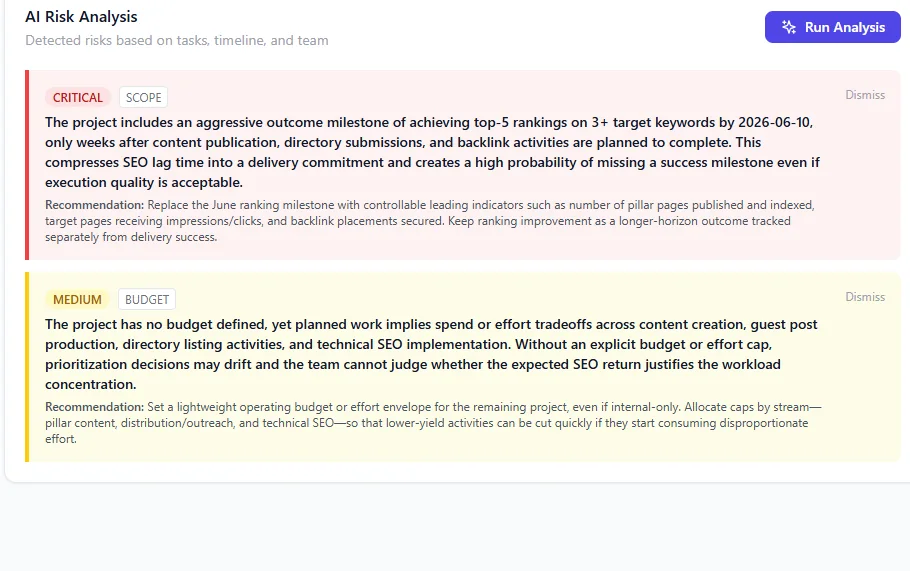
A suggest-zone surface in practice: AI flags critical scope and budget risks with the evidence row attached. The accept/dismiss control sits next to each one. The change-record owner is the PM, not the AI.
The suggest zone covers AI operations that propose a change to existing state but never apply it without a human accepting first. The pattern is identical across operations: AI proposes, evidence shown inline, human accepts, edits, or rejects, accepted action runs as if the human did it themselves. This is the propose-ratify model that Onplana's autonomous AI agents operate under: autonomous on retrieval, analysis, and drafting; deferential on the state change.
Five operations live here today:
- Risk flags. AI flags a task as at risk and names the signal (overdue dependency, no progress in 14 days, owner on PTO during the planned window). The PM accepts the risk into the register, dismisses it, or routes it.
- Resource shift proposals. When the heatmap shows a 130% allocation, the AI proposes a specific shift ("move task X from Sara to Raj for the week of June 8") with the impact on Sara's load shown. The PM accepts or rejects.
- Schedule what-if. AI runs a scenario ("what if we push QA by a week") and shows the recalculated finish dates and CPM path. Nothing changes until the PM commits the scenario.
- Scope change impact analysis. Adding a feature mid-project triggers an AI estimate of downstream effects: which milestones move, which resources get overloaded, which dependent projects need a warning. The PM uses the estimate; the plan does not auto-rewrite.
- Baseline drift alerts. When the live plan diverges from the baseline by a configurable threshold, AI proposes a rebaseline. The change record is the PM's, not the AI's.
The shared shape: the AI brings the evidence, the human commits the state change. The suggest zone is where most of the time savings show up over a quarter, because the AI handles the analysis and the drafting while the human handles the judgment.
What sits in the stay-out zone
The stay-out zone is not a dial. Onplana has no feature for most of what sits in it, so there is nothing for AI to act on, and where a related surface does exist AI runs with the permissions of the person using it and cannot exceed them. The reason these sit outside AI authority is that a wrong call creates legal, financial or interpersonal cost that a revert button cannot fix.
Five operations are in this zone:
- Financial commitments. The AI can summarize a budget burn rate and surface a risk that spend will exceed the approved amount. It cannot approve a PO, commit a contract, or change an approved budget number.
- Baseline sign-off. The AI can recommend a rebaseline based on drift. The sign-off itself, the act that says "this is now the plan of record," is a human authority.
- Performance reviews. Onplana stores task completion data, comment history, and assignment patterns. The AI never assembles those into a review of an individual. The audit trail exists; the synthesis is yours.
- Vendor selection. AI can summarize an RFP response. The decision to award is not an AI output.
- Termination decisions. Closing a project, archiving a portfolio, or removing a user from a role are human actions. AI can surface that they may be warranted; it cannot do them.
The principle is consistent: where the wrong decision creates a legal, financial, or interpersonal cost that a "reverse" button cannot fix, AI does not act. The stay-out zone is small, and bounded specifically because the cost of misplacing a boundary is asymmetric.
Why the boundaries land where they do
Three properties decide which zone an operation lives in.
Reversibility. Can the action be undone in a click, cheaply, and without anyone outside the team noticing? If yes, it is a candidate for the act zone. If no, it is at most a suggest-zone operation, more likely stay-out.
Counterfactual cost. If the AI is wrong, what does the wrong outcome cost? A misparsed task wastes thirty seconds of edit time. A wrong baseline approval recalibrates a six-month commitment. The first lives in act; the second lives in stay-out.
Auditability. Does the operation produce a record that explains why the AI did what it did, what data it saw, and how a reviewer could check it? Every act-zone operation produces an auditable trail by design. Stay-out operations are excluded specifically because the synthesis they would require cannot be made auditable without the AI also doing the underlying judgment, and the judgment is what we are not delegating.
This framing maps cleanly onto the "govern, map, measure, manage" functions in the NIST AI Risk Management Framework. The boundaries are not a marketing convenience. They are the load-bearing decision of Onplana's AI-first architecture, which treats AI as a layer over deterministic project data, not as the data of record.
The audit trail behind every AI decision
Every AI act-zone decision in Onplana writes an entry to a per-project AI activity log. The entry captures the prompt that triggered the action, the retrieved context the model saw (including anything pulled in through Onplana's AI connectors to MS Graph, SharePoint, an MCP server, or an inbound webhook), the action taken, the user who initiated the operation, and the timestamp. The log is filterable, exportable, and visible to project members by default.
That matters in two ways. First, the "why" link on any AI-generated artifact opens the entry so the PM can see exactly what the AI was reasoning over. Second, the log is what the PMO uses when an auditor asks "how was this status report generated" or "who created this task." The answer is concrete and includes the AI's input and output.
Suggest-zone proposals get an even tighter loop: the proposal itself surfaces the evidence inline so the PM does not have to leave the page. A risk flag shows the rows it is based on; a resource shift proposal shows the loaded calendar that triggered it; a what-if shows the input parameters and the recalculated CPM. Acceptance is informed, not blind.
The reverse pattern is rarer in PM tools than it should be. Most AI-in-PM features are content boxes the PM has to either trust on faith or fact-check against a different screen. Onplana's evidence-attached suggestion model exists because the alternative, asking PMs to trust an unsourced AI claim about their own project, does not survive contact with the first wrong answer.
What you can actually change
The zones are not a per-workspace setting. Which operations act directly and which wait for a person is decided in the product, and there is no admin control that promotes one across. Being exact about that matters more than it sounds, because the interesting question a PMO asks next is "so what CAN we tune", and the honest list is shorter than the marketing instinct would like.
You can turn AI off for the whole organisation, and separately you can turn off each AI surface on its own, so adopting AI is not all or nothing and a surface a team finds noisy can go without taking the rest with it. You can cap what AI spends, both as a monthly ceiling in dollars and as a per-user share of the org pool so one person cannot drain it. And for external agents you can control who may connect at all, with destructive operations refused by default until an admin enables them one at a time.
What feeds back into AI behaviour is narrower and worth stating precisely because it is easy to overstate. Suggestion acceptance is measured, so you can see whether a kind of proposal is earning its place. And for risk detection, dismissals are counted across your projects and returned to the detector as a signal to be conservative about a category your teams keep rejecting. That is a steer rather than a mute: the category still surfaces where the project data clearly justifies it. Neither of those promotes anything automatically.
If the boundary sits in the wrong place for how your team works, the useful thing is to say where. That is a product decision rather than a configuration one, and it is the kind we would rather hear about than guess at.
Where the line moves next
The role of AI in Onplana grows by moving specific operations across zone boundaries when the evidence supports the move. The current roadmap has three additions in flight.
Suggest-zone resource leveling. Today, resource leveling is a manual PM action. The next release pushes leveling proposals into the suggest zone, with the impact on each loaded resource shown inline before acceptance.
Act-zone weekly digest. A workspace-level "what changed this week" digest, currently a one-click action, becomes a scheduled act-zone operation with a 24-hour edit window before the digest sends.
Suggest-zone dependency repair. When a task's dependency is broken (deleted, archived, completed without acknowledgment), the AI will propose a specific repair with the original intent reconstructed from the comment trail. PM accepts or rejects.
None of the planned additions move an operation into the stay-out zone, and none move an operation out of it. The boundary that matters most is the one that does not move.
If you want to see the boundaries in action, the AI features run on every Onplana plan with the default zones already wired up. Adjust the act and suggest zones from the admin console; the stay-out zone is what you would expect.
Microsoft Project Online™ is a trademark of Microsoft Corporation. Onplana is not affiliated with Microsoft.
Frequently asked questions
What is the role of AI in Onplana?
AI in Onplana fills three roles: it acts autonomously on low-risk operations (drafting plans, parsing intake, writing first-draft status reports), it suggests changes on medium-risk operations (risk flags, resource shifts, scenario analysis), and it stays entirely out of high-risk operations (financial commitments, baseline sign-off, performance reviews). The three-zone model is enforced in code, not in prompt engineering.
Does Onplana's AI make decisions on its own?
Only inside the act zone, and only on operations where a wrong call is cheap to undo: plan structure on first generation, status report drafts, natural-language task parsing. Everything in the suggest zone produces a proposal that a human accepts, edits, or rejects. The stay-out zone is not a setting anyone can move: Onplana has no feature for committing a budget or writing a performance review, and where a related surface exists AI runs with the permissions of the person using it and cannot exceed them.
Can an admin change what Onplana's AI is allowed to decide?
Not by moving operations between zones. Which operations act directly and which wait for a person is decided in the product, and there is no admin control that promotes or demotes one. What you can change is coarser: AI can be switched off for the whole organisation, each AI surface has its own toggle, spend can be capped monthly and per user, and external agent connections are admin-controlled with destructive operations refused by default.
How does Onplana keep AI from hallucinating a project decision?
Every AI act-zone decision is grounded in retrieval over your actual project data (RAG), runs through deterministic post-checks (does the referenced task exist; does the suggested due date fall after the dependency), and is logged with the prompt, the retrieved context, and the resulting action. Suggest-zone proposals additionally surface the evidence inline so the human reviewer can verify before accepting.
What happens when the AI is wrong inside the act zone?
Every act-zone operation is reversible in one click and shows a 'why' link that opens the AI's reasoning trail. The default settings prefer false negatives (skip the action) over false positives (act incorrectly). Teams that find the AI consistently wrong on a specific operation can narrow the act zone for that operation without losing the rest of the AI workflow.
How do the boundaries shift as a team gets comfortable with AI in Onplana?
It does not widen. There is no mechanism that promotes an operation from the suggest zone into the act zone, and no threshold or admin prompt that offers to. What does accumulate is evidence: suggestion acceptance is measured, and for risk detection dismissals are counted across projects and fed back to the detector as a signal to be conservative about a category your teams keep rejecting. If a boundary sits wrong for your team, that is a product decision worth telling us about rather than a setting to find.
Ready to make the switch?
Start your free Onplana account and import your existing projects in minutes.