See Onplana in action
A screen-by-screen look at the product: the portfolio dashboard, a real Gantt with critical path, agile boards, capacity planning, PMO governance, cross-project reports, goals, AI risk detection, and AI agents that work like teammates.
No credit card. Free plan, no time limit.
Dashboard
Your whole portfolio on one screen
Start the day with portfolio health, on-track vs at-risk counts, budget burn, and every project's status, owner, and due date, all rolled up. The AI Project Assistant sits right at the top for intake, planning, and status.
Projects
Every project gets a command center
The Overview tab rolls one project up the same way: progress against plan, the task mix, budget, linked goals, open risks, and an external-dependency banner when something outside the team's control moves. One glance, no status meeting.
Planning
A real Gantt, with the critical path computed for you
Four dependency types with lag, saved baselines as Gantt shadows, drag-to-reschedule with what-if cascade, and native .mpp import. The AI narrates the bottleneck in plain language. Full Gantt is on every plan, including Free.
Agile
Sprints and scrum, in the same project
Backlog, sprints, epics, and burndown live alongside the Gantt, not in a separate tool. Drag tasks across the board or pull them from the backlog into a sprint. Waterfall and agile in one place.
Resourcing
See who has room before you commit the plan
Per-person capacity against logged hours, week by week, with utilization badges that flag who is over and who has room. Timesheets, approvals, and rate cards feed the same numbers, so the plan and the payroll agree.
Governance
PMO governance that actually holds up
A staged proposal pipeline with multi-reviewer gates, weighted scoring, a Change Control Board, and an exportable audit trail. Proposals advance through named reviewers, not a checklist plugin.
Reporting
Ask for the report, or build it yourself
Type "overdue high priority tasks by assignee this month" into the Ask AI bar, or assemble it from data sources, filters, and formulas. Status, progress, and budget burn across every project, exportable and shareable. On every plan.
Strategy
Tie the work to the goals it serves
Objectives with measurable key results, owners, and links to the projects doing the work. Status rolls up from the numbers, so "at risk" is a computed fact, not an opinion in a slide deck.
AI
AI that flags the risk before it hits
The risk model scans the live schedule, capacity, dependencies, and sponsor signals, then names the specific risk and proposes a mitigation. You promote it into the issue log, or dismiss it.
AI agents
Delegate a task to an agent, brief and all
Pick the deliverable, write a two-line brief, and hand the task to the agent. A readiness score tells you if the brief has enough context before you spend a run. The output lands in a review inbox, a human approves it before it counts.
Workspace
Docs, pages, and whiteboards inside the project
Document folders with custom fields, publishable pages, collaborative whiteboards, and lists, all scoped to the project. Attach from Google Drive, SharePoint, or upload directly.
Collaboration
The conversation stays on the work
Threaded comments and @mentions live on the task, next to its fields, files, and history. Agents read the same thread on their next sync, so briefing an AI teammate is the same motion as briefing a human one.
AI agents
Connect your AI agents as teammates
Connect Claude Code, Codex, Cursor, Gemini, or Copilot over the MCP server. Each becomes a scoped, revocable org member you can assign tasks to, with every session and output logged for review. OAuth 2.1 or a project-scoped token, audited end to end.
AI agents
Run your projects from inside your AI client
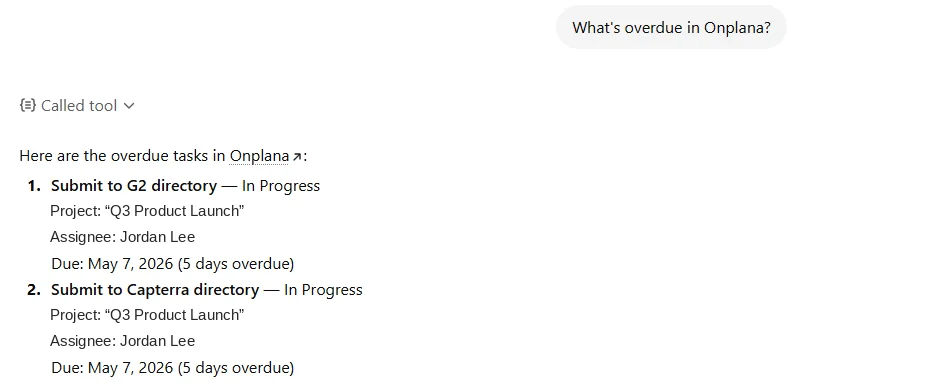
Ask "what's overdue in Onplana?" in ChatGPT or Claude and it reads live data through the MCP server, the tool-call indicator is the proof. Then tell it to mark a task done, and it does, against your real org.
Try it on your own projects
Sign up free, import a Microsoft Project file or start from a sentence, and have a populated project in minutes. No card required.
Prefer to read first? Browse the step-by-step docs