AI Meeting Notes to Tasks: What Works and What Fails
AI meeting notes to tasks tools extract action items from transcripts automatically. Here's what works, what breaks, and the patterns that actually ship.
Find the notes from your last project status call. However you recorded them: a bullet dump someone typed during the meeting, a Teams auto-transcript, or a Zoom AI summary. Read through them and count the explicit action items. Now count the implicit ones: the things that were clearly decided but never stated as "X will do Y by Z."
In most meeting notes, explicit action items outnumber implicit ones by about two to one. The AI meeting notes to tasks workflow captures the explicit ones reliably. The implicit ones remain exactly as invisible as they were in the original notes.
This distinction matters because the implicit actions are often the consequential ones. The explicit action item is "Tim will update the rollout plan." The implicit one is: the rollout plan changes, which means the testing window moves, which means the vendor needs to be notified. Tim's task got created; the downstream implications did not.
The direct answer: AI meeting notes to tasks tools reliably extract explicit action items with clear owner/deadline/description triples. They fall short on implicit actions, ambiguous assignments, group commitments, and anything that requires understanding project context to interpret correctly. The workflow is worth implementing for explicit-item extraction; it does not replace a PM reading the notes and thinking about consequences.
The real problem meeting-to-task is solving
The workflow addresses a specific friction point: after every meeting, someone spends 5 to 20 minutes copying action items from notes into a task management tool, assigning owners, setting due dates, and routing each task to the right project. Across a PMO running ten projects, each with two or three meetings per week, that is two to four hours per week of administrative PM work that produces no analysis value. The PM is a transcriptionist.
AI can handle that transcription role with reasonable accuracy, which is genuinely worth having. It also creates a byproduct benefit: when meeting notes are processed automatically, action items appear in the task system within minutes of the meeting ending, rather than appearing at the end of the day (or not at all). Accountability becomes visible faster.
The workflow does not address the broader problem of meeting note quality, which is the actual bottleneck in most PMOs. Meetings where nobody has clear ownership of action items, or where commitments are made implicitly, produce transcripts that even a human reviewer struggles to convert into tasks. AI does not fix ambiguous meetings: it just processes them faster and with equal ambiguity in the output.
How AI meeting notes to tasks actually works
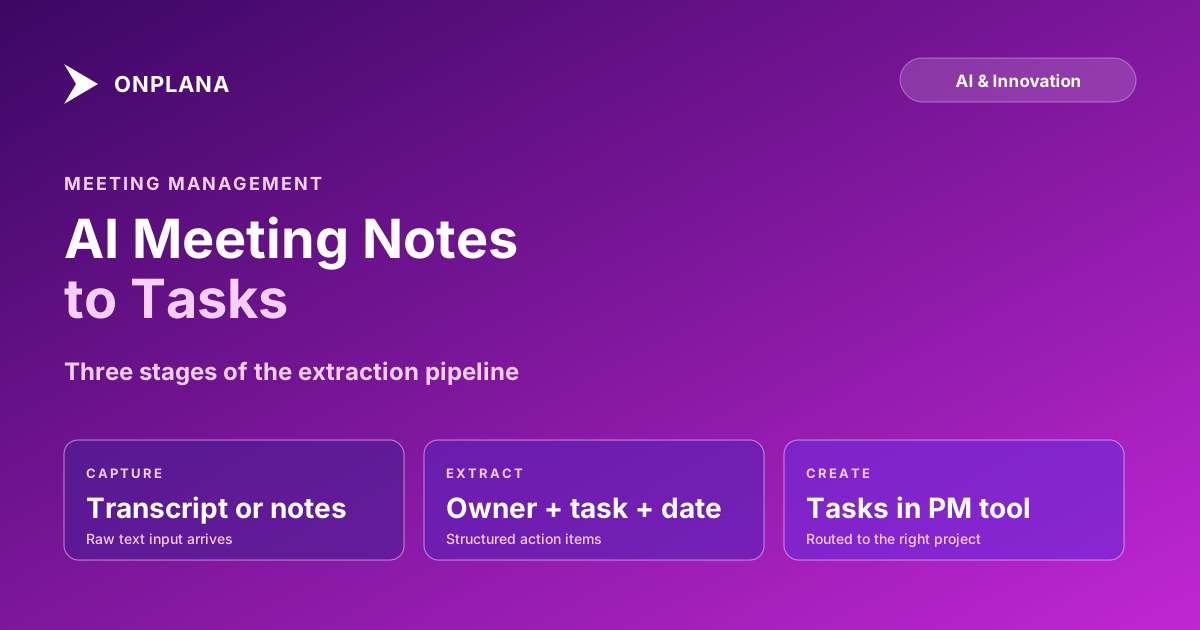
The technical pipeline has three stages, regardless of which tool implements it.
Capture. The tool receives the raw text: either a structured transcript (speaker-labeled turns, timestamps) or unstructured meeting notes (bullet lists, paragraphs, tables). Structured transcripts produce higher extraction accuracy because speaker attribution is already present. Unstructured notes require the model to infer speaker attribution from context, which it does adequately for single-speaker notes and poorly for multi-speaker discussion dumps.
Extraction. The model identifies spans of text that contain action items: usually sentences with future-tense verbs, explicit agent phrases ("John will," "the team needs to," "we agreed that Sarah would"), or imperative statements directed at a named person. For each span, the model extracts four fields: owner (who), task (what), deadline (when), and project context (where it belongs). The first three fields extract reliably for well-formed action items. Project context is the hardest: the model must infer from the surrounding meeting content which project the task belongs to, and this inference fails often enough to require a routing review step.
Creation. The extracted tasks are pushed to the target system. In integrations with direct PM tool access, this means creating real task records with fields populated from the extraction. In lower-fidelity integrations, this means generating a formatted list that someone manually copies.
The diagram below shows where each stage can break.
What AI extracts well
For meetings that follow even loose conventions, AI meeting notes to tasks extraction performs reliably on three item types.
Explicit commitments with a named owner. Any sentence of the form "Alex will do X by Y" extracts with high confidence. The owner is unambiguous, the deadline is stated, and the task content is clear. These are the items that were already going to land in the system anyway; the AI just removes the manual copy-paste step.
Decisions with follow-on actions. "We decided to delay the launch, so the marketing team will update the campaign calendar" contains an implicit chain, but the action item is still explicitly stated for the marketing team. AI handles this type well because the action item is fully specified even if the reasoning is attached.
Recurring action items across meeting series. If your weekly status call reliably generates the same category of items ("weekly progress report to stakeholders," "dependency update to engineering lead"), a well-configured integration learns to route these without ambiguity. The confidence for recurring patterns is higher than for novel action items.
One practical note: extraction quality improves significantly when you use AI tools to take notes during the meeting rather than processing notes afterward. Real-time capture tools that track speaker attribution (Microsoft Teams Copilot, Zoom's AI Companion, Otter.ai) produce structured transcripts with timestamps and speaker labels that are substantially easier to process than a human's free-form notes typed after the fact.
Where AI meeting-to-task fails reliably
Four failure modes appear in nearly every implementation, regardless of the underlying model.
Implicit action items. The most consequential decisions in a meeting are often never stated as tasks. When the team agrees to cut a feature from the current sprint, the action items are: update the roadmap, notify the customer who requested it, unblock the dependent engineering work, and reschedule the sprint review. None of these are stated explicitly. AI extracts nothing; a PM reviewing the notes adds all four. This is not an AI limitation that better models will overcome: the information was never in the text.
Group commitments. "The engineering team will have this ready by Friday" produces an extracted task with no specific owner, no clear assignee, and no accountability. Who on the engineering team? Group-attributed tasks require human assignment before they are useful. AI that guesses by assigning the task to the meeting's engineering representative is often wrong enough to create confusion.
Deadline ambiguity. "Next week," "by the end of the sprint," and "before the client call" all require outside context to resolve to a calendar date. AI that has access to your calendar can resolve "before the client call" if a client call is in the meeting owner's calendar. AI without that access outputs vague deadlines that appear precise: "next week" becomes "2026-06-28" based on the transcript date, which may be wrong if the meeting ran on a Friday and "next week" meant the following Monday.
Context-dependent tasks. "Update the tracker" is a task only if you know which tracker, what the current state is, and what "update" means in context. These items appear in team-specific shorthand that the model has no way to decode without your project context. Well-integrated PM tools with RAG access to your project data do better here: they can resolve "the tracker" to a specific linked spreadsheet or dashboard. Tools that process the transcript in isolation produce a task with a title that only the person in the meeting understands.
Three integration patterns that actually ship
Not all meeting-to-task implementations work in practice. Three patterns have proven to hold up across different team sizes and meeting cadences.
Meeting type routing. Define which project each recurring meeting type maps to. Standup notes route to the active sprint board. Steering committee notes route to the program task list. Client meetings route to the client project. This one configuration decision eliminates most wrong-project routing errors and removes the need for post-extraction manual triage.
Explicit confirmation step. The AI generates a list of extracted tasks and shows them to the PM before creating any records. The PM accepts, rejects, or edits each item in thirty to sixty seconds. This adds a step, but it catches the group-commitment and implicit-item gaps before they become noise in the task system. Tools that auto-create tasks without confirmation produce more total tasks but fewer useful ones: team members start ignoring AI-generated tasks, and the workflow loses its value.
Structured meeting notes format. If your team uses a consistent notes template with an explicit "Action Items" section formatted as "Owner: Task: Due Date:", extraction accuracy improves substantially. You are essentially pre-formatting the extraction input. The overhead is small (teams who take structured notes already do this), and the payoff in extraction confidence is measurable.
Testing your current tool against edge cases
Before committing to a meeting-to-task integration, run it against three edge cases that reveal the quality gap between implementations.
Give it a meeting where the key decision was a scope cut. Count how many of the downstream actions appear in the extracted task list. Most tools extract zero.
Give it a meeting with three recurring phrases your team uses: your internal name for a dashboard, your term for a specific process, your abbreviation for a customer. See how many the model handles versus how many it translates incorrectly or outputs as literal text. Tools with project context do better; generic processors fail here.
Give it a meeting where two people have the same first name. See which tasks get attributed correctly. Speaker attribution failures in multi-participant meetings are a common quality issue that extraction demo videos rarely test.
If the tool fails on all three, the value proposition is limited to the low-hanging explicit items your team was already capturing anyway. If it handles one or two well, it is probably worth the integration overhead.
Building AI meeting notes to tasks into your PM cadence
The workflow integrates cleanly into most PM cadences with three configuration decisions.
Match the meeting type to the action item routing. Align the AI extraction trigger (automatic for all meetings with transcripts, manual for ad-hoc calls) to the meeting types that consistently produce actionable output. Steering committee calls and sprint reviews produce high-value items; hallway chats recorded on video do not.
Assign a rotating reviewer. Someone reads the extracted task list after each high-stakes meeting and adds the implicit items the AI missed. This is not a failure of the workflow: it is the intended division of labor. AI handles the explicit extraction; a human handles the consequential ones that require judgment.
Instrument the miss rate. Track how often the rotating reviewer adds items the AI did not extract. If the miss rate on explicit items is above 10 percent, the extraction quality is below the threshold for trusting the workflow unsupervised. If it is below 5 percent for explicit items, the workflow is working correctly, and the misses are the implicit items that no automation can catch.
The AI Status Report Writer solves an adjacent problem: turning the output from those meetings, the progress log and open items, into a first-draft status report for stakeholders. The two tools compose naturally: meeting-to-task extraction creates the record of what was committed; the status report writer synthesizes what has been completed. Together they reduce the post-meeting administrative load that typically consumes an hour or more of PM time per project per week.
For a broader look at how natural-language task parsing works inside a PM product, see How AI Runs Project Management in Onplana, which covers the NL parsing surface that underlies the meeting-to-task integration and how it connects to the broader AI stack.
Onplana's natural-language parser processes meeting transcript sections and inbound email body text using the same extraction model. Any text forwarded to a project's inbound mailbox, including a pasted transcript section, gets parsed for action items and surfaced as draft tasks. The Onplana features overview describes the full set of AI surfaces and how they connect to the scheduling engine.
Run the free Status Report Writer After your meeting's action items are captured, the Status Report Writer converts your project's progress log into a first-draft stakeholder update in about five seconds. No login required. → Open the Status Report Writer
Frequently asked questions
What does AI meeting notes to tasks actually do?
It parses a meeting transcript or note dump, identifies sentences that contain action items, extracts the owner, deadline, and task description, and creates structured tasks in your project management tool. Better implementations also route tasks to the correct project based on meeting context.
What makes a meeting transcript easier for AI to process?
Clear assignment language ('Sarah will review the proposal by Thursday'), explicit deadlines, and a consistent transcript format all improve extraction accuracy. Rambling discussion without clear attribution produces ambiguous extractions that need manual review.
What does AI get wrong when converting meeting notes to tasks?
Four things reliably: implicit action items (things assumed but not said), tasks assigned to groups rather than individuals, deadline ambiguity ('next week' vs a calendar date), and context-dependent tasks that only make sense if you know the broader project context.
Does AI meeting-to-task work without a transcript?
Yes, but accuracy drops. Free-form meeting notes work better than nothing; formatted bullets with owner and date work nearly as well as a transcript. The model needs enough signal to infer who owns what and when it is due.
Which PM tools support AI meeting notes to tasks?
Onplana supports this via its natural-language task parser, which processes meeting transcript sections and email body text. Several standalone tools (Otter.ai, Fireflies.ai, Notion AI) also extract action items, but without native PM integration the tasks still require manual routing.
How do I handle action items that belong to different projects?
Route by meeting type first: standups route to the sprint board, steering meetings to the program-level task list, cross-team syncs to a shared inbox for manual triage. Most tools let you define project mapping rules at the meeting-series level.
Ready to make the switch?
Start your free Onplana account and import your existing projects in minutes.