Deploying Onplana on Azure: Architecture and Steps
Deploy Onplana on Azure with AKS, Azure SQL, Key Vault, and Entra ID. Complete Onplana Azure architecture guide for IT teams and regulated enterprise PMOs.
Here is the pattern. An organization has been on Microsoft Project Online for years. Their IT estate is Azure-first: Entra ID for identity, Azure SQL for most workloads, Azure Blob for storage, Key Vault for secrets. When Project Online retires on September 30, 2026, they start evaluating replacements.
Their natural instinct is to keep the replacement in Azure. They already have the compliance documentation for Azure infrastructure. Their security team knows Azure's controls. Moving to a SaaS product hosted on AWS or on someone else's multi-tenant cloud means starting a new vendor security review from scratch.
Deploying Onplana on Azure lets those organizations keep their project data inside the Azure tenant they already govern. They get a modern AI-native PM platform without renegotiating their data residency controls.
TL;DR Onplana deploys on Azure using AKS or App Service for the application layer, Azure Database for PostgreSQL as the database, and Azure Blob Storage as the object store. Azure Key Vault holds secrets. Entra ID handles SSO and SCIM provisioning. Private endpoints keep all service traffic within the virtual network. The deployment takes one to two days for an experienced Azure engineer.
When Azure Makes Sense for an Onplana Azure Deployment
Azure self-hosted makes sense in the same situations as any self-hosted deployment: hard data-residency requirements, air-gapped or restricted networks, on-premise data integration. It also makes sense for one additional reason specific to Azure: your organization already has mature Azure governance controls, compliance documentation, and an active Entra ID tenant, and adding a new SaaS vendor means re-certifying a new external cloud relationship.
If you are migrating from Project Online, you almost certainly already have this Azure infrastructure. Your Project Online data lived in Microsoft-managed SharePoint infrastructure, but your Entra ID tenant, Key Vault, and Azure monitoring setup are yours. The Onplana Azure deployment slots into that existing governance model with minimal new surface.
The decision criteria are the same as for any self-hosted path: if you need project data in infrastructure you control, self-hosted is the answer. If SaaS with Azure region selection covers your actual requirements, it is simpler. The self-hosted deployment overview has the full framework for making this call before you commit to deploying infrastructure.
Onplana Azure Reference Architecture
The diagram below shows the full architecture inside an Azure Virtual Network. An Application Gateway or Azure Load Balancer fronts inbound HTTPS traffic. AKS pods run in a private node pool subnet. Azure Database for PostgreSQL, Blob Storage, and Key Vault are accessed via private endpoints so no traffic crosses the public internet inside the network.
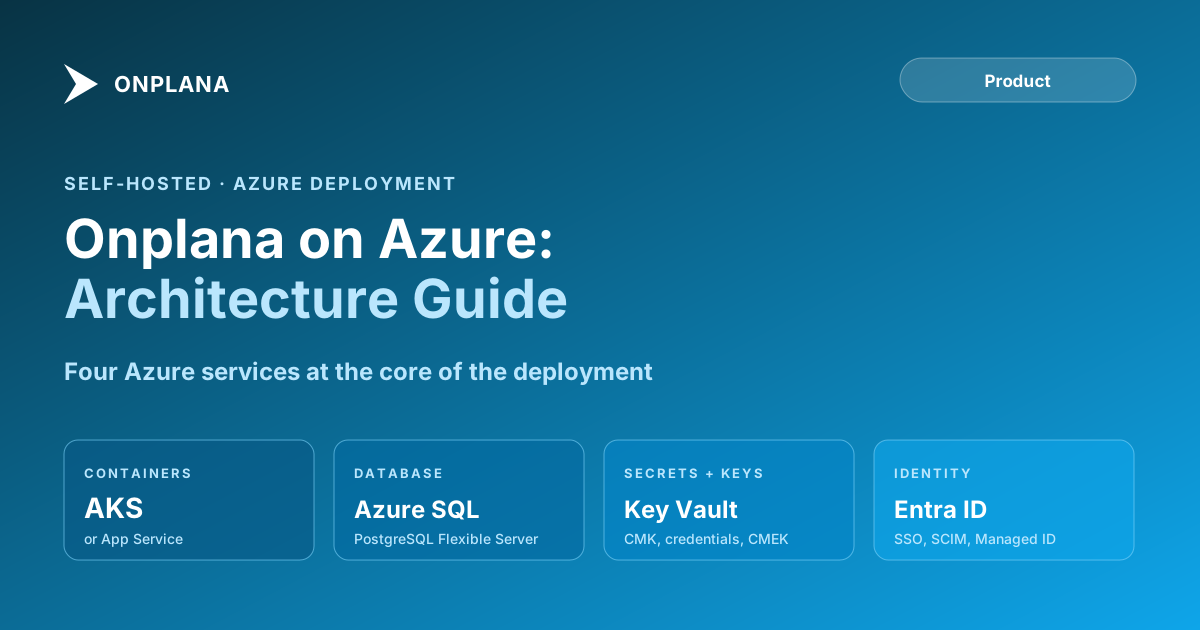
Four components define the architecture: the container layer, the managed database, object storage, and the Key Vault and Entra ID services for secrets and identity management.
Container Layer: App Service vs AKS
Onplana runs as a single Docker container. Two Azure services can host it.
Azure App Service is the lower-friction path. Create an App Service Plan (at least P2v3 for 2 vCPU, 8 GB), deploy the Onplana container image, configure environment variables referencing Key Vault secrets, and assign a system-assigned managed identity. App Service handles OS patching, scaling, and availability. Deployments are a container image tag update plus a restart. For organizations that do not already run Kubernetes, App Service avoids the AKS control-plane cost and the operational overhead of cluster management.
Azure Kubernetes Service is the right path when your organization runs an existing AKS cluster or wants Onplana to share a cluster with other containerized workloads. Onplana deploys via a Helm chart. Use Azure Workload Identity (the modern replacement for pod-managed identities) to assign the pod a managed identity for keyless authentication to Azure services. AKS with Azure Kubernetes Service provides the same managed control-plane model as EKS on AWS: Microsoft manages the API server; you manage the node pools.
For new deployments: use App Service unless you have an existing AKS cluster. The simplicity gap between App Service and AKS is larger on Azure than the Fargate-vs-EKS gap on AWS.
Database: Azure Database for PostgreSQL
Onplana requires PostgreSQL 14 or later. Azure Database for PostgreSQL Flexible Server is the recommended option: it supports zone-redundant high availability, read replicas, and CMK encryption via Key Vault, and it avoids the maintenance windows of the older Single Server tier.
Provision the instance inside the virtual network using a private endpoint so the database is not reachable from the public internet. For compute sizing, a 2-vCore General Purpose tier handles up to 50 concurrent users. A 4-vCore General Purpose tier handles 50 to 200 users. For 200-plus users or when query response time becomes a bottleneck, move to 8 vCores or the Business Critical tier, which includes a zone-redundant standby replica for automatic failover.
Enable customer-managed keys in Key Vault to satisfy compliance requirements around key ownership. Set the Key Vault key rotation policy to automatic annual rotation; Azure Database for PostgreSQL re-encrypts the database with the new key automatically when the rotation fires.
Set the backup retention window to at least 7 days. For compliance-heavy environments, enable geo-redundant backups and set retention to 35 days (the Azure maximum). Test the restore procedure before going live.
Storage: Azure Blob Storage
Onplana uses Azure Blob Storage for file attachments, .mpp import processing, report exports, and static assets. Create a dedicated storage account in the same region. Enable customer-managed keys from Key Vault. Enable versioning and soft-delete on the blob container if your compliance policy requires point-in-time recovery of deleted files.
Grant the Onplana pod or App Service managed identity the Storage Blob Data Contributor role scoped to the specific storage account, not to the full subscription. This follows the principle of least privilege and limits the blast radius if the application credential is ever misused.
Create a private endpoint for the storage account. Traffic between the application container and blob storage then stays inside the virtual network. Disable the "Allow public network access" setting on the storage account firewall after the private endpoint is confirmed working. Never allow direct public access to blob containers; Onplana serves downloads through time-limited signed URLs (SAS tokens).
Identity and Security: Entra ID, Key Vault, SCIM
Managed Identity eliminates credential management. Assign a user-assigned managed identity to the App Service or AKS workload. Grant this identity the specific roles it needs: Storage Blob Data Contributor on the storage account, Key Vault Secrets User on the Key Vault, and database access via the PostgreSQL firewall allowlist. No connection strings or API keys appear in environment variables; the identity token is fetched automatically from the Azure IMDS endpoint.
Key Vault centralizes secrets and encryption keys. Store any secrets that cannot use managed identity (SMTP credentials, Anthropic API key for SaaS AI, third-party webhook tokens) as Key Vault secrets. Reference them in the App Service or Kubernetes manifest using Key Vault secret references; the platform fetches and rotates them transparently. Store the CMK keys for database and storage encryption as Key Vault keys, separate from the secrets, with their own access policies.
Entra ID for SSO and SCIM. Configure Onplana's SAML 2.0 or OIDC integration with your Entra ID tenant in Org Settings. Enterprise customers can also configure SCIM 2.0 provisioning to automate user creation, deactivation, and role assignment when employees join or leave the organization. For a detailed walkthrough of SSO configuration options, the security and compliance overview covers the SAML, OIDC, and SCIM setup flows.
How Onplana Handles AI
Onplana's AI features (plan generation, risk detection, status writing) run on two managed providers: Claude (Anthropic) and Azure OpenAI (GPT-4 family). Onplana manages provider selection and failover at the platform level, so if one provider is degraded or has an outage, Onplana routes to the other. These calls go to Onplana's managed provider endpoints over their enterprise APIs, which contractually do not train on customer inputs.
Onplana stores its provider API keys in Azure Key Vault. The AI provider is managed by Onplana and is not configured per deployment; there is no customer-supplied AI-provider option. If AI features are enabled, the deployment needs outbound access to Onplana's AI providers, so in a fully air-gapped deployment AI features are disabled while all scheduling, Gantt, resource, and governance features continue to work.
The Azure OpenAI support announcement covers the dual-AI architecture in more detail, including how Claude and Azure OpenAI interact with the Onplana data model.
First Deployment Checklist
Run through each item before sending production traffic to the deployment. These are the failure modes that appear in real Azure deployments.
Confirm the healthcheck at
/api/healthreturns 200 with database connectivity confirmed. A database misconfiguration shows as a 500 on every page; catch it here before users see it.Verify managed identity access to Blob Storage. Upload a test file through the Onplana UI and confirm the download works. App Service or AKS managed identity permission errors are silent at startup and loud in production.
Test Key Vault secret retrieval in the application logs. Look for Key Vault access errors in the App Service diagnostic logs or AKS pod logs. A missing Key Vault Secrets User role assignment prevents startup silently until a secret is requested.
Confirm private endpoints are routing correctly. Run a connectivity test from inside the virtual network to the storage account and database using their private FQDNs. Public DNS resolution should return the private IP; if it returns the public IP, the private DNS zone is misconfigured.
Test Entra ID SSO with a real user login before go-live. SAML clock skew and OIDC callback URL mismatches do not surface until users actually try to authenticate. Test the full authentication flow with a non-admin account.
Import a test .mpp file. Confirm dependency types and baselines survive the import before migrating production Project Online data. The import process exercises Blob Storage write permissions that the basic healthcheck does not cover.
Restore from backup. Provision a test restore from the first Azure Database for PostgreSQL backup to confirm the restore procedure works and data is intact. Run this test before the deployment goes live, not after the first incident.
Review the Onplana features page for AI configuration. If AI features are enabled but the Azure OpenAI or Anthropic API is unreachable from the VNet, AI calls fail with a visible error in the UI. Confirm AI is working or explicitly disabled before users try AI Project Kickstart.
For compliance documentation for an Azure-hosted deployment, including vendor DPAs, security questionnaire responses, and control matrices, reach out via the contact page.
Microsoft Project Online™ is a trademark of Microsoft Corporation. Onplana is not affiliated with Microsoft.
Frequently asked questions
Can Onplana be deployed on Azure?
Yes. Onplana ships as a Docker image and runs on Azure Kubernetes Service (AKS) or Azure App Service. Azure Database for PostgreSQL Flexible Server is the recommended database, and Azure Blob Storage serves as the object store.
What Azure services does an Onplana deployment require?
Core services: AKS or App Service for containers, Azure Database for PostgreSQL, Azure Blob Storage, Azure Key Vault for secrets, and Entra ID for SSO and SCIM provisioning.
Does Onplana on Azure integrate with Azure OpenAI?
Onplana's AI features run on two managed providers, Claude (Anthropic) and Azure OpenAI (GPT-4 family). Onplana manages provider selection and failover at the platform level and stores the provider API keys in Azure Key Vault. Customers do not configure the AI provider.
How does Onplana on Azure handle Entra ID SSO?
Configure Onplana's SAML 2.0 or OIDC integration with your Entra ID (formerly Azure AD) tenant. SCIM 2.0 provisioning for automatic user lifecycle management is available on the Enterprise plan.
What managed identity permissions does the Onplana AKS pod need?
The pod's managed identity needs Storage Blob Data Contributor on the storage account, Key Vault Secrets User on the Key Vault, and access to Azure Database for PostgreSQL via the firewall allowlist or private endpoint.
Can Onplana on Azure run with no public internet access?
Yes. Use private endpoints for Azure Database for PostgreSQL, Azure Blob Storage, and Key Vault. Deploy AKS with a private cluster. AI features require outbound access to Onplana's managed AI providers, so in a fully air-gapped deployment AI features are disabled while all scheduling, Gantt, resource, and governance features continue to work.
What is the recommended Azure Database for PostgreSQL tier?
General Purpose with 2-4 vCores handles up to 100 active PMO users. For 100 to 500 users, increase to 8 vCores or move to the Business Critical tier for high-availability with zone-redundant standbys.
Ready to make the switch?
Start your free Onplana account and import your existing projects in minutes.