AI Token Budgets in PM Tools: What Each Feature Costs
AI token budget limits hit without warning. Know what each AI feature costs in tokens, how to estimate your monthly usage, and choose the right plan tier.
The support request arrived on a Wednesday morning, mid-sprint. "Our AI summaries stopped working. Is it down?" The tool was not down. The organization had consumed its monthly AI token allocation in eleven days. Three project managers on four active projects had been running the AI status writer daily, plus two had been using plan generation for a new initiative. The mid-month cutoff was a surprise because nobody had explained what an AI token budget was, how fast it ran down, or what to do when it ran out.
This is the standard first encounter with AI token limits: retroactive, during a crunch, when it's least convenient to stop and figure out why.
TL;DR: An AI token budget is the total volume of text your AI features can process in a billing period. Tokens are the unit AI providers charge for: roughly four characters or three-quarters of a word. A status summary on a medium-complexity project uses 1,500 to 3,000 tokens. A team of five PMs running weekly AI summaries for four projects each will consume 120,000 to 240,000 tokens per month on status reporting alone. Estimate your usage before committing to a plan tier, and build in a 20% buffer for ad-hoc queries. The pricing page shows current Onplana tier caps.
What an AI token budget actually is
A token is the unit of text that AI language models process. The most common approximation: one token equals roughly four characters in English, or about three-quarters of a word. A 500-word project update is approximately 670 tokens. A 2,000-word project plan is approximately 2,700 tokens.
Every AI feature in a PM tool works the same way underneath: it sends a request to a language model, the model processes the request and generates a response, and both the input and output are counted in tokens. The request includes a system prompt (instructions that tell the model how to behave), the context the feature needs (your project data, task list, status history), and your specific input. The model processes all of that text, generates a response, and returns it. Total tokens processed equals the cost.
PM tools that offer AI features pay this cost to the AI provider and fold it into their subscription pricing. Major AI providers publish their per-token costs in developer documentation; Anthropic's model pricing shows how costs scale by model tier, which is the upstream structure PM tools buy wholesale and repackage as subscription tiers. When a plan tier says "500,000 AI tokens per month," that is the total amount of text their AI features can process on your behalf, across all users in your organization, during the billing cycle.
The reason this matters in practice: usage is not uniform. A project manager running ten large, long-running projects will consume ten times the AI budget of a PM running one small project, even if both click the status button the same number of times. The token cost scales with project complexity, not with feature use count.
Why PM tools meter AI by token instead of by feature run
Per-token metering reflects how AI inference actually works economically. The same AI feature costs very different amounts depending on how it is used.
A status summary for a two-week project with ten tasks is cheap. The context the model receives is small, the response is short, and the total token count is low. The same feature on a project with 200 tasks, six months of status history, and a comment thread on a critical dependency is expensive. The model processes far more text to produce the summary.
If a PM tool charged per feature run (one credit per status summary regardless of project size), it would be subsidizing large-project users at the expense of small-project users. Per-token metering means cost scales with actual use, which is also how it scales with value: the AI produces more useful output on a richer context, and that richer context costs more to process.
The practical implication for PMOs evaluating plan tiers: do not count the number of AI feature clicks your team makes per month. Count the token volume those clicks produce. A small number of large-project, heavy-context queries can exhaust a token budget faster than a high volume of small-project queries.
How many tokens each AI feature uses
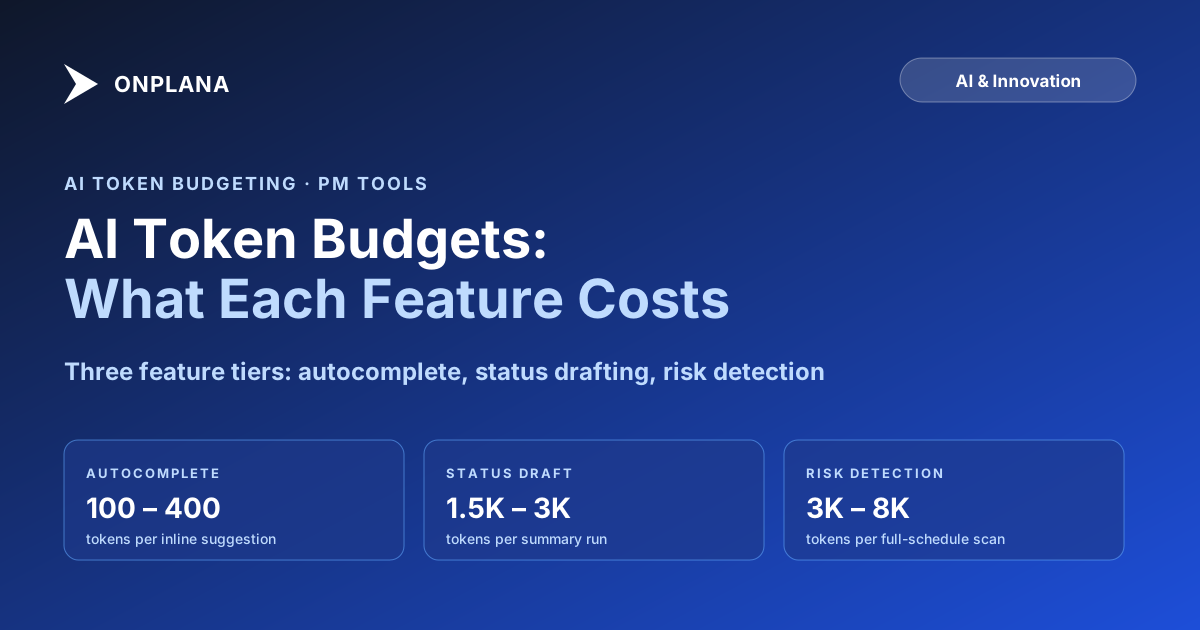
The diagram below shows typical token consumption ranges for the AI features most PM tools offer. These figures cover the full request, including the system prompt, context, user input, and response, at medium project complexity.
The key pattern: risk detection is the most expensive AI feature by a wide margin, because the model context includes the full task list, resource assignments, baseline data, and often status history. That context can be 5,000 to 10,000 words of structured data before the model produces any output. Autocomplete, by contrast, is trivially cheap because each call sends only a short sliding window of recent text.
Calculating your team's monthly token requirement
A four-step estimation model:
Step 1: Count your weekly AI runs per feature type. How many status summaries does each PM generate per week? How many risk detection runs? How many plan generations?
Step 2: Multiply by the token midpoint for each feature type. Use the middle of the ranges in the diagram above: 2,250 for status summaries, 4,000 for risk detection, 4,000 for plan generation.
Step 3: Multiply by team size. Scale by the number of PMs who will use AI features regularly, not your total headcount.
Step 4: Multiply by four for the monthly total, then add 20% for ad-hoc queries, onboarding, and usage spikes.
A worked example for a team of six PMs, each running four active projects:
- Weekly status summaries: 6 PMs × 4 projects × 2,250 tokens = 54,000 tokens/week
- Weekly risk detection: 6 PMs × 2 projects × 4,000 tokens = 48,000 tokens/week
- Monthly subtotal: (54,000 + 48,000) × 4 = 408,000 tokens
- Buffer (20%): 81,600 tokens
- Estimated monthly total: 489,600 tokens
If the plan tier cap is 500,000 tokens, this team is operating close to its limit with no room for plan generation or unusual activity. Realistically, a team at this usage pattern needs the next tier up.
The AI-first architecture walkthrough covers how Onplana routes different requests to different model tiers, which affects token cost directly. Short autocomplete calls and risk detection calls go to different models with different token economics; understanding the routing helps teams predict costs more accurately before committing to a plan.
What happens when you exceed the token budget
Behavior varies by tool vendor, and most teams do not discover their vendor's policy until after they hit the limit.
Hard cutoff with graceful degradation. AI features stop generating output and display a message until the billing cycle resets. Other non-AI features continue working normally. This is the most common implementation.
Overage billing. The tool continues serving AI requests and charges per token for usage above the cap. This avoids the mid-month cutoff problem but can produce an unexpectedly large invoice if the overage is large.
Throttling. AI features continue working but at a slower rate, queuing requests and prioritizing by user role or feature type. Status summaries might continue working while risk detection is paused.
Silent degradation. Some tools return generic or empty AI output when the budget is exhausted without clearly flagging why. The PM sees what looks like a low-quality AI response when the actual cause is a depleted budget. This failure mode is the most disruptive because it is the hardest to diagnose quickly.
Check your tool vendor's documentation before you need this answer. Discovering the policy during a sprint review is considerably more disruptive than discovering it during procurement.
For context on how AI features work inside Onplana specifically, including the allocation model and how administrators can monitor usage, that post covers the operational details.
Choosing the right AI plan tier
Most PM tools with AI features offer two to four plan tiers with different token allocations. Three approaches to choosing the right one:
Estimate first, then commit. Run the four-step calculation above before signing the contract. The calculation takes about fifteen minutes and prevents a first-month budget shock. If the estimate falls near a tier boundary, start at the higher tier.
Start lower, watch the dashboard, upgrade if needed. If you have genuinely low confidence in your usage estimate (new team, new tool, uncertain feature adoption), start at the lower tier and monitor the usage dashboard for the first two to three weeks. Most tools expose a running token total for the current billing period. Extrapolate to the full month and upgrade if you are projecting an overrun.
Use AI selectively rather than universally. Not every project needs daily AI analysis. Reserving risk detection for your largest and most complex projects, and running plan generation only at project kick-off, can reduce monthly token consumption by 40% to 60% without meaningfully reducing AI value to the team.
The pricing page shows the current Onplana plan tiers and token allocations per tier. Compare the tier caps against the monthly estimate your team produces from the four-step model.
How to reduce token consumption without losing value
Token costs scale directly with context size. The most effective way to reduce consumption is to pass less text to each AI feature call while keeping the text specific.
Maintain a curated project brief. Instead of passing full task exports with all historical updates to each AI feature, maintain a structured brief that captures the current project state in 300 to 500 words. An AI summary built on a curated brief uses a fraction of the tokens that the same feature uses on a raw full schedule export, and often produces better output because the brief is structured around what matters rather than everything.
Scope risk detection to high-value tasks. Running full-schedule risk detection on a 400-task project is expensive. Running the same detection on the 40 tasks on or near the critical path produces actionable alerts at roughly one-tenth the token cost. Most of the risks worth responding to are on or adjacent to the critical path anyway.
Batch portfolio summaries. A single portfolio-level summary for five projects in one AI call uses fewer total tokens than five separate project-level calls, because the shared context (system prompt, formatting instructions) is only counted once.
Reserve plan generation for kick-off. Using AI to regenerate a project plan on an in-flight project is expensive and rarely produces useful output; the AI does not have the context of why current tasks exist or what constraints were already negotiated. Plan generation is most valuable at project initiation.
The Status Report Writer tool applies an optimized prompt architecture that minimizes token consumption for status drafting while maintaining output quality. The tool's input structure, which asks for concise, specific inputs rather than a raw project export, is a useful model for how to structure AI calls efficiently across other features too.
Run the token estimation model against your team's actual usage pattern before your next plan renewal. The calculation takes fifteen minutes, prevents the mid-month cutoff that catches most teams by surprise, and gives you a concrete number to use in vendor negotiations if the available tiers do not fit your usage profile cleanly.
Frequently asked questions
What is an AI token budget in a project management tool?
An AI token budget is the total volume of text your AI features can process in a billing period. One token equals roughly four characters or three-quarters of a word. PM tools charge by tokens because AI inference providers (Anthropic, OpenAI) charge by tokens, and the cost scales with how much text the model processes per request.
How many tokens does a typical AI status report use?
A status report on a medium-complexity project uses roughly 1,500 to 3,000 tokens per run. The exact count depends on how many tasks the schedule contains, how much history the tool includes in the context, and how long the generated output is. Larger projects with longer status histories use proportionally more tokens.
Which AI PM tool features use the most tokens?
Risk detection is the most token-intensive feature, typically consuming 3,000 to 8,000 tokens per run because it requires the full task list, resource assignments, and baseline data in the context. Plan generation runs second at 2,000 to 6,000 tokens. Status summaries are in the middle. Autocomplete is the cheapest at 100 to 400 tokens per prompt.
What happens when I hit my AI token limit mid-month?
Behavior varies by tool vendor. Most implement a hard cutoff (AI features stop generating output), overage billing (charges continue per token), or throttling (requests queue at reduced speed). A minority of tools silently return empty or generic output without flagging why, which is the worst outcome. Check your vendor's documentation before you hit the limit.
How do I choose the right AI plan tier for my team?
Run a usage estimate before committing: multiply your team's weekly AI feature runs by the median token count for each feature type, scale by team size, and multiply by four for monthly total. Compare that number against the plan tier caps. Add a 20% buffer for ad-hoc usage. If the estimate falls near a tier boundary, start at the higher tier.
How can I reduce token consumption without losing AI value?
Three high-impact tactics: pass a curated project brief to AI features instead of the full raw task export (reduces context size by 60-80%), limit risk detection to critical-path and near-critical tasks rather than the full schedule, and batch status summaries at the portfolio level rather than running them project by project.
Ready to make the switch?
Start your free Onplana account and import your existing projects in minutes.