Managing Multi-Currency Project Budgets in Onplana
Multi-currency project budgets break in single-currency PM tools. Here's how Onplana handles FX rates, budget consolidation, and cross-currency reporting.
Managing a multi-currency project budget across an international portfolio usually looks like this. The budget is approved in USD. The European vendor invoices in EUR. The delivery team is costed in INR. The executive dashboard reports in GBP because that is the CFO's home currency. Every month, a project coordinator applies FX rates in a spreadsheet to reconcile four currencies into one number the finance team will accept. The spreadsheet uses slightly different rates than the one the finance team uses. Nobody notices until the quarterly review, at which point nobody can explain the variance.
Single-currency PM tools do not solve this. They track one currency per project, leave the conversion to spreadsheets, and produce portfolio roll-ups that ignore the problem entirely. The result is a PM tool that feels integrated and a budget process that is not.
Multi-currency project budgets in Onplana address this at the data model level. Each project defines its primary currency. Resource rates carry their home currency. The portfolio rolls everything up to a base currency through a configurable exchange rate mechanism. The monthly spreadsheet step disappears because the conversion is part of the tool's data model, not a downstream workaround.
TL;DR. Onplana's multi-currency budget system lets each project track costs in its own currency, converts resource rates from their home currency automatically, and rolls everything up to a portfolio base currency for consolidated reporting. Exchange rate handling is configurable in three modes: snapshot rates locked at project initiation, periodic rate updates on a schedule, and manual rates published by your finance team. The result is budget visibility across currencies without the monthly FX reconciliation exercise.
Why Single-Currency PM Tools Fail International Projects
The failure is structural, not cosmetic. A PM tool that records budget amounts in one currency field has no place to store the exchange rate. When a vendor invoice arrives in EUR and the project budget is in USD, the PM converts the amount, enters the converted number, and loses the original currency forever. The audit trail shows USD entries with no way to verify whether the right rate was used.
For individual projects, this is a minor inconvenience. At portfolio scale, it compounds. A portfolio of 30 projects across six countries, each with its own ad-hoc conversion approach, produces budget roll-ups that nobody fully trusts. Finance teams compensate by maintaining their own reconciliation workbooks in parallel with the PM tool, which defeats the purpose of centralizing project data in the first place.
Three specific patterns surface repeatedly in PMOs that manage cross-currency portfolios without proper tooling.
Vendor invoice variance. A contractor quotes $50,000 USD in March. They invoice EUR 47,000 in September. The project is now EUR 47,000, which at the current rate converts to $51,800 USD. Is this a budget overrun? The answer depends on whether the budget was denominated in USD or EUR and which rate was used when the quote was accepted. Without currency-aware budget tracking, the PM cannot answer this from the project record.
Resource cost allocation. An offshore team is costed at INR 800 per hour. The project budget is in USD. Every time the PM enters actual costs, they need a current USD/INR rate. If the rate moves during the project, the same resource hours cost different amounts in the budget, producing cost curve artifacts that look like overruns but are actually currency fluctuations.
Portfolio consolidation. The portfolio manager needs one number: total project spend across the portfolio in the company's reporting currency. If each project tracks costs in a different currency with no common exchange rate basis, the roll-up either uses inconsistent rates or requires a separate financial reconciliation process outside the PM tool.
Onplana's multi-currency budget system addresses all three patterns.
How Multi-Currency Project Budgets Work in Onplana
When you create a project in Onplana, you set a project currency. This is the primary currency for all budget entries, cost tracking, and variance reporting within that project. The project currency can be any currency code defined by the ISO 4217 standard.
At the portfolio level, you configure a base currency. Onplana converts all project-level amounts to the base currency for portfolio dashboards, roll-up reports, and program-level budget views. The conversion is automatic and tied to the exchange rate mode configured for each project.
Resources in Onplana carry cost rates in a home currency. A software architect in Germany has a rate in EUR. A senior engineer in Bangalore has a rate in INR. Both can be assigned to the same USD-denominated project. When Onplana calculates project cost from assignments, it converts each resource's rate to the project currency using the rate in effect for that project. The project cost report shows USD. The resource pool configuration shows each rate in its home currency. The conversion layer is visible: each cost entry shows the original amount, home currency, and the exchange rate applied.
Vendor cost entries can be recorded in the vendor's billing currency. If a EUR vendor invoices EUR 47,000 against a USD project, the PM enters EUR 47,000; Onplana converts it to USD for the project's cost tracking and stores the original EUR amount and the applied rate for audit purposes.
Exchange Rate Handling: Three Modes Explained
Exchange rate handling is where multi-currency budget systems most often go wrong. Onplana supports three modes to cover the range of organizational needs. The diagram below shows how to choose.
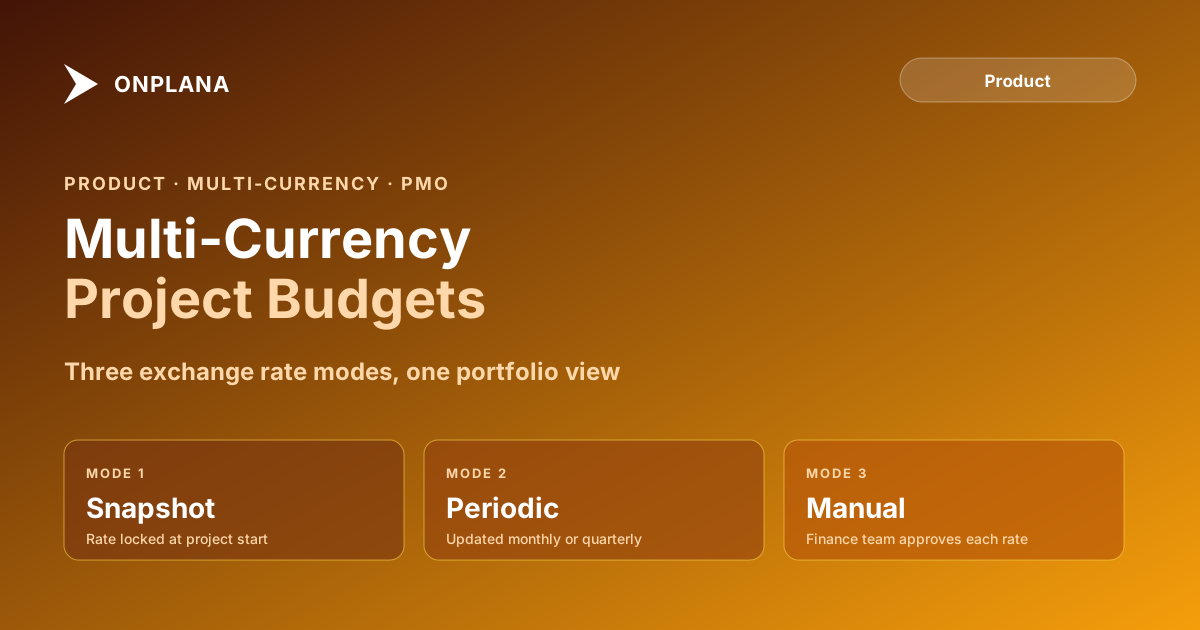
Snapshot rates. At project initiation, you record the exchange rate for each currency pair the project will use. Those rates are locked for the duration unless explicitly revised. This mode suits fixed-price contracts where cost exposure is defined upfront. If a vendor quoted EUR 100,000 at 1.08 USD/EUR, the budget is $108,000 USD and it does not move with currency markets. Variance reporting stays clean because the rate is stable.
Periodic rate updates. You define an update schedule: monthly, quarterly, or at project milestones. At each update, you enter the new exchange rates and Onplana recalculates forward-looking cost projections. Historical actuals retain the rate that was in effect when they were recorded. This mode suits long-duration projects where locking rates at initiation would create large budget variances by the time the project is complete.
Manual rates. Your finance team publishes an approved FX rate table on a defined schedule, and you enter those rates directly into Onplana. This mode is required when audit or compliance rules govern FX rate approval: the recorded rate has a chain of custody back to a finance sign-off, not a market feed, which is what regulators in financial services and pharmaceuticals typically require.
The right mode is usually not the most sophisticated one. Snapshot rates cover most projects where the budget was fixed in the contract currency. Manual rates add overhead but are non-negotiable in regulated contexts. Periodic updates fit multi-year programs where a snapshot taken in year one would produce misleading projections in year three.
Which Currency Mode Should You Use?
A practical decision rule covers the majority of cases. Use snapshot rates when the project has a fixed-price or time-and-materials contract in a defined currency and the budget was set at the start. Use periodic updates when the project runs longer than 12 months and the organizational budget process updates FX assumptions annually. Use manual rates whenever your finance or treasury team maintains an official rate schedule that projects are expected to use for internal reporting.
The mode choice matters most for variance reporting. Under snapshot rates, exchange rate movements show up in actual cash flows against budget, but the budget number itself is stable. Under periodic updates, the budget adjusts at each rate update, so exchange rate effects are partially absorbed into the revised forecast rather than surfacing as variance. Under manual rates, variance reporting is consistent with the rates your finance team uses for financial statements, which simplifies reconciliation between project reports and P&L reporting.
For PMOs managing portfolios with projects in both modes, Onplana's portfolio view labels each project with its exchange rate mode so the portfolio manager can identify which projects are rate-sensitive and filter accordingly.
Budget Roll-Up and Consolidated Reporting
Portfolio-level budget reporting is where the multi-currency configuration delivers the most visible value.
Onplana's portfolio dashboard displays total budget, actual spend, forecast cost, and budget variance for each project in the project's own currency. Alongside those project-currency numbers, a base-currency column shows everything converted to the portfolio's base currency using each project's current exchange rate. The PM sees project-level numbers in the currency they manage; the portfolio manager sees everything in one currency without running a separate reconciliation.
When you drill from the portfolio view into a project, the project currency is primary. When you pull a portfolio-level export or report, Onplana converts everything to the base currency and includes the exchange rate used for each conversion, so the finance team can verify the reconciliation against their own rate sources.
For programs containing multiple projects in different currencies, Onplana provides a program-level budget view that aggregates converted amounts across all projects in the program. The report shows each project's total in its project currency, the rate used for conversion, and the converted amount, so the roll-up is traceable rather than opaque.
Multi-Currency Resource Costing
Resource cost rates are the part of multi-currency budgeting that single-currency tools handle worst.
In Onplana, each resource has a cost rate in a home currency. When that resource is assigned to a project in a different currency, Onplana converts the rate using the project's exchange rate mode. The cost report within the project shows the project currency. The resource pool configuration shows each rate in its home currency. The conversion is visible in each assignment's cost detail.
This approach matters directly for capacity and utilization reporting. When you view the resource heatmap across an international team, the financial dimension of utilization, which resource hours are most expensive relative to others, is comparable in a single currency without requiring manual conversion. A resource overallocation that looks equivalent in hours may not be equivalent in budget impact, and the converted cost rates surface that difference.
The connection to PMO maturity is direct. Resource cost transparency at the portfolio level is a capability most organizations do not have until they standardize on a tool that handles currency at the data model level, not in a spreadsheet downstream. The spreadsheet approach makes the information theoretically available but practically invisible, because the effort to maintain it is too high for routine reporting.
Common Setup Mistakes Teams Make
The most common mistake is setting a project currency that does not match the budget approval currency. If the steering committee approved a $500,000 USD budget, the project currency should be USD, even if most vendor invoices arrive in EUR. Denominating the project in EUR to avoid conversion steps at invoice entry introduces a different problem: the budget tracking currency no longer matches the approved budget, and every variance report requires a conversion step when comparing actual to plan.
The second mistake is mixing rate modes across projects in the same portfolio without documenting why. A portfolio where some projects use snapshot rates and others use periodic updates will show conversion adjustments that look like project performance differences when they are actually rate timing differences. If different rate modes apply to different project types, document the policy so the portfolio manager can explain rate timing effects in the consolidated view.
The third mistake is setting the portfolio base currency without confirming it matches the organizational financial reporting currency. If it does not match, the portfolio roll-up will disagree with financial statements, which creates reconciliation overhead for the finance team and reduces confidence in the PM tool's numbers. Set the base currency once at portfolio setup, aligned with the currency your finance team uses for P&L reporting.
Making Multi-Currency Work at PMO Scale
The multi-currency budget system earns its overhead at scale. For a single five-person project, the manual spreadsheet approach probably works. For a PMO managing 30 active projects across eight countries, the cumulative reconciliation cost of spreadsheets is significant: if each project requires one hour per month of currency reconciliation work, that is 30 hours of PMO capacity consumed by administrative conversion rather than portfolio analysis.
Configuration takes roughly half a day to set up correctly: define the base currency, configure exchange rate modes by project type, load initial rates, and verify the portfolio roll-up against a known period. After that, the ongoing maintenance is entering rate updates on the schedule you defined, which takes minutes per period rather than hours per project.
For PMOs expanding into international portfolios, the Onplana features page covers how multi-currency budgets integrate with the broader project financial model, including earned value management, cost baseline tracking, and budget forecasting. For organizations at earlier stages of financial reporting maturity, the pricing page shows which plan tiers include multi-currency budget tracking and consolidated portfolio reporting.
Track international project budgets without the spreadsheet Onplana's resource heatmap shows capacity and cost across your entire team in a consolidated currency, regardless of where each resource is based. No signup required to explore it. → Open the Resource Heatmap
Frequently asked questions
What is a multi-currency project budget?
A multi-currency project budget tracks costs in two or more national currencies within a single project, with the PM tool handling exchange rate conversion and consolidated reporting in a base currency.
How does Onplana handle currency exchange rates?
Onplana offers three exchange rate modes: snapshot rates locked at project initiation, periodic rate updates on a defined schedule, and manual rates entered by a finance team and applied across all projects.
Can I consolidate multi-currency project budgets into a single reporting currency?
Yes. Onplana converts all project-currency amounts to a portfolio base currency for roll-up dashboards and program-level reports. The conversion uses whichever rate mode each project is configured with.
Which projects benefit most from multi-currency budget tracking?
Projects with international vendors, offshore delivery teams, or stakeholders who report in different currencies. Government and infrastructure programs where funding is in one currency and spend is in another are common cases.
Does Onplana support manual FX rate overrides?
Yes. For organizations where a finance team publishes approved FX rates on a schedule, Onplana's manual rate mode accepts those rates directly so all projects use the same approved conversion basis.
How does multi-currency budgeting affect resource cost tracking in Onplana?
Resources carry cost rates in their home currency. Onplana converts those rates to the project currency when calculating assignments, then to the portfolio base currency for roll-up. Each conversion layer is visible in the audit trail.
Ready to make the switch?
Start your free Onplana account and import your existing projects in minutes.