Original vs Remaining Duration: Why a Status Date Matters
Remaining duration in a project schedule is how much work is left as of the status date, not original duration minus elapsed days. Here's the worked difference.
A schedule that subtracts elapsed calendar days from original duration to get remaining duration isn't tracking progress. It's tracking a calendar, and a calendar has never finished a task on time by itself.
The direct answer: original duration is the planner's estimate of how long a task takes, fixed at baseline. Remaining duration is a different, live number: how much duration is still needed to finish, recalculated at the status date from the work actually completed, not from how many days have simply gone by. The DCMA 14-Point Schedule Assessment (Deltek, Nov. 19, 2024) sets the tolerance for invalid dates, a forecast sitting before the status date, or an actual date sitting after it, at zero, which is the formal way of saying the status date is the one line a schedule is never allowed to be confused about.
In short. Original duration is the plan; remaining duration is the schedule's honest, current estimate of what's left, recalculated at each status date from real progress rather than from elapsed time. Confuse the two, or skip setting a status date at all, and a schedule will report "on track" right up until the day it can't anymore.
Original Duration vs Remaining Duration, Defined
Five terms do the actual work here, and mixing any two of them up is how a schedule ends up technically populated but practically useless.
The three ways to measure it are set out in how to calculate percent complete.
| Field | What it means | Set at | Changes over time? |
|---|---|---|---|
| Original duration | The planner's estimate of how long the task will take | Task creation, locked in at baseline | Fixed once baselined |
| Actual start | The date work genuinely began | Logged when the task starts | Fixed once set |
| Status date | The as-of date the engine uses to separate done from remaining | Set explicitly each reporting cycle | Moves forward every update |
| Remaining duration | Duration still needed to finish, as of the status date | Recalculated from actual progress at each status date | Changes every update |
| Percent complete | Share of the task's work finished | Should be derived from remaining duration | Changes every update |
The last row is where most schedules go wrong. Percent complete should fall out of a remaining-duration estimate, not the other way around. Type in "40% done" and let the tool back-calculate remaining duration, and you've built a number with nothing underneath it. Estimate remaining duration directly, from the actual state of the work, and percent complete becomes a number you can trust because it was derived, not guessed.
Why the Status Date Is the Anchor, Not a Formality
The status date draws the line between two different kinds of data in the same schedule: actual dates on one side, forecasts on the other. Move the status date forward each reporting cycle, and every task's remaining duration gets a chance to be recalculated against what actually happened, not what the plan assumed would happen.
Skip that step, and a task can carry the same "50% complete" label for three status cycles in a row while nothing underneath it changes, the exact staleness the DCMA 14-point schedule assessment checks for in its own audit. Total float on the current critical path only means what it claims to mean when it's measured against remaining duration to the finish milestone, not against a percent-complete field nobody has touched in weeks.
A Worked Example: When "On Pace" and "Actually Done" Disagree
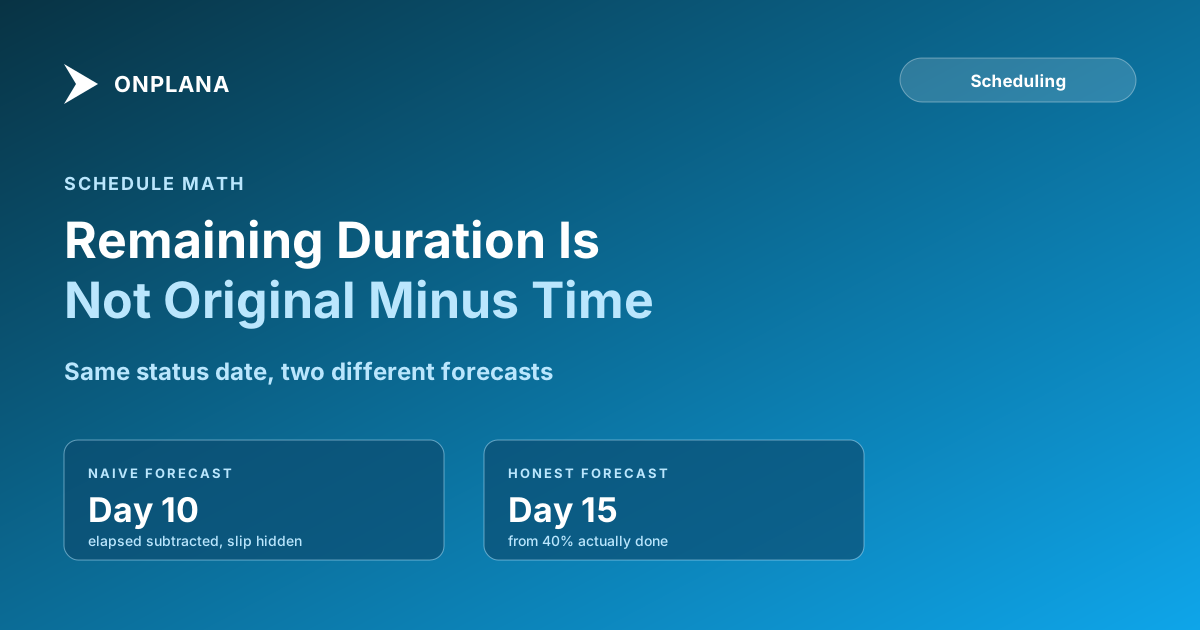
Take a ten-day task, integrating a payment gateway, with an original duration of 10 working days starting Day 1. The status date lands on Day 6, six working days in. The team's honest assessment of the work itself, not the calendar, puts it at 40% complete.
Two different remaining-duration numbers come out of that same status date, depending on which method computed them.
The naive method takes the original 10-day duration, subtracts the six elapsed days, and reports 4 days remaining, finishing right on the original Day 10 plan. It never asked how much work actually got done; it just watched the calendar. The honest method starts from the 40% figure: if 40% of the work took 6 days, the remaining 60% at that same rate takes roughly 9 more days, pushing the forecast finish to Day 15, a 5-day slip that already happened and simply hadn't been reported yet.
Nothing about the honest method requires better software. It requires asking "how much of the work is actually done" instead of "how many days have passed," and letting remaining duration answer from there.
Where This Runs in Onplana
Onplana's Gantt view tracks original and remaining duration, actual start, and a project status date as separate fields on every plan, including Free, alongside baselines with variance and a critical path with total float computed from the dependency graph rather than from whatever MS Project happened to flag. Day counting is inclusive throughout: a one-day task starts and finishes on the same day, so a remaining-duration figure lines up with how a person actually counts days on a calendar, not an off-by-one that quietly compounds across a long schedule.
Moving the status date forward each reporting cycle is what keeps that math honest. A schedule imported from a .mpp or MSPDI export carries its original duration and actual-start fields intact, and the same file opens directly in Onplana Schedule, the desktop app, if the habit of updating the status date and re-deriving remaining duration is easier to keep on the file itself before it moves into a shared plan. Either way it's a habit, not a migration detail, and it's worth auditing on whatever tool a schedule lives in. The free Schedule Health Check flags tasks where the status date, actual dates, and remaining duration have drifted out of the relationship described above, the same invalid-dates check the DCMA assessment runs, on a .mpp or MSPDI file in under a minute.
Run the free Schedule Health Check Upload your .mpp or MSPDI XML file and get a per-finding breakdown of invalid dates, stale percent-complete fields, and the real critical path, computed from the file's own data. No signup, no credit card. → Run the Schedule Health Check
The eight MS Project constraint types interact with this same status-date boundary from the other side: a hard constraint set months ago can pin a date that no longer reflects how much work is actually left, which is one more reason the status date needs to move forward on schedule rather than by exception.
Reading the result on a chart is a separate skill; planned vs actual bars on a Gantt chart walks through how a status-date update changes the current bar against its baseline.
Microsoft Project Online™ is a trademark of Microsoft Corporation. Onplana is not affiliated with Microsoft.
Frequently asked questions
What is remaining duration in a project schedule?
Remaining duration is how much time is still needed to finish a task, recalculated at the status date from the work actually completed so far, not from the calendar days that have passed.
What is the difference between original duration and remaining duration?
Original duration is the planner's estimate of how long a task will take, fixed once the schedule is baselined. Remaining duration is a live number that gets recalculated at every status date based on real progress.
What does a status date do in a project schedule?
The status date is the as-of date the schedule engine uses to split a task into what's already happened and what's left. Everything before it should carry actual dates; everything after it should carry a forecast, and remaining duration is calculated from that boundary.
Why shouldn't remaining duration just be original duration minus elapsed time?
Because it assumes every calendar day produced a day of progress, which silently hides a task that's behind. A task can be six days into a ten-day original duration and still have nine days of work left if progress has been slower than planned.
Does percent complete determine remaining duration, or the other way around?
Remaining duration should determine percent complete, not the reverse. A team estimating remaining work directly, then deriving percent complete from that, catches a slip immediately; a team typing in a percent complete number and letting the schedule back-calculate remaining duration from it can hide the same slip for weeks.
What happens if a task has no status date set?
Percent complete becomes a subjective guess with nothing to anchor it, and remaining duration defaults to the naive original-minus-elapsed calculation, which is exactly the version that hides a schedule slip instead of surfacing it.
Ready to make the switch?
Start your free Onplana account and import your existing projects in minutes.