How to Calculate Percent Complete in Project Management
How to calculate percent complete: duration, work and physical each give a different answer for one task. See the formulas, a worked example and rollup.
A task reads 90 percent complete for a month because three different people mean three different things by the number. One reports the days elapsed, one the hours spent, and one how much of the thing actually exists.
The direct answer: to calculate percent complete, divide what is done by what the task totals, and be explicit about the unit. Duration percent complete is actual duration divided by total duration. Work percent complete is actual work divided by total work. Physical percent complete is the share of the real deliverable finished, entered by a person. Microsoft's Project documentation describes physical percent complete as a value independent of the duration fields, which is exactly why the three can disagree on one task.
The short answer. Use duration percent complete to show where a task sits against its time, work percent complete to show effort burned, and physical percent complete to show output. Report one of them per task and say which. Earned value multiplies the chosen percent by the task budget, so the choice moves the money number too.
What are the three percent complete formulas?
Each measure divides a different "done" by a different "total", so one task can return three honest answers.
| Measure | Formula | Answers | Fails when |
|---|---|---|---|
| Duration percent complete | Actual duration / total duration x 100 | How much of the time has run | Work is back-loaded or the team is idle |
| Work percent complete | Actual work / total work x 100 | How much effort is spent | Effort is spent on rework |
| Physical percent complete | Units finished / total units x 100 | How much of the output exists | The output cannot be counted |
Worked example: one task, three answers
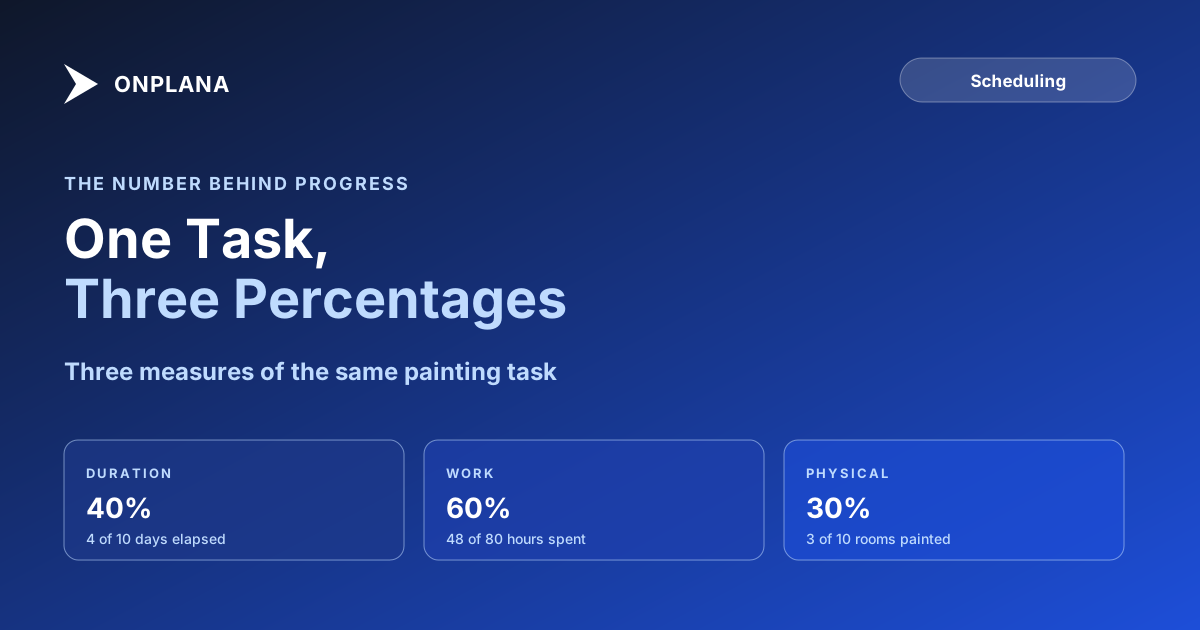
Take a task to paint 10 rooms. It is planned for 10 days and 80 hours, with a budget of 8,000. Four days in, the crew has logged 48 hours and finished 3 rooms.
- Duration: 4 / 10 = 40 percent.
- Work: 48 / 80 = 60 percent.
- Physical: 3 / 10 = 30 percent.
The task is 40, 60 or 30 percent complete depending on the question, and only the third says how many rooms are painted. The work figure is highest because the crew spent hours on prep that produced no finished room, so reporting 60 would overstate progress by half.
The diagram below plots the three measures for this task.
Which percent complete does earned value use?
Earned value is the percent complete times the task's budget, so it uses whichever measure the task carries. With a budget of 8,000, physical gives an earned value of 2,400, duration gives 3,200 and work gives 4,800. Only the first matches the three rooms on the wall. For the full set of ratios, see earned value management explained, and for the drift against plan, the schedule variance formula.
How does a summary task roll up percent complete?
A summary task has no work of its own, so its percent comes from its subtasks, and the weighting changes the answer. Suppose one subtask of 2 days is done and another of 18 days is not started. A simple average reports 50 percent. Weighting by duration reports 10 percent, which is what the schedule has actually earned. Weight by duration or work, never by task count. The summary task post covers how dates roll up the same way.
How do you stop a task sitting at 90 percent?
Estimate the remaining duration directly and derive the percent from it, instead of typing a percent and hoping. A task with 5 of 10 days left is 50 percent complete by duration however confident the owner feels. The reasoning is in original vs remaining duration. Then check the schedule for the tasks that carry progress with no logic behind them: the free Schedule Health Check reads a file and flags them before anyone relies on the numbers.
Where does Onplana fit?
Onplana tracks progress per task, and percent complete comes across when you import a Microsoft Project file. Onplana Schedule, the desktop app, shows percent complete as a column beside duration, start, finish and the critical path, so the three numbers sit next to each other. For a schedule you are moving in, the import page covers the file types.
Run the free Schedule Health Check Upload a schedule and see which tasks carry progress that does not match their logic, dates or links. No signup required. → Open the Schedule Health Check
Frequently asked questions
How do you calculate percent complete?
It depends on the measure. Duration percent complete is actual duration divided by total duration, work percent complete is actual work divided by total work, and physical percent complete is the share of the real output finished, entered by a person.
What is the percent complete formula for duration?
Actual duration divided by total duration, times 100. A 10-day task that has run 4 days is 40 percent complete by duration, whatever has actually been produced.
What is physical percent complete?
It is an entered value that reflects how much of the deliverable exists, independent of time or effort spent. Microsoft's Project documentation describes it as independent of the duration fields, and recommends it where the calculated figure would not reflect work performed.
Which percent complete does earned value use?
Earned value is the percent complete times the task's budget, so it uses whichever measure you choose for the task. Pick physical percent complete where output is countable, because duration and work can both run ahead of what is built.
How does a summary task calculate percent complete?
It has no work of its own, so it is computed from its subtasks. Weighting by duration or work gives a different answer from a simple average, and the simple average overstates progress when small tasks finish first.
Why does a task sit at 90 percent for weeks?
Because the percent is a guess on time or effort, not a count of what remains. Estimating the remaining duration directly, then deriving the percent, removes the stall.
Ready to make the switch?
Start your free Onplana account and import your existing projects in minutes.