Request Access to a Project, Without an Add-Me Email
Onplana lets you request access to a project straight from the link you opened: managers approve from one inbox, no add-me email, no waiting on chat.
Here's the message every project manager has both sent and received at least once this month: "Hey, can you add me to the Atlas project?" It goes to whoever happens to be online, gets answered whenever someone notices it, and leaves no trace of who actually approved it. StrongDM's 2022 Access-Productivity Gap Report found that 57% of organizations say a request like that one takes days or weeks to resolve, and only 32% have a service-level agreement that grants access within hours.
The direct answer: Onplana replaces the add-me message with a request-access flow built into the project management tool itself. Open a link to a project you're not on, and instead of an error, the page asks whether you'd like access. The people who manage that project see the request in an inbox on People and Teams, pick the access level, and you're in. No email thread, no forgotten Slack message, and a record of exactly who approved what.
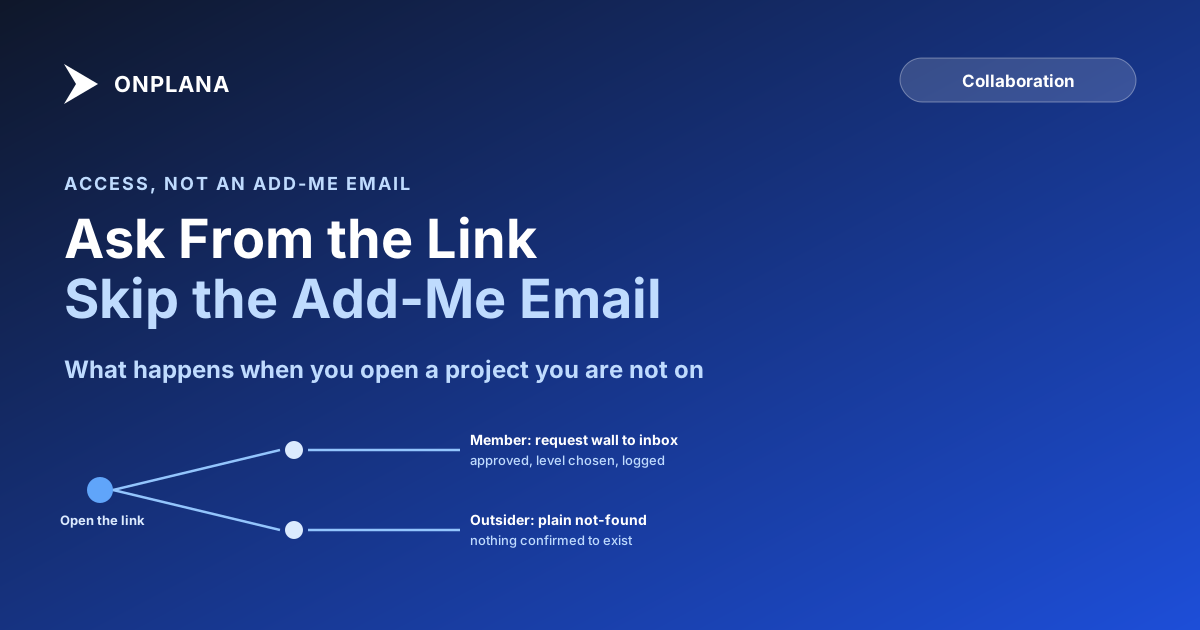
In short. A member who opens a link to a project, page, library or list they can't see gets a request wall instead of an error. The people who manage that resource see it in one inbox on People and Teams, approve it at whatever level fits, and the grant happens through the normal permission rails. Someone truly outside the workspace never sees the wall at all; they get a plain not-found page instead.
What happens when you open a link you're not on
The wall only appears for people who are already inside your organization's workspace. That distinction matters, because it's what keeps the flow from becoming a way to probe for projects that exist. A member who isn't on the specific project sees a page that names what they're looking at and offers a button to ask for access. Someone with no Onplana account, or an account in a different organization entirely, gets a generic not-found page. There's nothing on it that confirms the project exists, who owns it, or what it's called.
That asymmetry is deliberate. "Can this specific person get in eventually" and "can a stranger learn anything by guessing URLs" are two different questions, and the request-access flow only answers the first one.
Who approves it, and from where
Every request routes to the people who manage the resource, whether that's a project, a page, a document library, or a list. They see it in a request inbox that lives on People and Teams, the same place they already manage roster and role changes, rather than in a separate queue nobody checks. From there they pick the level the request should be granted at (view, contribute, or full project membership, depending on what was asked for) and the access takes effect through Onplana's normal permission system. There's no separate "pending access" state that behaves differently from a standard membership once it's approved.
A new request landing in that inbox is exactly the kind of event that should reach a phone rather than wait: it names the approver directly and changes what they need to do next, the same test that decides which project notifications escalate and which ones stay in the grouped feed.
The diagram below shows the two branches: what a workspace member sees when they hit a project they're not on, versus what happens for someone genuinely outside the organization.
Request access vs. asking in chat vs. a guest seat
Three ways someone ends up with access to a project, and only one of them leaves a trail without extra effort:
| Request access | Asking in chat or email | Guest seat | |
|---|---|---|---|
| Who it's for | An org member not yet on the project | Anyone, informally | Someone outside the organization |
| Where it's asked | The project page itself | Wherever the person happens to reach someone | A separate invite flow |
| Response time | Sits in one inbox until actioned | Depends on who's online | Depends on who's online |
| Record kept | Yes, in project activity history | No, unless someone screenshots it | Yes, as a membership event |
| Costs a seat | No | No | Free up to the plan's guest allowance, billed past it |
The chat-and-email path isn't wrong so much as untracked. It works exactly as often as the right person happens to see the message in time, and it leaves nothing behind once the thread scrolls away. A guest seat solves a different problem entirely: it's for a client or contractor who was never part of the organization to begin with, and it draws from a per-plan allowance rather than routing through an approval inbox. Choosing between a member seat, a guest seat and a share link covers that decision for a whole project team at once, contractor, client and in-house staff included.
Why the inbox matters more than the request
A request that goes to a named inbox rather than a person's attention has a property that ad hoc messages don't: it survives someone being on vacation, out sick, or simply not the one who happened to be tagged. Anyone with the right role on People and Teams can act on it, and the project doesn't stall on a single person's availability. That's a small operational detail, but it's the difference between "access requests get answered in minutes" and the 57% StrongDM found stuck for days or weeks: the bottleneck usually isn't a policy problem, it's that the request had nowhere durable to land.
It also changes what a status meeting sounds like. "I'm still waiting to get added" used to mean tracking down whoever owned that decision. Now it means checking one inbox, the same one that already handles role and team changes, so there's one place to look rather than a search through old messages.
Request access is one of four practices that keep a team, a client and an agent on a single plan, set out in project collaboration around one plan.
Where a decision actually gets recorded matters just as much once someone is in the project as it did while they were asking to join it. Where decisions belong: task comments vs a chat channel covers the same durability problem for day-to-day project discussion, not just onboarding. For access that doesn't need a full membership at all, sharing a single document with a client, no licence required covers the narrower case where someone only needs to see one file rather than the whole project.
Frequently asked questions
How do I request access to a project I can't see in Onplana?
Open the link you were sent, or navigate to the project directly. If you're already inside the workspace but not on that project, a request wall appears in place of an error, and you ask for access from that same page.
Who approves a request to join a project?
The people who manage that project. The request lands in their inbox on People and Teams, and they grant it or pick a specific access level from there.
What does someone outside my company see if they open a project link?
A plain not-found page, not a request wall. The wall only appears for people already inside your workspace, so someone with no account at all can't even confirm the project exists.
Does requesting access use up a guest seat?
No. A guest seat is for someone outside your organization entirely. Requesting access to a project inside your own workspace doesn't touch the guest allowance at all.
Is there a record of who requested and approved access?
Yes. The request and its approval both land in the project's activity history, so there's a record of who asked, who approved it, and when, rather than a decision buried in a chat thread.
What's the difference between request access and a guest seat?
Request access is for people already inside your organization who need into one more project. A guest seat is the paid-plan tool for bringing someone from outside the organization onto a project entirely.
Ready to make the switch?
Start your free Onplana account and import your existing projects in minutes.