AI Assistant for Project Management: What to Expect
An AI assistant for project management should know your plan, draft updates and flag risk. Three ways vendors ship one, compared, with prices dated.
Most buyers searching for an AI assistant for project management want something that knows the project, not a chatbot parked beside it. Asana's pricing page, read on 13 November 2026, lists its AI Teammates at 5 requests per user per month on Starter, which shows how differently vendors count what an assistant may do.
The short answer. An AI assistant for project management should do four jobs against your own plan: answer questions about it, draft updates, turn notes into tasks and flag risk. Vendors ship it in three ways: a chat box inside the tool, a general assistant connected to the tool, or an agent that works as a team member. Pick by where your team already works and by what a person must approve.
If you want to test one on your own plan, ask the assistant about your own plan, free.
What should an AI assistant for project management actually do?
It should do four jobs, each against data in the plan rather than from general knowledge:
- Answer questions. "What is overdue on the launch project?" should return tasks, not advice.
- Draft updates. A weekly status summary built from task activity, ready for a person to edit.
- Turn notes into tasks. Paste meeting notes and get tasks with owners and dates proposed.
- Flag risk. Point at tasks with no float, overbooked people and slipping milestones.
A tool that only does the first job with generic knowledge is a chatbot, not a project assistant. The same test works for any vendor: ask a question only your plan can answer, and see whether the reply cites a real task. For the wider landscape, the AI project management tools comparison scores eight platforms on six capabilities.
How do vendors ship an AI project management assistant?
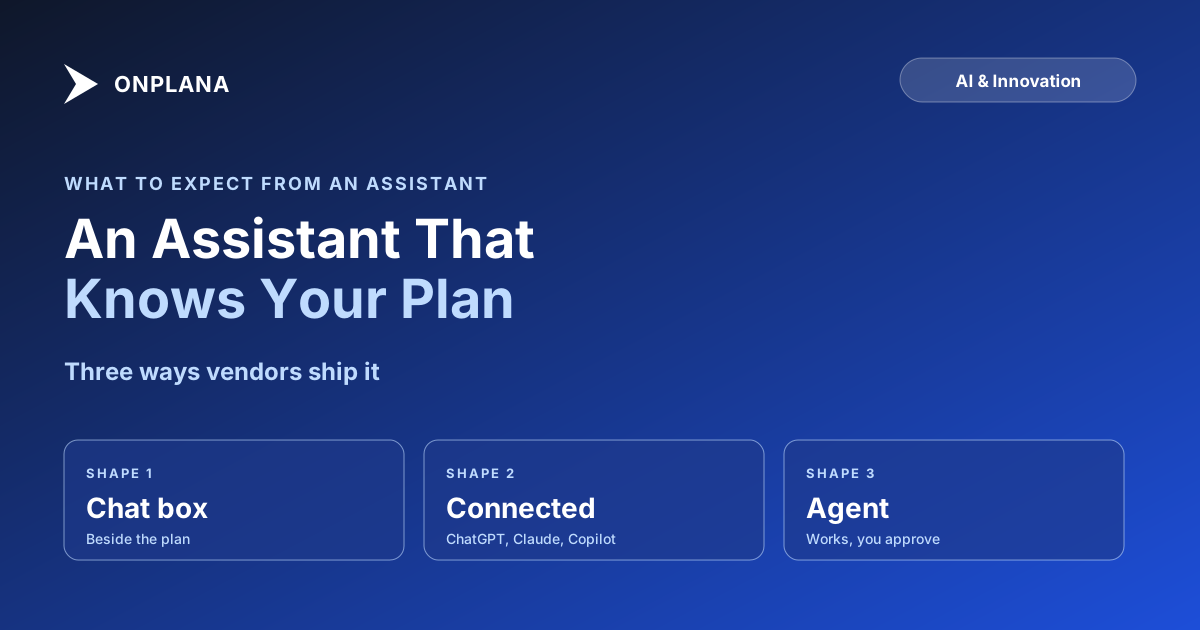
Three shapes cover almost every product, and they differ in where the assistant lives and who it answers to.
The diagram above sorts the three shapes by autonomy. A chat box answers when asked. A connected assistant can also change the plan if its connection allows writes. An agent takes work and returns a result.
Which AI assistants for project management compare today?
The table covers the main shapes with prices from each vendor's pricing page on 13 November 2026, per user per month billed annually. Rows are in no ranking order.
| Tool | Shape | What the AI does | Entry price with AI |
|---|---|---|---|
| Onplana | Chat box, connected assistant and agent | Chat with project context, plan generation, status summaries; connects to ChatGPT, Claude and Microsoft 365 Copilot | Free (one-time 100K-token bonus per seat); Professional USD 12 |
| Asana | Chat box and AI Teammates | AI Studio credits and AI Teammates, capped per user | USD 10.99 (Starter) |
| ClickUp | Chat box | Brain with pooled AI credits per user | USD 9 (Core) |
| monday.com | Chat box | AI credits for columns, summaries and automations | USD 9 (Basic, 1,000 credits) |
| Microsoft Planner | Connected assistant | Copilot features need a separate Microsoft 365 Copilot licence | Check Microsoft's price list |
Reading it honestly: monday.com, Asana and ClickUp have larger ecosystems than Onplana, and a chat box inside a tool your team already uses costs the least to adopt. Where Onplana differs is the third shape, an agent that takes a task and returns work for approval, and its connectors to outside assistants. Sources: Asana pricing, ClickUp pricing and monday.com pricing, each read on 13 November 2026.
What does Onplana's AI assistant cover?
Onplana's AI chat reads the project it is opened on, and it is on every plan including Free, subject to your AI balance. So are plan generation from a goal, status summaries and report drafts. Advanced AI, which is risk detection, schedule suggestions and portfolio insights, is on Professional and above. The full list is on the AI project management software page.
Two connections extend it. Connect Onplana to ChatGPT and the assistant you already use reads and updates your projects through MCP, and the Microsoft 365 Copilot agent answers what is assigned or overdue from live Onplana data. For work that takes longer than a question, "Delegate to an agent" on a task posts an @mention, the agent reacts on its next sync, and everything it produces lands in the Agent review inbox. Nothing is sent or published until a person approves it, as the Agent review inbox post explains. See also the team side of this in team collaboration.
Onplana runs on both Claude and Azure OpenAI, and Onplana decides which one serves requests, with the other on standby. You do not choose the provider.
What still needs a person?
Four things stay with a person, whichever assistant you pick:
- Approving what leaves the building. A status update, an email, a published page.
- Judging a blocker. The assistant sees a task is late; it does not know why.
- Choosing the trade-off. Cutting scope or moving a date is a decision, not a draft.
- Reading comments as untrusted text. Anything a person can write, an assistant may read.
Concede the limit and plan around it: a team that reviews drafts for two weeks learns quickly where its assistant is reliable and where it is not.
Ask the assistant about your own plan, free Create a free workspace, import or generate a plan, and ask the assistant what is overdue or at risk. No card required. → Start free
Frequently asked questions
What is an AI assistant for project management?
It is an AI that reads the plan it is asked about, then answers questions, drafts updates, turns notes into tasks and flags risk. The test is whether it works from your tasks, dates and owners or only from general knowledge.
Can an AI assistant change my project without asking?
Only if the tool lets it, so check before you turn it on. In Onplana, an agent's work lands in the Agent review inbox and nothing is sent or published until a person approves it.
Who is accountable when the assistant gets it wrong?
The person who approves the output, not the assistant. An assistant can draft a status update with a wrong date, and the approver owns what goes out, which is why drafts should pass through a review step.
Can someone steer the assistant through a comment or a task description?
Yes, any assistant that reads text written by other people can be steered by that text, and no vendor has fully closed this. The bound is permissions: an assistant that cannot send or publish without approval can only propose a change, not make one.
What happens to the bill when the whole team uses it?
Usage draws down a balance, so cost rises with use. Onplana meters AI in tokens against a plan allowance plus optional top-ups, and purchased top-up credits expire 90 days after purchase.
Is ChatGPT or Microsoft Copilot enough on its own?
Only if it can see the plan. A general assistant with no connection to your project tool answers from what you paste into it; connected through MCP or an agent, it answers from the live plan.
Where does an AI assistant fall short?
On judgment. It can draft, summarize and flag, but it does not know which blocker is real, which stakeholder to call, or what a contractor told you in the corridor, so a person still owns the plan.
Ready to make the switch?
Start your free Onplana account and import your existing projects in minutes.