Guest Seats Explained: What a Guest Can and Cannot Do
A guest user in project management software sees and comments on one invited project, free up to the plan allowance, but cannot see billing or other projects.
A guest is a project workspace user with access to exactly one thing: the specific project someone invited them into. They can open it, read it, comment on it, and reply to @mentions inside it. They cannot browse the rest of the organization's projects, see billing, or find out the workspace exists at all beyond the one door they were handed a key to.
That definition matters because "guest" gets used loosely, as a stand-in for anyone outside the company, when in most project management software it's a specific, licensed role with its own allowance and its own limits. Mix it up with a full member seat or a one-off document share and you either overpay for access nobody needed or under-provision a client who actually needed to be inside the project. When the client only needs to see the schedule, sharing a Gantt chart with a client compares a PDF, a guest seat and a member seat.
In short. A guest seat gives someone standing, invited access to one project, comments included, without visibility into the rest of the workspace. Per Onplana's published plan limits (current as of September 2026), it is free up to the plan's allowance (2 on Pro, 5 on Business, 10 on Enterprise and Enterprise+, none on Free) and billed like a normal seat past that. A guest is not the same as a document share link, which needs no account and never touches the allowance, and it is not the same as a full member, who can be assigned work.
What a Guest User Is in Project Management Software
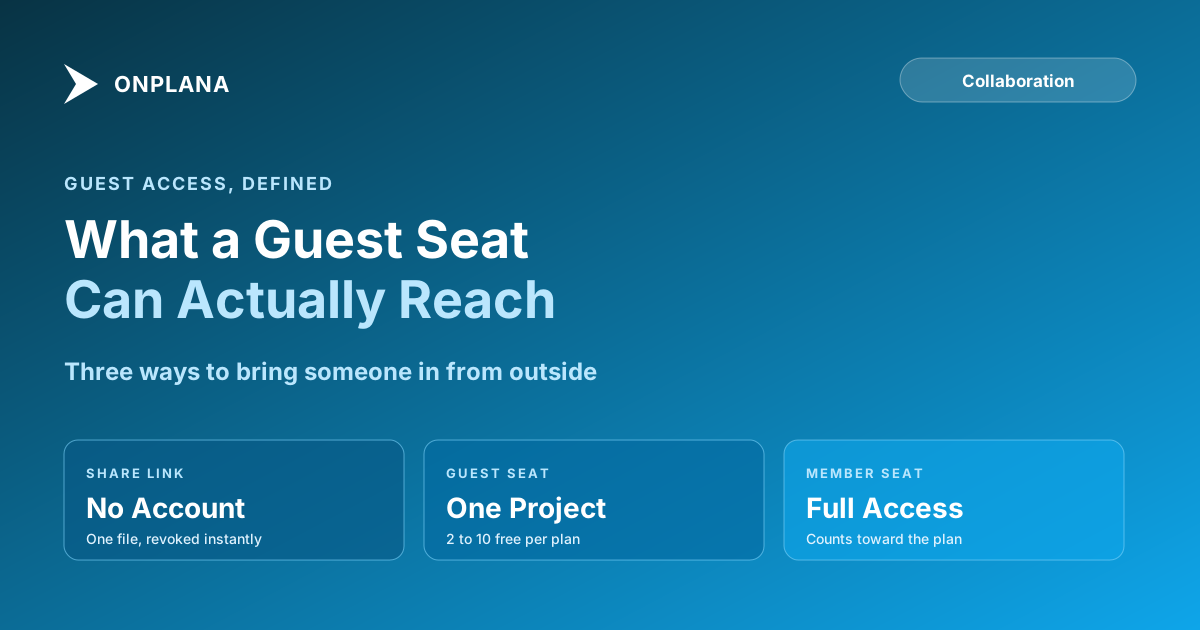
A guest sits between two other access modes, and confusing it with either one is the usual mistake:
- A document share is narrower: one file, no account, no login, revocable instantly. It never draws from a guest allowance because it never creates a user at all.
- A guest seat is a real, invited user with a login, scoped to one or more specific projects. They can comment, reply to mentions, and see the work inside those projects, but nothing outside them.
- A member seat is the full role: assignable work, visibility into resourcing and reporting for the projects they're part of, and (depending on permissions) a voice in decisions beyond commenting.
The distinction that trips people up most: a guest is a licensed identity, not a link. Someone has to be invited by email, they get a login, and their access persists until it's revoked, which is different from a share link that anyone holding the URL and the emailed code can open once and never needs an account for.
What a Guest Can and Cannot Do
Inside a project they've been invited to, a guest can typically:
- View tasks, files, and the project's activity feed for that project only.
- Comment and reply, including responding to an @mention that reached their inbox, email, or phone.
- Open documents and see the Gantt or board view for that project, read-only in most role configurations.
A guest cannot:
- See any other project in the workspace, even one owned by the same client contact on another engagement.
- See billing, plan details, or the member roster beyond the people already visible inside the shared project.
- Be assigned ongoing work as an owner, in the sense of carrying a task the way a full member does; a guest's role is built for visibility and comment, not accountability for a deliverable.
How Many Free Guest Seats Come With Each Plan
Guest seats are free up to an allowance that scales with plan tier, then billed like a member seat past it. This is plan data, not a feature gate, so it changes only when pricing changes:
| Plan | Free guest seats |
|---|---|
| Free | 0 |
| Professional | 2 |
| Business | 5 |
| Enterprise | 10 |
| Enterprise+ | 10 |
The pattern worth noticing: Free has none at all. A workspace on the Free plan that needs to give a client visibility into a project has exactly one free option, a document share link, not a guest invite. That's a real product boundary, not an oversight, and it's the first thing to check before promising a prospective client "you'll be able to see everything" on a plan that hasn't been upgraded yet.
One detail Onplana's own billing documentation is explicit about and worth repeating here: the allowance tracks the role someone was actually given, not the label in your head. Invite someone as a Guest and they draw from the free allowance above; invite that same person as a Member instead, even for a client you think of as "just a guest," and it bills as a full seat regardless of what you call them in conversation.
The diagram below lines up the three access modes against what each one actually unlocks, since the right tool depends entirely on what the outside person needs to do, not just who they are.
If guest cost decides your tool choice, the ranking of project management collaboration tools compares what Asana, ClickUp, Smartsheet and Onplana include.
When a Guest Is the Wrong Answer
A guest seat is the right tool less often than people reach for it. Three cases where it isn't:
- The outside person only needs one file, once. A guest invite is overkill for a single budget document or status export. A document share link covers that with no account and no allowance spent, on every plan including Free.
- The outside person needs to actually do the work. A contractor delivering tasks, not just reviewing them, needs a member seat so they can be assigned ownership; a guest can comment on a task but was never meant to carry one. Mixing all three access levels on one project is common enough on client engagements that it's worth deciding upfront who gets which.
- A teammate already inside the organization needs into one more project. That's not a guest scenario at all; it's an internal permissions gap, and requesting access from the link itself is the faster fix than either a guest invite or a support ticket.
If you are weighing a guest seat against a separate portal, client collaboration tools compared sets the two approaches side by side.
Guests are one of three audiences on a shared plan, alongside the team and AI agents; see project collaboration: one plan for team, client and agent for how the pieces fit.
Whether guests tip a per-seat bill over a flat fee is worked through in per-seat vs flat-rate pricing. Getting this right at the start of a client engagement avoids two failure modes: paying for member seats a client never needed, or under-provisioning someone who actually needed to be inside the project rather than watching it from outside. The team collaboration overview covers how guests, members, and document shares fit together as one system rather than three separate decisions.
Frequently asked questions
What is a guest seat in project management software?
A guest is a workspace user who can see and comment inside one project they've been explicitly invited to, without seeing the rest of the organization's workspace or billing. Most tools, Onplana included, give a limited number of guest seats free before an added guest is billed like a regular member.
How many free guest seats come with each Onplana plan?
None on Free, 2 on Pro, 5 on Business, and 10 on Enterprise and Enterprise+. Past that allowance on a paid plan, an additional guest is billed at the plan's per-seat rate. Figures current as of September 2026; check the pricing page for the latest.
Can a guest see projects they weren't invited to?
No. A guest's access is scoped to the specific project (or projects) an admin or manager explicitly added them to. They cannot browse the organization's other projects, teams, or billing settings.
What's the difference between a guest seat and a document share link?
A guest seat is standing access to an entire project, including comments; a share link hands over one document without creating any account at all. If someone only ever needs to see one file, a share link is the simpler tool and never touches the guest allowance.
When does a guest need to become a full member instead?
When they need to own tasks, not just comment on them. A guest can reply and react inside the project they're on, but assigning them ongoing work, giving them visibility into resourcing, or making them accountable for a deliverable calls for a member seat.
Is a guest seat available on the free plan?
No. Onplana's Free plan has zero guest seats; guest access starts on Professional. A client on a Free-plan workspace who needs project visibility gets a document share link instead, which is free on every plan including Free.
Ready to make the switch?
Start your free Onplana account and import your existing projects in minutes.