Construction Project Collaboration Software Compared
Construction project collaboration software, compared on what an outsider sees without a licence, comments on activities and whether the programme is shared.
Most construction collaboration fails at the programme. The general contractor holds the schedule, the subcontractor works from a PDF printed two revisions ago, and the owner asks for dates that the programme no longer shows. FMI and PlanGrid's "Construction Disconnected" report put poor communication behind 26% of rework, a potential $17 billion a year in the US (Construction Dive, August 2018).
The short answer: the best construction project collaboration software is the one where the programme itself is shared, not a copy of it, and where an outside party can comment on an activity without buying a full licence. Compare tools on four things: what an outsider sees without a licence, whether comments attach to activities, how documents are shared, and whether there is one live schedule.
Put the programme in one shared plan, free Start a free Onplana workspace, load the programme and invite the subcontractor or owner to the one project they need. → Create a free workspace
What should construction collaboration software let outsiders do?
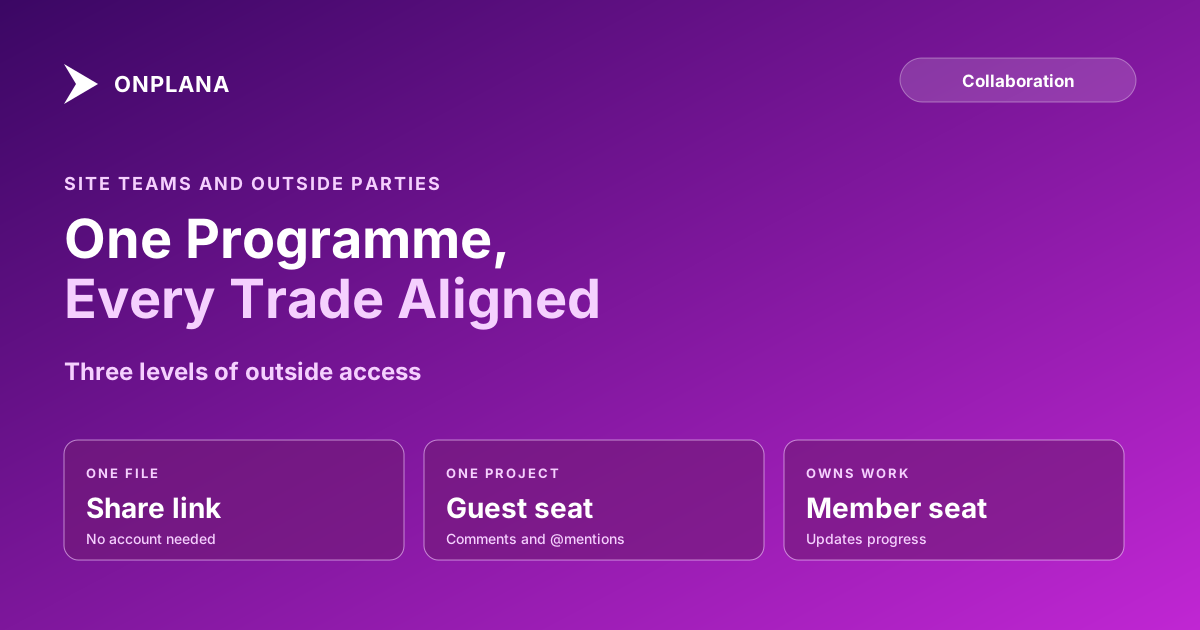
A job has four outside parties at once: subcontractors, the designer, the owner and often an inspector. The software has to give each the narrowest useful view. The diagram below shows the three access levels most tools offer and what each lets an outsider do.
The point of the middle level is that most outsiders only need to see the programme and say something about it. Guest seats explained sets out exactly what a guest can and cannot do, and collaborating with external contractors on one project shows how to mix all three on one job.
How do the main tool types compare?
Rather than rank brands, compare the three shapes of tool a construction team actually chooses between. Vendor features change often, so check each against its own current documentation before you buy.
| Dimension | Construction suite | General PM tool | Onplana |
|---|---|---|---|
| Outsider without a licence | Usually a limited portal | Varies by plan | Guest seat or share link |
| Comments on activities | Often on documents and RFIs | On tasks | On tasks, projects and issues, with @mentions |
| Document sharing | Strong, with revision control | File attachments | Share link per document, no account |
| Shared schedule or a copy | Often a copy or import | Shared | One shared plan |
| Imports a P6 or .mpp programme | Varies | Often limited | .mpp, XML and .xer import |
| Drawings, RFIs, submittals | Core strength | Not offered | Not offered |
| Best fit | Large jobs with formal records | Small internal teams | Programme-led teams with outside parties |
The last two rows are the honest trade. Onplana is a scheduling and project tool, not a construction ERP: it has no BIM, no drawing manager and no RFI or submittal log, so a contract that demands those keeps a suite beside it.
What does one shared programme look like in practice?
A shared programme means the subcontractor, the designer and the contractor all open the same Gantt, not three exports. In Onplana the steps are short:
- Import the programme. Bring in the .mpp, Project XML or Primavera .xer file you already have; the import is on every plan including Free. Project management for construction covers what to test first.
- Invite each outsider at the right level. A guest seat for the designer and owner's representative, a member seat for the subcontractor foreman who updates progress, a share link for a one-off document.
- Comment on the activity. Put the question on the task and @mention the person; the mention reaches their inbox, email and phone. Task comments versus a chat channel explains why the thread belongs on the activity.
- Let people ask for access. Someone who opens a link to a project they cannot see asks from that same URL, and the project's managers decide. Requesting access to a project walks through it.
Guest seats are on every paid plan: Professional includes 2 free, Business 5 and Enterprise 10, and the Free plan has none, so a Free workspace shares documents by link. For the scheduling side, the construction scheduling solution shows the programme view the whole team shares.
What should you check before you choose?
Ask each vendor five questions, and test the answers on a real programme rather than a demo:
- Can a subcontractor comment on an activity without a full licence, and what does it cost past the free allowance?
- Is the schedule the same object for everyone, or an export that drifts?
- Can an outsider see only their own project and nothing else?
- Does it open the file format your programme is already in?
- What does it deliberately not do, and who covers that gap?
Design firms face the same question across disciplines, covered in engineering project collaboration software. The wider picture of one plan serving a team, a client and AI agents is in project collaboration: one plan, and client collaboration tools compared widens the comparison beyond construction.
Put the programme in one shared plan, free Load your programme, invite the owner and subcontractors to the one project each needs, and keep the conversation on the activity. → Create a free workspace
Frequently asked questions
What is construction project collaboration software?
It is software that lets the general contractor, subcontractors, designer and owner work from the same programme, documents and conversation instead of emailing copies. The useful test is what an outside party can see and say without being licensed as a full user.
Can a subcontractor comment on a programme without a paid licence?
In Onplana, yes on a paid plan: a guest seat gives an invited outsider access to one project, comments and @mentions included. Professional includes 2 free guest seats, Business 5, Enterprise 10; the Free plan has none.
Is Onplana a construction ERP or a drawing manager?
No. Onplana is a scheduling and project tool. It does not do BIM, drawing control, RFIs or submittals, so a job that needs those keeps a construction suite beside it.
What if a client only needs to read one document?
Send a document share link instead of a seat. It needs no account, never draws on the guest allowance, and is available on every plan including Free.
Can an outsider see the rest of my projects?
No. A guest sees only the project they were invited into. Someone who opens a link to a project they cannot see can ask for access from that same URL, and the people who manage it decide.
Where does a shared programme fall short?
A shared plan keeps everyone on one set of dates and one thread of comments. It does not replace the formal records a contract may require, such as RFIs, submittals and drawing revisions.
Ready to make the switch?
Start your free Onplana account and import your existing projects in minutes.