Best Project Management Software for Healthcare, Ranked
The best project management software for healthcare, ranked on BAA availability, audit trail, hosting and scheduling depth, with what each vendor documents.
The best project management software for healthcare is chosen on compliance paperwork before anyone compares a Gantt chart. The HIPAA Journal counted 710 breaches affecting 500 or more individuals reported to the HHS Office for Civil Rights in 2025 (HIPAA Journal, 2025 Healthcare Data Breach Report), which is why security teams ask for a business associate agreement (BAA), an audit trail and a hosting answer first.
Short answer. For healthcare, Smartsheet ranks first on what is documented today: an Enterprise HIPAA program with BAAs, exportable audit logs and deep scheduling. Asana and monday.com follow, each with a BAA on Enterprise plans. Onplana ranks fourth: strong scheduling and governance, but its BAA is by request and its SOC 2 is in progress. Choose on the paperwork you can get in writing, then on delivery capability.
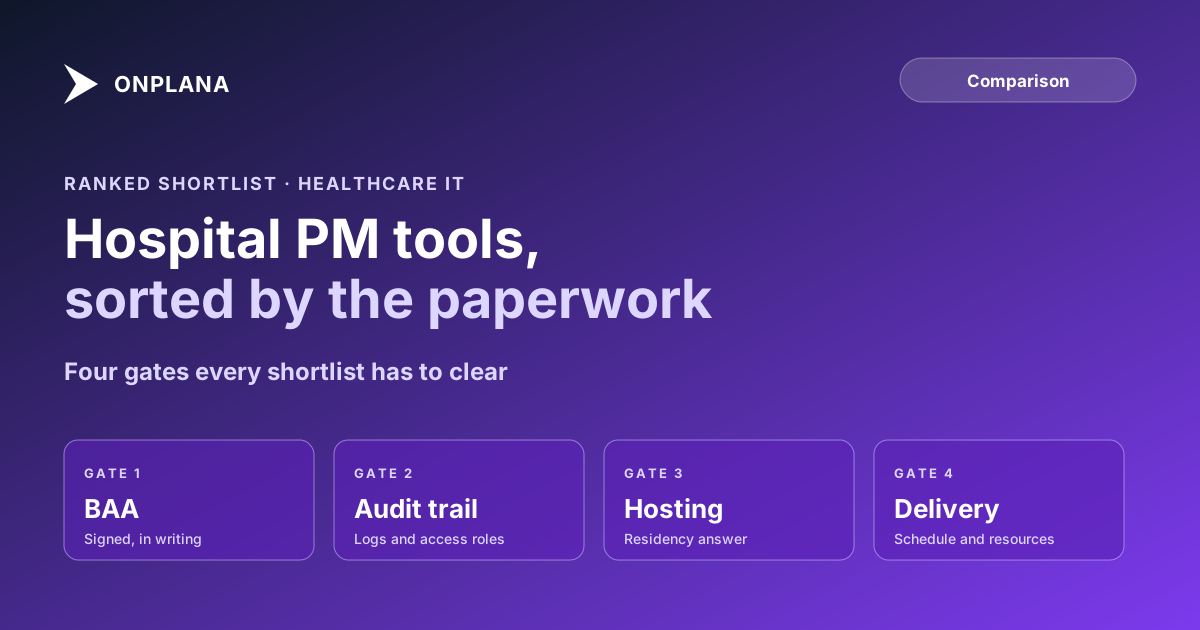
The diagram below shows the order of the gates this ranking applies, and the sections after it explain each vendor and where it falls short.
What is the best project management software for healthcare?
The table compares five tools on what each vendor documents publicly. A blank in a cell means we could not confirm it, not that it is absent.
| Rank | Tool | BAA | Audit and access | Hosting | Delivery strength |
|---|---|---|---|---|---|
| 1 | Smartsheet | Enterprise HIPAA program with BAA | SOC 2, exportable audit logs, role-based access | Commercial cloud; Smartsheet Gov exists for US government | Sheets, dashboards, portfolio rollups |
| 2 | Asana | Enterprise-level plan with BAA | Enterprise audit log; Audit Log API needs a higher tier | Commercial cloud | Task and workflow coordination |
| 3 | monday.com | Enterprise plan; BAA accepted in admin settings | Enterprise governance controls | Commercial cloud | Flexible boards; test critical path on a real file |
| 4 | Onplana | HIPAA BAA on request via the DPA process | Audit logs, SSO and SCIM on Enterprise | Self-hosting for residency on Enterprise and above | Gantt with critical path on every plan |
| 5 | Microsoft Planner and Project | Confirm service scope with Microsoft | Microsoft 365 controls | Microsoft 365 regions | Deep scheduling in Project |
1. Smartsheet: best documented HIPAA path
Smartsheet documents HIPAA compliance through its Enterprise program, with Business Associate Agreements, SOC 2 and exportable audit logs (Smartsheet healthcare guide). It suits a health system PMO that wants one governed platform for clinical trials, facilities projects and IT work.
Pros: the clearest published BAA route of the group; dashboards and portfolio rollups; a spreadsheet model clinical operations staff already understand. Cons: the HIPAA program requires the Enterprise plan plus a BAA, per Smartsheet's own comparison chart; test a large EHR dependency network on a real file before committing.
2. Asana: strong coordination, Enterprise for HIPAA
Asana supports regulated use for Enterprise-level customers that execute a BAA, and compliance capabilities such as the Audit Log API need higher tiers or an add-on (AccountableHQ, Asana HIPAA review). It fits teams whose main need is cross-department task coordination.
Pros: easy adoption by clinical and operational staff; a BAA route on Enterprise. Cons: the HIPAA feature depends on subscription tier, so confirm the exact entitlement before signing; deep schedule dependencies are not its headline capability, so test them.
3. monday.com: flexible boards with a BAA on Enterprise
monday.com can hold PHI only on an Enterprise plan, after an admin accepts the BAA and activates HIPAA compliance in security settings, and HIPAA coverage ends if you downgrade (AccountableHQ, monday.com HIPAA review).
Pros: self-service activation; flexible boards for operational teams. Cons: not HIPAA-ready out of the box, and coverage ends on downgrade; test multi-year critical path scheduling on a real file.
4. Onplana: scheduling depth, with paperwork still maturing
Onplana's DPA page lists a HIPAA BAA among the sector addenda it supports on request (Onplana DPA), and the security page documents an append-only audit log with a HIPAA retention preset, CSV and JSON export, SSO and SCIM, and data residency through self-hosting on Enterprise and above, while the managed service runs in one region. The Gantt with critical path, baselines and all four dependency types is on every plan, including Free. Audit logs, SSO and SCIM start on Enterprise, at $29 per seat per month.
Pros: the Gantt, critical path and baselines are on every plan, which suits an EHR program; self-hosting answers strict residency policies. Cons: SOC 2 is listed as in progress, not complete; the BAA is a request, not a self-service toggle; it ranks below the three incumbents on documented compliance maturity, which is the first gate.
For a longer treatment of EHR programs, read project management for healthcare IT.
5. Microsoft Planner and Project: confirm scope first
Microsoft's HIPAA BAA is incorporated through its Online Services terms, but whether Planner and Project fall inside it is not stated in the sources we found, so get written confirmation for the specific service. Project's scheduling depth is real, and it fits organizations already standardized on Microsoft 365. Project Online itself retired on September 30, 2026, so plan on the current Planner and Project plans (see the migration guide).
Pros: deep scheduling; familiar to IT staff. Cons: service-level BAA scope needs confirming; licensing is spread across several SKUs.
How should a healthcare PMO choose?
Start with the paperwork, then match the tool to the work. Use this order:
- Write down whether PHI will ever enter the tool. If not, a BAA may be policy rather than law.
- Ask each vendor for the BAA, the plan it requires and the audit log export format, in writing.
- Check hosting against your residency policy; self-hosting is the cleanest answer where it exists.
- Import a real schedule and test dependencies and resource loading. For audit-driven scheduling, see regulated industry audit scheduling and the security and compliance overview.
- Compare against Onplana directly in Onplana vs Smartsheet if scheduling depth is the deciding factor.
Check where your own PMO stands before you shop.
Run the free PMO Maturity Assessment Assess your healthcare PMO's governance, resource planning and compliance maturity in about 10 minutes, so you know which gate matters most. No signup required. → Open the PMO Maturity Assessment
Microsoft Project Online™ is a trademark of Microsoft Corporation. Onplana is not affiliated with Microsoft.
Frequently asked questions
Does project management software for healthcare need to be HIPAA compliant?
Only if it will hold protected health information. If patient identifiers can reach the tool, the vendor becomes a business associate and must sign a BAA; if the tool holds schedules and tasks only, many health systems still require a BAA by policy.
Which project management tools sign a HIPAA BAA?
Smartsheet, Asana and monday.com each document a BAA on their Enterprise-level plans, and Onplana's DPA page lists a HIPAA BAA among the addenda it supports on request. Confirm the plan and scope in writing before any PHI goes in.
Can I put patient data in a project management tool?
You can only if a BAA is signed and the tool's HIPAA mode is active, and even then the safer policy is not to. Keep identifiers in the EHR and refer to them by ticket number in the project plan.
What does a healthcare IT PMO need beyond a BAA?
An audit trail of who changed what, role-based access, a hosting model that satisfies your data residency policy, and enough scheduling depth to run dependencies and resources across an EHR program.
Is a free project management tool acceptable in a hospital?
Usually not for anything touching PHI, because free tiers do not carry a BAA. A free tier can still serve a team that keeps PHI out of the tool, but check your own policy first.
Ready to make the switch?
Start your free Onplana account and import your existing projects in minutes.